TL;DR
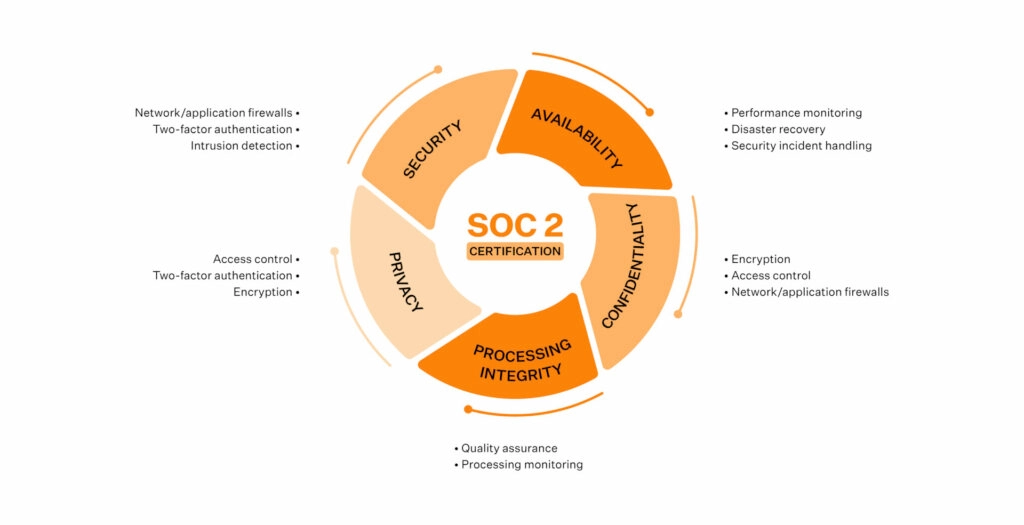
| SOC 2 has no universal controls checklist: organizations design their own to meet the AICPA’s Trust Services Criteria, with Security mandatory and Availability, Confidentiality, Processing Integrity, and Privacy added as needed. |
| The Security category includes nine common criteria: control environment, risk assessment, monitoring, logical access (MFA, RBAC, password policies), physical access, change management, system operations, risk mitigation, and control activities. |
| Availability controls cover infrastructure and capacity monitoring, backup and replication (automated backups, data replication across zones), and business continuity and disaster recovery with documented RTO alignment. |
| Confidentiality and Processing Integrity controls restrict access via classification policies and secure handling, and ensure data accuracy through validation and reconciliation procedures. |
| Criteria vs. requirements vs. controls: criteria define what you must achieve, requirements what you must prove, and controls how you prove it through operational safeguards. |
SOC 2 is often the gateway to compliance for most SaaS companies. Teams quickly learn that implementing SOC 2 controls cannot be done by following a checklist. It requires transparent processes, defined ownership, and diligent evidence of controls. For many SMBs, the challenge is not intention but interpretation. Documentation can feel abstract, the terminology can be confusing, and mapping the Trust Services Criteria to real-world operations can feel like guesswork.
In this blog, we aim to provide a detailed breakdown of SOC 2 controls, explain what each one means in practice, and provide tips for building a control foundation that is clean, defensible, and easy to maintain.

What are SOC 2 controls?
SOC 2 controls are the policies, procedures, and technical safeguards an organization puts in place to protect customer data. They are mapped to the AICPA’s five Trust Services Criteria (TSCs), namely Security, Availability, Processing Integrity, Confidentiality, and Privacy.
Independent auditors validate these controls during SOC 2 assessments, but for SMBs and fast-growing SaaS teams, they function as more than audit prerequisites. SOC 2 controls operate like the OS for secure, scalable operations — governing access, protecting systems, and surfacing risks in real time. Working as an interconnected system rather than isolated safeguards, they show how security runs day to day and require continuous monitoring and evidence to prove security is ongoing, not a one-time setup.
It’s also important to recognize that SOC 2 does not prescribe a rigid checklist. The framework is intentionally flexible, allowing organizations to design controls that fit their specific environment, architecture, and customer expectations while still meeting the Trust Services Criteria. When aligned well, these controls form a defensible security posture that scales with your growth, adapts to new risks, and provides auditors with a straightforward narrative.
“If you are handling sensitive customer data or looking at Enterprise-Scale customers, especially in the US, SOC 2 becomes a table-stakes requirement for a sales engagement.”
SOC 2 controls vs. requirements vs. criteria
The terms controls, requirements, and criteria are often confused because they appear together throughout the SOC 2 journey. Many teams, especially those going through SOC 2 for the first time, use them interchangeably, leading to confusion about what auditors actually evaluate and what companies must implement.
But in practice, this is how they differ:
- Criteria define what you must achieve
- Requirements define what you must prove
- Controls define how you prove it through real and operational safeguards
Below is a table that distinguishes these terms in the simplest way.
| Term | Meaning | Example |
| Trust Services Criteria (TSC) | High-level objectives defined by AICPA | “The system is protected against unauthorized access.” |
| SOC 2 Requirements | What you must demonstrate to meet the criteria | Show how you enforce logical access controls. |
| SOC 2 Controls | The specific actions/policies used to meet the requirement | MFA, RBAC, password rotation, and access reviews. |
Full SOC 2 control list
There are 5 SOC 2 criteria, namely the TSCs. The control groups fall under each TSC and have separate counts. Security is mandatory for every SOC 2 audit; the others are optional and added based on customer commitments, industry needs, or risk profile.
Security controls
Security controls form the foundation of SOC 2 as they address how your organization protects systems, people, and data. These nine common criteria (CC) series controls work together to ensure governance, risk awareness, effective monitoring, and operational stability.
Let’s discuss them one by one.
1. Control environment
It establishes the organizational culture, expectations, and governance needed to support a strong security posture.
Common controls:
- Code of conduct and ethics policy
- Board/management oversight
- Defined roles and responsibilities
- Accountability mechanisms
2. Risk assessment
These controls ensure you regularly identify, analyze, and prioritize risks that could impact systems or data.
Common controls:
- Formal risk register
- Annual risk assessment
- Threat and vulnerability identification
- Risk treatment plans
3. Monitoring activities
It validates the fact that the controls continue to operate effectively through ongoing reviews and automated oversight.
Common controls:
- Continuous monitoring tools
- Internal audits
- Automated alerts
- Regular compliance reviews
4. Logical access controls
These controls are known to prevent unauthorized system and data access through authentication, authorization, and lifecycle management.
Common controls:
- MFA everywhere
- RBAC (Role-Based Access Control)
- Password policies
- User onboarding/offboarding workflows
- Permission reviews
5. Physical access controls
Physical access controls protect physical locations, devices, and on‑premise assets from unauthorized access or tampering.
Common controls:
- Restricted office entry
- ID badges
- CCTV
- Secure server rooms
6. Change management controls
These controls ensure that system, infrastructure, and software changes are reviewed, tested, and approved to prevent unintended risks.
Common controls:
- Pull request reviews
- Configuration management
- Patch management
- Change approval workflows
7. System operations controls
System operations controls monitor system performance, availability, and incidents to maintain operational stability and timely issue resolution.
Common controls:
- Logging and monitoring
- Incident detection and response program
- Root cause analysis
- Uptime monitoring
8. Risk mitigation controls
These controls implement safeguards and activities to minimize the likelihood and impact of identified risks.
Common controls:
- Vendor risk assessments
- Business impact analysis
- Documented risk treatment plans
9. Control activities
Control activities define the procedures and policies that ensure your broader security program is consistently applied across the organization.
Common controls:
- Information security policy
- Acceptable use policy
- Data handling standards

Availability controls
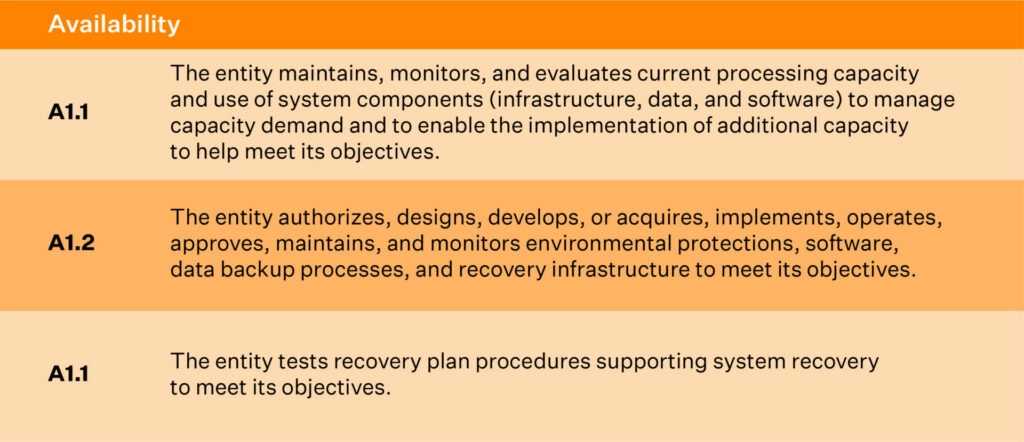
Availability controls ensure your systems stay reliable and resilient during both normal operations and unexpected disruptions.
The controls below map directly to the three availability criteria.
1. Infrastructure and capacity monitoring
These controls ensure systems have adequate health, performance, and resource availability. It also helps in identifying performance issues early.
Common controls mapped to this criteria are:
- CPU, memory, and disk utilization monitoring
- Automated performance alerts
- Capacity planning reviews
- Infrastructure scaling procedures
2. Backup and replication controls
This control protects critical data by creating recoverable copies and ensuring integrity during restoration.
Common controls mapped to this criteria are:
- Automated backups with defined frequency
- Data replication across availability zones
- Backup integrity checks
- Scheduled restore tests
3. Business continuity and disaster recovery
These controls ensure operations can resume quickly after disruptions through the use of documented plans and regular testing.
Common controls mapped to this criteria are:
- Documented business continuity/disaster recovery plan
- Annual DR simulation exercises
- Recovery Time Objective (RTO) alignment
- Vendor continuity evaluation
Confidentiality controls
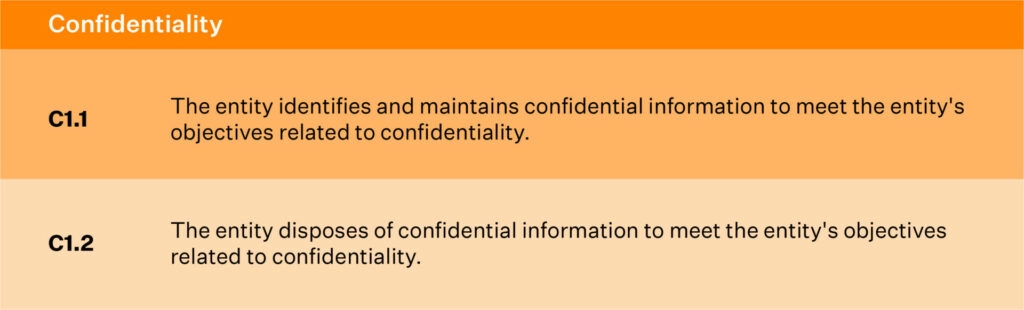
Confidentiality controls safeguard sensitive information throughout its lifecycle and ensure access is tightly governed.
1. Restricting access to confidential data
These controls ensure that only authorized individuals view or handle confidential information.
Common controls mapped to this criteria are:
- Role-Based Access Controls (RBAC) with least‑privilege permissions
- Encryption at rest and in transit
- Access approval workflows
- Monitoring of privileged activity
2. Secure data deletion processes
These controls ensure that confidential data is securely destroyed only when it is no longer required, such as outdated information or data that must be purged, so it cannot be recovered.
Common controls mapped to this criteria are:
- Secure wipe or cryptographic erasure
- Data retention schedules
- Decommissioning procedures
- Vendor‑verified data deletion
Processing Integrity controls
Processing Integrity controls ensure that systems process data accurately, completely, and within expected timelines. These controls are particularly crucial for organizations that rely on precise and reliable data handling for their services.
1. Data accuracy
These controls ensure that information processed and stored is correct and free from errors.
Common controls mapped to this criteria are:
- Validation rules at data entry
- Automated data quality checks
- Reconciliation procedures
2. Data completeness
These controls ensure that all required data is captured, stored, and processed accurately and without omission.
Common controls mapped to this criteria are:
- Workflow completeness checks
- Logging of incomplete transactions
- Source-to-destination verification
3. Data validity
This control set ensures that data is reliable, complete, accurate, and collected with integrity for its intended purpose.
Common controls mapped to this criteria are:
- Input validation controls
- Authorization workflows
- Audit trails for data changes
4. Timeliness
These controls ensure data is processed and delivered within defined time requirements.
Common controls mapped to this criteria are:
- SLA monitoring
- Batch processing schedules
- Alerts for processing delays
5. System monitoring
These controls ensure issues affecting processing quality are detected and resolved quickly.
Common controls mapped to this criteria are:
- Error logging and triage
- Automated anomaly detection
- Incident escalation workflows

Privacy controls
Privacy controls govern how personally identifiable data (PII) is collected, used, stored, disclosed, and deleted while upholding user rights. These controls ensure transparency, accountability, and lawful data practices.
1. Consent and notice
These controls ensure individuals understand what data is collected and how it will be used.
Common controls mapped to this criteria are:
- Public privacy notices
- Consent banners or checkboxes
- Version tracking for notices
2. Collection and use
These controls ensure personal data is gathered lawfully and used only for stated purposes.
Common controls mapped to this criteria are:
- Data minimization procedures
- Purpose-based access controls
- PII classification guidelines
3. Access and disclosure
These controls determine who can view, modify, or share personal information.
Common controls mapped to this criteria are:
- Access request workflows
- Disclosure approval logs
- Encryption controls
4. Data retention and deletion
These controls ensure personal data is stored only as long as needed and securely removed afterward.
Common controls mapped to this criteria are:
- Retention schedule enforcement
- Automated data deletion mechanisms
- Secure wipe or anonymization
5. Quality assurance
These controls ensure personal data remains accurate, relevant, and up to date.
Common controls mapped to this criteria are:
- Periodic accuracy reviews
- Customer data correction workflows
6. Monitoring and incident response
These controls ensure privacy breaches are detected, investigated, and resolved quickly.
Common controls mapped to this criteria are:
- Privacy incident reporting workflows
- Breach notification procedures
- Continuous monitoring tools
7. Privacy training
These controls ensure employees understand their responsibilities when handling PII.
Common controls mapped to this criteria are:
- Mandatory privacy training
- Annual refresher modules
8. Handling complaints or requests
These controls ensure individuals can exercise rights such as access, correction, or deletion.
Common controls mapped to this criteria are:
- Data subject request (DSR) workflows
- Identity verification procedures
- Response time tracking
Everything you just read, packaged into one downloadable controls list
SOC 2 common criteria
The SOC 2 Common Criteria (CC-series) represent the foundational pillars auditors use to evaluate whether your organization’s security program is structured, governed, monitored, and maintained effectively.
These controls cut across all Trust Services Criteria and apply to every SOC 2 audit, making them essential for demonstrating organizational maturity.
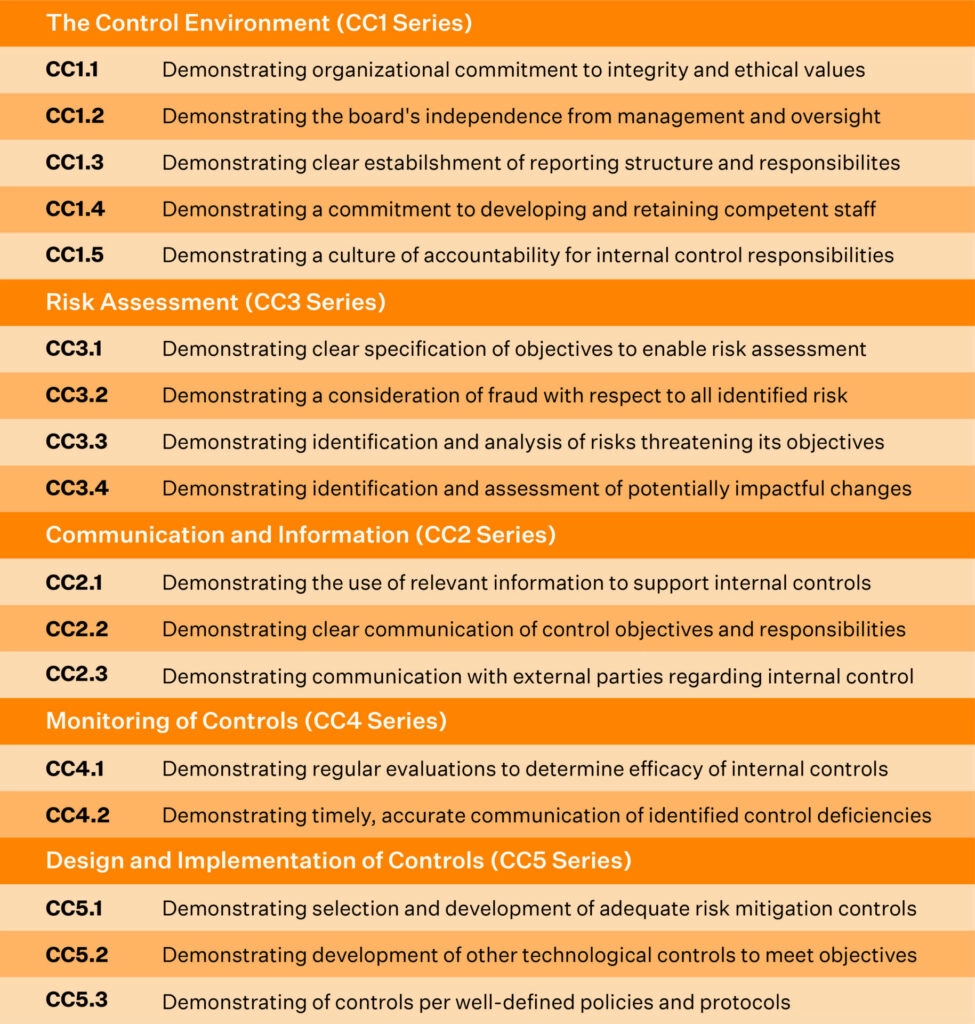
CC1.0: Control environment
Establishes the governance, ethics, accountability, and leadership oversight that define your organization’s security culture.
CC2.0: Communication and information
Ensures important security information flows consistently across teams so members understand their responsibilities.
CC3.0: Risk assessment
Identifies and analyzes internal and external risks that may prevent the organization from achieving its security objectives.
CC4.0: Monitoring activities
Evaluates how well controls operate over time through reviews, automated monitoring, and audits.
CC5.0: Control activities
Implements policies and procedures that enforce security practices and ensure consistent operational behavior.
CC6.0: Logical and physical access
Controls who can access systems, data, facilities, and infrastructure to prevent unauthorized use.
CC7.0: System operations
Ensures systems are monitored, maintained, and supported to detect issues and resolve incidents efficiently.
CC8.0: Change management
Manages updates to systems and applications in a controlled, reviewed, and approved manner to avoid unintended risks.
CC9.0: Risk mitigation
Implements mechanisms that reduce the likelihood and impact of identified risks, ensuring resilience.
SOC 2 controls by scenario
Different organizations face different operational realities, and SOC 2 controls must adapt accordingly. These scenarios illustrate how control expectations shift based on business model, data sensitivity, and growth stage, giving teams clearer insight into what “right-sized” compliance looks like for them.
Scenario 1: Fully remote SaaS team
A remote‑first company must secure a fully distributed workforce, ensuring all devices, networks, and cloud systems remain protected without a centralized office. In this setup, controls focus on securing endpoints, enforcing identity protections, and maintaining consistent security across varying work environments.
Below are the key controls that teams typically rely on:
- MFA for all tools to ensure strong authentication
- Device encryption + MDM for uniform endpoint security
- Automated employee lifecycle workflows for fast provisioning and deprovisioning
- Zero‑trust or VPN access to protect distributed network access
- Workspace security policies tailored for remote environments
Scenario 2: Fintech startup
Fintechs handle financial data and transactions, requiring stringent access controls, auditability, and risk mitigation to meet customer and regulatory expectations. Because financial data is highly sensitive, fintech controls emphasize preventing unauthorized access, reducing fraud risk, and ensuring operational accuracy.
Key controls include:
- Restricted production access to prevent unauthorized financial data exposure
- Segregation of duties to reduce fraud and operational risk
- Continuous vulnerability scanning for proactive threat detection
- Mandatory background checks to reduce insider risk
- Transaction monitoring to ensure processing integrity and detect anomalies
Scenario 3: Healthcare SaaS
Healthcare companies must protect PHI and support privacy and retention requirements while maintaining operational visibility and auditability. This means controls must strictly govern how PHI is stored, accessed, processed, and shared while maintaining audit trails for compliance. Typical controls include:
- HIPAA‑aligned privacy controls to safeguard PHI
- Audit logs with retention to support traceability and compliance
- Data masking in lower environments to avoid PHI exposure
- PHI segregation policies to separate sensitive and non‑sensitive data
- Secure integration APIs to ensure safe interoperability with providers
Scenario 4: High‑growth SaaS scaling quickly
Rapidly scaling SaaS teams require automated, scalable controls that keep pace with growing infrastructure, user base, and engineering velocity. As systems, teams, and dependencies multiply, maintaining consistency becomes the central challenge, making automation and transparent governance crucial.
Common controls include:
- Automated access reviews to maintain least‑privilege control as headcount rises
- Change approval workflows to reduce deployment risk at scale
- DR testing and replication to ensure resilience across expanding systems
- Continuous monitoring tools to detect issues in a larger environment
- Centralized policy management to keep teams aligned as they grow
SOC 2 controls implementation guide (step-by-step)
Implementing SOC 2 controls is most effective when approached methodically. A structured approach ensures that controls are not only selected thoughtfully but also deployed in a way that aligns with how your teams actually work.
Step 1: Understand the Trust Services Criteria (TSC)
Understanding the TSC is the foundation of any SOC 2 program. Each criterion—Security, Availability, Processing Integrity, Confidentiality, and Privacy—represents a specific area of assurance your organization must demonstrate. Taking time to interpret what each criterion means in the context of your business helps you avoid unnecessary scope creep and ensures you build a program that matches your real risks and commitments.
This step also clarifies what your customers expect and what your systems actually handle, making it easier to right‑size your compliance efforts.
Step 2: Define your audit scope
Scoping determines which systems, processes, teams, and vendors are part of your SOC 2 boundary. This includes cloud infrastructure, production environments, HR systems, code repositories, ticketing tools, and employee devices.
A well‑defined scope prevents wasted effort and ensures your audit focuses only on what truly impacts customer data. Improper scoping can lead to significant rework down the line. Getting this right saves significant time and frustration.
Step 3: Conduct a risk assessment
In this step, you identify potential threats and vulnerabilities across your people, processes, and technology. This includes evaluating operational risks, security gaps, external threats, and vendor dependencies.
Documenting likelihood and impact helps prioritize what matters most. A strong risk assessment prevents over-engineering while ensuring that no critical gaps are overlooked, enabling your controls to address the risks identified directly.
Step 4: Select the right SOC 2 controls
With risks identified, you can now map risks to relevant controls across the Trust Services Criteria. This step transforms your assessment into actionable safeguards. Effective selection balances rigor with practicality. The best controls are the ones your teams can maintain consistently. Overly complex controls often break down during daily operations, creating evidence gaps later.
Step 5: Deploy controls and publish policies
This is where SOC 2 becomes operational. Rolling out technical controls (such as MFA, logging, and encryption), implementing procedural workflows (like onboarding/offboarding), and establishing administrative controls (like policy acknowledgments) become the primary objectives. Policies should accurately reflect how your teams already work—or how they will work going forward—and must be acknowledged by employees.
Step 6: Collect evidence continuously
For SOC 2 Type II, auditors want proof that your controls worked consistently throughout the entire audit period. Instead of rushing to gather everything at the end, teams need an ongoing, steady way to collect evidence that shows those safeguards were actually working.
Maintaining logs, approvals, screenshots, monitoring data, and access review records as part of normal operations ensures a defensible audit posture. Automation can make this process significantly more manageable and reduce human error.
Step 7: Prepare for the SOC 2 audit
Preparation for a SOC 2 audit requires a thorough review of control health, evidence, and gaps. It also involves addressing these gaps, aligning expectations with your auditor, defining timelines, and ensuring teams know what to expect. A well-prepared environment significantly reduces audit friction.
Real examples of SOC 2 controls (mapped to evidence)
Auditors don’t just expect controls to be designed and implemented correctly; they require proof that controls have been operating reliably and consistently. Evidence becomes the backbone of a SOC 2 audit as it demonstrates operational discipline, reveals how well teams follow security processes, and helps auditors validate that safeguards remain effective in real-world scenarios.
| Control | Description | Expected Evidence |
| MFA enforced | Prevents unauthorized access to critical systems | Authentication settings, MFA logs |
| Quarterly access reviews | Ensures least‑privilege access is maintained | Review records, approval logs |
| Encryption at rest/in transit | Protects sensitive data from interception or misuse | Cloud provider encryption configs, certificates |
| Background checks | Reduces insider risk and validates employee trustworthiness | HR verification reports |
| Incident response workflow | Ensures security incidents are detected and resolved consistently | IR tickets, post‑incident reports |
| Change approvals for production | Protects system integrity and stability | Pull requests, approval trails |
| Backup & DR testing | Validates resilience and recovery capability | DR test logs, recovery validation reports |
| Vendor risk assessments | Ensures third-party risks are identified and monitored | Completed assessments, risk ratings |
SOC 2 controls cost, effort & timeline
Understanding the SOC 2 cost, effort, and timeline is crucial for planning resources, setting realistic expectations, and aligning teams before the audit journey begins. These factors vary widely based on company size, infrastructure complexity, security maturity, and whether you’re targeting a Type I or Type II report.
By breaking down the elements below, organizations can anticipate the required investments and how to balance technical, operational, and compliance responsibilities.
Cost breakdown
The cost of achieving SOC 2 compliance often depends on factors such as company size, cloud architecture, internal security maturity, and whether additional frameworks need to be aligned. Understanding each cost category helps organizations create accurate budgets and avoid unexpected expenses during the readiness or audit phase.
- Readiness assessment: $5,000–$15,000
- Compliance software & consulting: $10,000–$50,000
- Security tools (MDM, SIEM, monitoring): $5,000–$40,000
- Legal + policy work: Up to $10,000
- Employee training: Up to $5,000
- Audit (CPA firm): $5,000–$50,000
Effort requirements
Effort for SOC 2 varies based on how centralized your systems are and how extensively teams must coordinate to map, configure, and operationalize controls across systems. Engineering, IT, HR, and compliance teams must collaborate consistently, making realistic effort planning essential for keeping the audit timeline on track.
- Engineering hours for access control, logging, and disaster recovery setup
- HR + IT involvement for lifecycle processes
- Compliance lead time for evidence collection
Typical timelines
The typical timeline for SOC 2 depends on your audit type, control readiness, and whether evidence is already being collected.
Here’s how the typical timelines for both types of SOC 2 look:
- SOC 2 Type I: 2–8 weeks
- SOC 2 Type II: 3–12 months (monitoring period)
Sprinto is helping us stay continuously compliant with SOC 2 by automating evidence collection, monitoring controls in real time, and centralizing all audit-related activities. It eliminates the manual effort and back-and-forth typically involved in compliance, allowing us to focus on our core business while staying audit-ready year-round.
Automating SOC 2 controls with Sprinto
As you reach the end of your SOC 2 journey, it becomes clear that manual workflows cannot sustain consistent, audit‑ready compliance. SOC 2 demands ongoing control performance, dependable evidence, and predictable processes—requirements that quickly overwhelm teams when handled manually. Automation shifts SOC 2 from a periodic effort to an operational discipline that supports continuous readiness without added overhead.
Sprinto, powered by its AI-native compliance engine, is designed to be that operational layer.
Here’s how Sprinto AI helps automate SOC 2 compliance
- Continuous control monitoring: Analyze control signals across cloud, HR, and IT systems to instantly identify misconfigurations, drift, and failing controls.
- Evidence collection automation: Auto‑collect and organize audit‑ready evidence so you never chase screenshots, logs, or manual artifacts again.
- Employee lifecycle automation: Verify access, device posture, and policy readiness automatically during onboarding and offboarding.
- Access governance automation: Review permissions proactively, flag unusual access patterns, and ensure ongoing least‑privilege enforcement.
- AI‑powered vendor oversight:Analyze vendor documents instantly, surface real risks, and automate security questionnaires.
- Automated DR & backup verification:Validate backups, replication health, and recovery readiness using contextual cloud insights.
- Policy compliance enforcement: Track policy acknowledgments and automate nudges to maintain organization‑wide compliance discipline
FAQs
SOC 2 standard controls are safeguards designed to protect systems and data across the Trust Service Criteria. They include access management, encryption, logging, monitoring, and incident response.
No—but many B2B customers require it before signing contracts, especially in enterprise or regulated markets.
Auditors may issue a qualified or adverse opinion, signaling gaps in your security program. These issues must be remediated quickly to restore trust.
No. Only Security (Common Criteria) is mandatory. Organizations choose the remaining criteria based on their service commitments and data practices.
The operating period typically ranges from 3 to 12 months. Auditors must see controls functioning consistently throughout the period.
Ownership varies, but often involves Engineering, IT, Security, HR, and Compliance/GRC leaders working together to maintain ongoing readiness.
Technically, Security (the Common Criteria) is the only mandatory category; you can pass a SOC 2 audit with just that. But for companies handling personal data for healthcare clients, it is rarely sufficient in practice. Enterprise healthcare buyers typically require the Confidentiality and Privacy categories as well, especially when their contracts or BAAs require you to demonstrate controls over how personal information is collected, used, and protected.
Privacy criteria aligns closely with HIPAA’s individual rights requirements, and Confidentiality covers your data classification and NDA obligations. Excluding them can create a gap that shows up in a vendor security questionnaire or deal review. Adding these two categories does increase audit scope modestly, but not including them when your clients expect them tends to create a bigger problem down the road.
Azure’s SOC 2 report covers the physical security of its data centers, including building access, surveillance, guards, and so on. You can reference it in your own audit to satisfy that layer. You don’t need to audit a data center you don’t own. What Azure does not cover is physical access to your own offices, employee workstations, and any on-premises equipment you operate. Those remain your responsibility.
More importantly, logical access to your Azure environment, who has what permissions, how MFA is enforced, and how roles are assigned is entirely on you. That is often where the real audit work lives for cloud-hosted companies. Sprinto automatically maps your Azure setup and flags which controls are inherited from Azure and which you need to implement yourself.
A SOC 2 Type 2 audit covers an observation period, the time during which your controls must be running, and evidence must be collected. The minimum is typically three months, with six months being the most common for a first audit.
There is no rule that says you must wait six months before starting. The period is agreed upon between you and your auditor. Some auditors will accept two to three months for a first-time audit, particularly if the controls are well-documented.
If you have an urgent deal that needs a report sooner, the practical path is to get a SOC 2 Type 1 first. Type 1 is a point-in-time assessment with no observation period. It can typically be completed in four to eight weeks once controls are in place. You can run the Type 2 observation period in parallel.
Sprinto starts collecting timestamped evidence from day one, so by the time your observation window closes, the evidence package is already assembled.

Author
Bhavyadeep Sinh Rathod
Bhavyadeep Sinh Rathod is a Senior Content Writer at Sprinto. He has over 7 years of experience creating compelling content across technology, automation, and compliance sectors. Known for his ability to simplify complex compliance and technical concepts while maintaining accuracy, he brings a unique blend of deep industry knowledge and engaging storytelling that resonates with both technical and business audiences. Outside of work, he’s passionate about geopolitics, philosophy, stand-up comedy, chess, and quizzing.Go beyond the surface and uncover the governance, risk, and compliance insights that actually matter.


Win digital goodies for boardroom success



Explore more SOC 2 articles
SOC 2 Compliance Overview
SOC 2 Preparation and Documentation
SOC 2 Audit and
Reporting
SOC 2 Differences and Similarities
SOC 2 Updates & Management
SOC 2 Industry-Specific Applications
research & insights curated to help you earn a seat at the table.