


TL; DR
| Hyperproof can be a solid compliance and risk workspace, especially if cross-framework control reuse matters to you. Teams usually start exploring alternatives when day-to-day execution gets noisy: UI friction, slower ownership workflows, and reporting that still needs cleanup. If you want less evidence chasing, broader integrations, and more flexible reporting, these 11 tools are worth a look. Top 11 Hyperproof alternatives in 2026: 1. Sprinto 2. Drata 3. Vanta 4. AuditBoard 5. LogicGate Risk Cloud 6. Scrut Automation 7. Secureframe 8. Thoropass 9. Scytale 10. Workiva 11. OneTrust. |
Hyperproof is a GRC platform for mapping controls, collecting and testing evidence, managing audits, and keeping stakeholders aligned as requirements expand across frameworks. The pitch is simple: fewer spreadsheets, less last-minute audit scramble, and one system of record for controls, evidence, issues, and audit requests.
But every GRC program is different, and Hyperproof may not be the best fit for yours. You might need deeper automation, broader integrations, stronger TPRM or risk depth, or simply a less cumbersome way to run the work.
This guide will help you compare 11 alternatives to Hyperproof for 2026. For each, you’ll find a summary of key features, buyer considerations, and more. I will help you select a solution that minimizes evidence-toil, aligns with your workflows, and supports smooth, disruption-free audits.
Hyperproof overview
In practice, security, compliance, and GRC teams use it to gather and map evidence to controls, track requirements across multiple frameworks, and collaborate with internal stakeholders and external auditors.
It works well when you want to reuse evidence across audits and keep ongoing visibility into control status.
Key features
- Controls and framework mapping: Centralize controls, map them across frameworks, and help teams understand coverage and reuse work across audits.
- Evidence collection via integrations: Connects to cloud and SaaS systems to automate data/evidence collection and reduce manual follow-ups.
- Evidence testing and validation: Add testing/validation steps to ensure evidence is reviewed and tied back to the control.
- Audit management: Enable evidence sharing and collaboration, and track audit requests, evidence status, and auditor access from one place.
- Issue management and remediation tracking: Log gaps, assign tasks, and track progress, often via integrations with Jira/ServiceNow-style workflows.
- Risk and vendor-related workflows: Manage risks with more structure and accountability, and also support vendor-related workflows.
Pros
- Many customers highlight the Hyperproof team’s responsiveness and helpfulness.
- Users regularly cite streamlined audits because evidence and requests live in one place.
- Integrations and task workflows are frequently called out as time savers.
- Cross-framework mapping and evidence reuse minimize duplicated work.
- Flexible enough for broader GRC workflows, with users noting risk and vendor management alongside audit readiness.
Cons
- Out-of-the-box integration coverage can feel limiting, especially for teams with niche tools.
- Setup and configuration can be heavier than expected.
- Some users report performance rough edges, including lags or errors.
- Reviewers mention wanting customizable dashboards and reporting, better templates, and more flexible exports.
- Some users find the interface daunting, pointing to tangled navigation, information overload, and tedious click paths.
- Teams often report a learning curve around configuration and auditor permissions.
- Users report friction with imports/exports (spreadsheet formats) and workflow limitations, such as file-handling/sharing mechanics.
- Risk and vendor modules may feel less mature for advanced needs and may require more manual maintenance.
When should you look for alternatives to Hyperproof?
Consider switching or evaluating your options when:
- You need deeper, broader out-of-the-box integrations beyond the current coverage.
- You’re still relying on screenshots and Jira tickets for controls like access reviews, and the platform isn’t cutting down the interrupt-driven evidence chase.
- TPRM is a core workflow, and you need stronger support for vendor intake, assessments, and renewals.
- You need a more structured risk scoring system with less manual upkeep.
- Your team wants more opinionated guidance and faster time-to-audit, especially for SOC 2 or ISO programs.
- You need a platform that goes beyond compliance ops into internal audit, SOX, or ERM.
- Adoption is slowing because the UI or learning curve feels too steep for non-GRC stakeholders.
- Hyperproof feels too heavy or too expensive for your current maturity stage, and you want less admin overhead.
- You want newer AI-assisted workflows, with questionnaire automation, evidence summarization, or control-mapping help, that are becoming standard in the category.
“40% of organizations say over half their customers now consider compliance non-negotiable.”
~ The Business ROI of Compliance 2026
Your GRC function is your company’s trust engine. It should do more than store artifacts. It should explain how security works in your environment in a way customers, auditors, and leadership can follow. If Hyperproof isn’t giving you that clarity without constant cleanup, these alternatives are worth a look.
The 11 best Hyperproof alternatives in 2026
Not every Hyperproof alternative solves the same problem. Some are built for continuous compliance execution with heavy automation. Others are broader GRC platforms for internal audit, SOX, ERM, or TPRM at enterprise scale.
The 11 tools below made the list because they can realistically replace or outperform Hyperproof in the jobs teams care about most: controls and evidence, audit coordination, reporting, and risk or vendor workflows.
This guide is based on publicly available information, primarily:
- Product pages and documentation
- Public announcements and release notes
- Aggregated themes from customer reviews
I created this list focusing on the decision factors buyers care about most: automation depth, integration quality, reporting, workflow flexibility, scalability, TPRM capabilities and risk depth, AI utility, and commercial fit.
1. Sprinto
Sprinto is an Autonomous Trust Platform that centralizes trust obligations. You can set up the platform to autonomously execute the recurring work required to remain trustworthy across compliance, vendor risk, access, privacy, risk management, and AI governance.
As a Hyperproof user, you must choose Sprinto if you want a GRC system that enables hands-free evidence collection, continuous monitoring, and AI-assisted trust ops.
Key features:
- Continuous evidence collection: Use 300+ integrations across cloud, identity, HRIS, and security tools for automated evidence flow.
- Unified modules: Keep controls, risks, vendors, and audits connected instead of split across systems.
- Workflow automation: Assign owners, automate evidence collection, and track remediation within the platform.
- Trust sharing: Easily share compliance status with customers or prospects without repeating effort.
- AI-native compliance: Maintain updated evidence, policies, and risk data with agentic workflows.
- AI-powered security questionnaires: Generate questionnaire responses using your organization’s compliance knowledge base and prior approved answers.
Pros:
- Reviewers frequently highlight strong customer support and clear guidance, especially during implementation and audit prep.
- Users often describe the platform as straightforward and structured enough to keep programs on track.
- Automation and broad integration coverage help reduce evidence chasing, tracking, and follow-up work.
- It is particularly strong when you need a faster path from implementation to audit readiness.
Cons:
- Integration gaps still come up in reviews, especially when teams use niche tooling.
- Some users also point to UX refinements and minor product bugs as areas for improvement.
Pricing: Pricing is typically quote-based and varies by frameworks, scope, company size, and modules.
Best for: Fast-growing or mid-market teams that want to move from audit sprints to ongoing compliance with strong hands-on support. It is less suited to teams looking for a SOX-first or internal-audit-first platform, very specific niche integrations, or a lightweight tool with almost no setup.
“Sometimes you just need help, whether that’s with vendor due diligence or understanding what type of evidence an auditor expects. Sprinto’s consultative approach really outshines Drata there. I just had more confidence that there wouldn’t be issues when it’s time for an audit.”
~ Deepak Balasubramanyam, CTO, Rocketlane
2. Drata
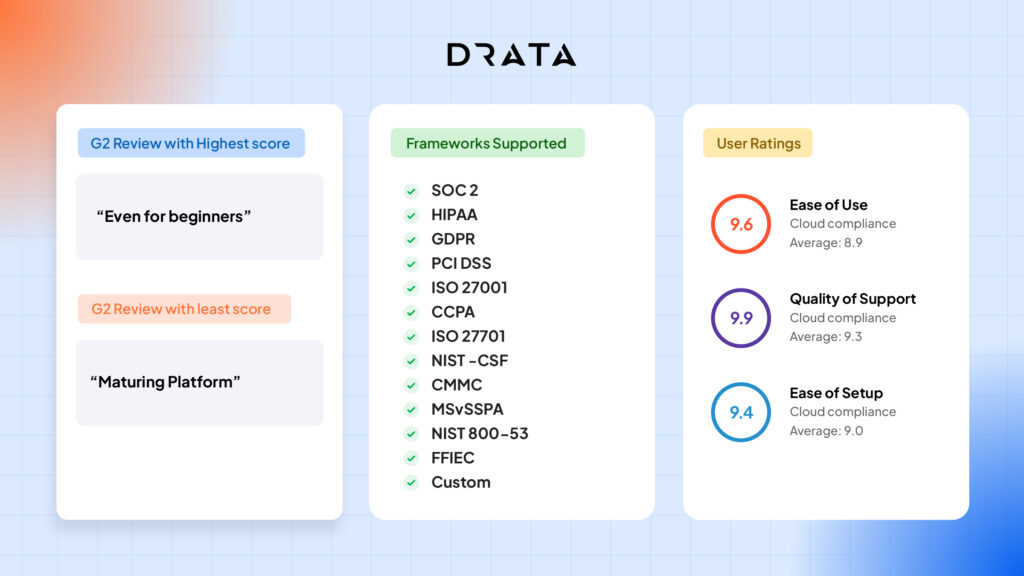
Drata is a compliance automation platform focused on continuous security monitoring, automated evidence collection, and audit readiness. It’s a strong Hyperproof alternative if you are pursuing SOC 2/ISO 27001 (and related frameworks) and want a structured, product-led approach to compliance automation.
Key features:
- Continuous control monitoring: Track whether controls are operating as intended over time, not only during audit season.
- Evidence collection via integrations: Pull evidence from common cloud and SaaS systems to reduce manual collection.
- Audit readiness workflows: Organize control owners, evidence requests, and auditor collaboration in a single workspace.
- Policy and control management: Standardize common controls and policies and map them across frameworks.
- AI Questionnaire Assistance: Use AI-assisted security questionnaire workflows to speed up repetitive vendor/customer requests.
Pros
- Customers consistently praise Drata’s support experience.
- Strong sentiment around ease of use for day-to-day compliance tracking.
- Automation is frequently described as time-saving for audit preparation and evidence management.
- Integrations are often viewed positively as a driver of operational efficiency.
Cons
- Some users report that integrations are limited and don’t meet their needs.
- Integration setup can be a pain point for certain systems.
- Reviewers frequently note that there is scope for UI/workflow refinements, and that navigation complexity can surface, especially early in adoption.
- Pricing is commonly described as expensive, especially for startups.
Pricing: Quote-based; reviews regularly describe Drata as being in a higher pricing tier.
Best for: Teams that want compliance automation plus strong customer support, especially for SOC 2- or ISO-first programs. If you need enterprise-grade internal audit, SOX, or deeply configurable multi-department GRC workflows, it may feel too narrow.
3. Vanta
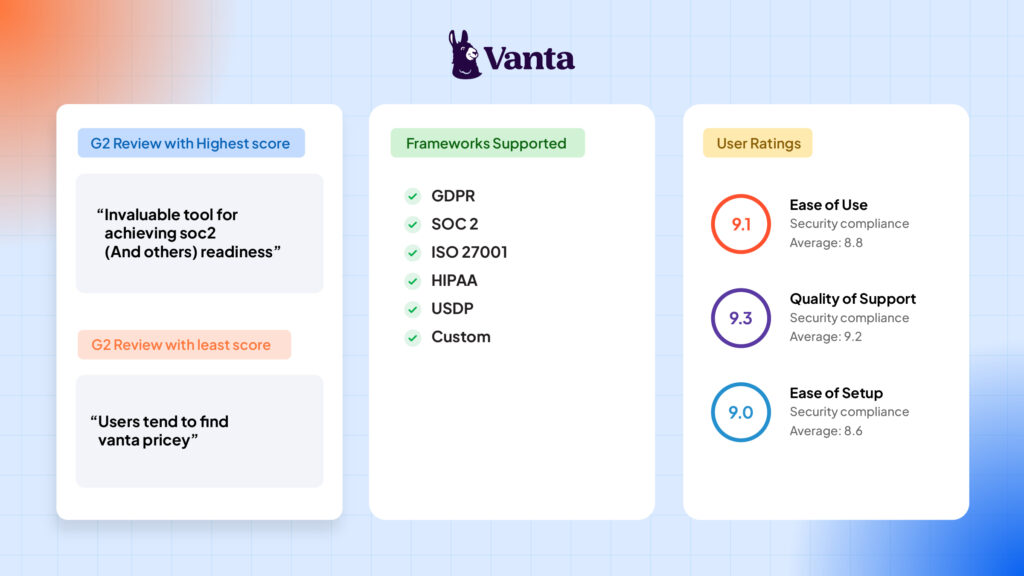
Vanta is a trust management platform centered on compliance automation, continuous monitoring, and faster security reviews. It is often chosen if you are a fast-growing SaaS organization that needs to show security maturity quickly.
Key features:
- Broad integrations ecosystem: Connect cloud, identity, and operational tooling to automate evidence collection and monitoring.
- Continuous monitoring and alerts: Surface security/compliance drift and keep teams on top of findings.
- Trust Centers: Share security posture and compliance progress with customers and prospects.
- Questionnaire Automation with Vanta AI: Generate suggested answers from your knowledge base and prior questionnaires, with citations for review.
- Workflow support for compliance programs: Track tasks, owners, and evidence status across frameworks.
Pros:
- Users frequently praise Vanta’s ease of use as a key factor in its rapid adoption.
- Reviewers highlight how it helps with compliance execution, reducing manual effort and improving status clarity.
- Connectors are often highlighted as helpful for speeding up compliance workflows.
- Many users describe Vanta as feature-rich and capable across common compliance use cases.
Cons
- Some customers experience integration issues or gaps for specific tools.
- Reviewers mention missing features or customization limitations, depending on maturity or requirements.
- Pricing is a recurring complaint: reviewers cite cost concerns and extra charges as the scope expands.
- Some users report a learning curve due to the product’s breadth and complex settings.
Pricing: Quote-based; reviews commonly characterize Vanta as pricey, especially as needs expand.
Best for: Teams that want a mature, product-led compliance platform with strong trust-center and questionnaire tooling. It may be a weaker fit if you are an early-stage team on a tight budget or for enterprise programs that need deeper internal audit or SOX capabilities.
4. AuditBoard
AuditBoard is positioned as a connected risk platform used heavily for internal audit, SOX, risk, and compliance at larger organizations. AuditBoard is a strong alternative if you feel that Hyperproof is not providing the audit or SOX depth your team requires.
Key features:
- Internal audit management workflows: Built around structured fieldwork, documentation, and reviewer workflows.
- SOX and controls management: Support testing, evidence collection, and control workflows aligned to financial reporting.
- Cross-team collaboration: Coordinate with preparers or reviewers and maintain an audit trail across projects.
- Dashboards and reporting: Consolidate audit, risk, and compliance views for leadership.
- AI-powered audit workflows: Use AI for scoping, summaries, and workflow acceleration.
Pros:
- Users highlight the preparer-reviewer workflow as valuable for audit supervision and accountability.
- Customers mention flexibility and customization as differentiators for complex programs.
- Reviewers cite responsiveness to feedback and ongoing product improvement.
- Reviewers point to meaningful value from centralization, fewer email exchanges, and less workflow fragmentation.
- Teams highlight improved cross-team alignment when multiple modules are connected.
Cons:
- Some customers cite implementation difficulties and support inconsistencies.
- Training and onboarding are sometimes described as self-serve, with limited admin oversight tooling.
- Teams report a learning curve and occasional friction with performance and complexity, especially for new users.
- Many reviewers find the pricing high, especially since support and add-ons are often locked behind extra fees due to module-based packaging.
- Some reviewers mention lag in dashboards and reports, as well as limitations in reporting capabilities.
Pricing: Typically quote-based.
Best for: Mid-market and enterprise organizations running formal internal audit, SOX, ERM, and multi-team risk programs. It is a stronger fit when you need a deeper audit system of record than a typical compliance automation tool provides. If your world is mostly SOC 2 or ISO and you want speed and simplicity, AuditBoard may feel heavy.
5. LogicGate Risk Cloud
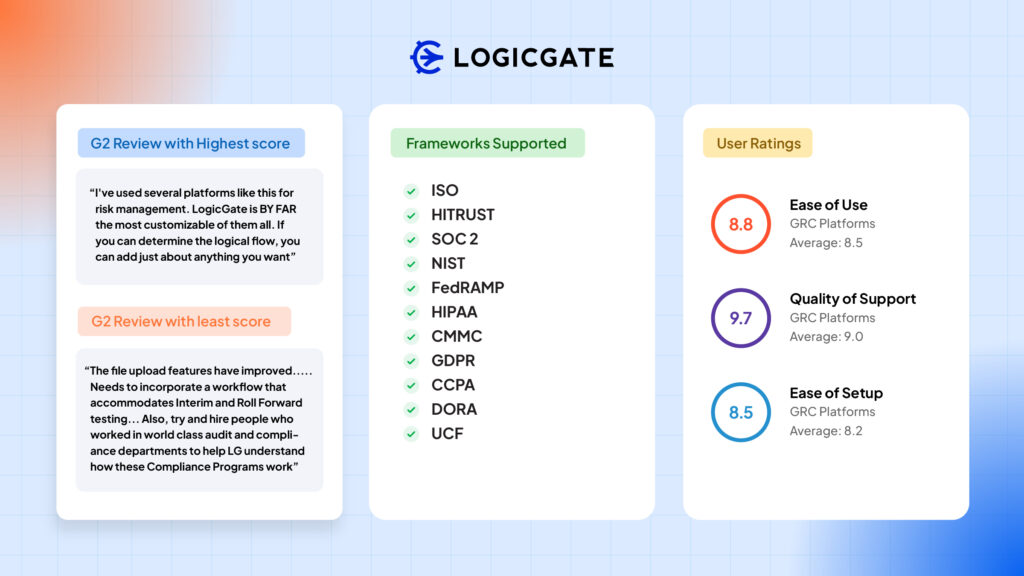
LogicGate Risk Cloud is a no-code GRC platform designed for teams that want to build and automate their own risk and compliance workflows, including TPRM, cyber risk, and internal audit. It’s a compelling Hyperproof alternative when your priority is workflow flexibility and customization.
Key features
- No-code workflow builder: Configure workflows without heavy engineering, covering steps such as intake, assessment, remediation, and reporting.
- Risk registers and assessments: Standardize risk capture, scoring, and tracking across teams.
- Dashboards and reporting: Create visibility into risk posture and program progress.
- Integration and API options: Connect business systems via integrations and a documented API to centralize risk data.
- Spark AI: Use AI to speed up writing and recommendations within GRC workflows.
Pros:
- Ease of use and an intuitive feel are mentioned frequently for a configurable platform.
- Users appreciate the ability to customize and tailor processes.
- Customers cite useful features and helpful support when building workflows.
- Reviews highlight that automation features help reduce manual coordination.
- Often viewed as capable of building broader GRC programs beyond compliance checklists.
Cons:
- Some users cite missing features or limitations depending on advanced use cases.
- Complexity can show up in navigation as programs scale.
- Reviewers mention learning difficulties and a lack of clarity during setup for some workflows.
- The learning curve is a common theme, especially for first-time GRC admins.
- Pricing is sometimes described as higher than expected.
Pricing: Typically quote-based.
Best for: Teams that want a configurable GRC workflow platform and have (or can build) the operational maturity to design processes for TPRM, cyber risk, compliance, and audit. It is less ideal if you want plug-and-play SOC 2 or ISO automation with minimal configuration.
6. Scrut Automation
Scrut positions itself as a security-first GRC platform that helps teams move quickly while staying audit-ready through automation. It is most relevant for SOC 2 or ISO programs where you also want risk-aligned security workflows.
Key features
- Continuous compliance automation: Manage controls, tasks, and readiness across frameworks.
- Evidence automation via integrations: Reduce manual evidence handling via structured workflows and integrations.
- Risk and compliance management: Connect risks to controls and evidence to align security priorities.
- Bundled services options: Often positioned around packaging audit or pen test–adjacent services together.
- Policy and documentation support: Provide policy artifacts and structured documentation workflows.
- Audit readiness workflows: Coordinate stakeholders, tasks, and evidence for audit cycles.
- AI-assisted questionnaire support: Automate responses to high-volume security questionnaires.
Pros
- Ease of use is a commonly cited reason teams adopt the platform.
- Customer support is often cited as a strength.
- Implementation is often described as smooth and structured.
- Many users describe the platform as helping reduce manual effort and improve readiness.
- Some reviewers like the bundled approach because it reduces the number of vendors they need to coordinate.
Cons
- Some reviewers report technical issues or bugs.
- As with many tools in the category, integration depth can vary by stack.
- Reviews point to product maturity gaps, with improvements needed or key features missing.
- Policy documentation may seem generic and often needs customization to fit specific needs.
Pricing: Typically quote-based.
Best for: Teams that want a compliance automation product for SOC 2 and ISO with strong support and built-in questionnaire automation. Look elsewhere if you need a highly polished UX, advanced workflow customization, or deep coverage for niche integrations.
7. Secureframe
Secureframe is a compliance automation platform commonly adopted by SMBs and mid-market companies pursuing SOC 2, ISO, and related frameworks. It may be a good fit when you want a guided, product-led compliance experience with automation and, in some cases, optional expert services.
Key features:
- Automated evidence collection: Pull evidence from key systems and monitor control posture continuously.
- Policy templates and training workflows: Standardize policies and enable structured employee compliance tasks.
- Risk and vendor workflows: Track common risk and vendor-related activities tied to compliance.
- Centralized compliance and audit: Consolidate compliance status, tasks, and artifacts, and coordinate audit readiness and auditor collaboration.
- AI-assisted capabilities: Use AI to automate risk assessment, policy creation, control mapping, evidence validation, vendor reviews, and questionnaire responses.
- Trust-sharing capabilities: Create a branded, self-service portal to showcase security and compliance posture and share documents securely.
Pros:
- Reviewers frequently cite a smoother compliance process.
- Automation is often highlighted as a time-saver.
- Reviewers often mention strong support and helpful guidance.
- Ease of use and structured workflows are commonly highlighted.
- Often perceived as a solid fit for first-time SOC 2 and ISO readiness.
Cons:
- Some users report integration issues depending on the stack they use.
- Limited integrations are a recurring friction point for certain teams.
- Some customers cite limited customization relative to more configurable platforms.
- Some reviewers cite missing features depending on advanced requirements.
- Pricing clarity and packaging can be a point of friction for some buyers.
Pricing: Typically quote-based.
Best for: Startups and SMBs that want a guided path to SOC 2 or ISO readiness with automation and templates. It may not be ideal if you need deep customization, complex governance workflows, or broad coverage for non-standard tooling.
8. Thoropass
Thoropass combines compliance automation with a stronger audit-partner layer. It may appeal to you if you are a smaller company that wants more hands-on support and a one-stop shop for readiness and audit execution.
Key features:
- Readiness and audit workflows in one platform: Track control readiness and move into audit without switching tools.
- Built-in integrations: Connect systems to streamline evidence collection and monitoring.
- Audit partner collaboration: Tight coordination between platform workflows and audit execution, depending on engagement model.
- Evidence organization: Keep your artifacts tied to controls and audit requests.
- AI-driven questionnaire automation: Use AI-generated suggested responses to vendor or customer security questionnaires.
- Trust-sharing workflows: Support external trust sharing via trust center-type workflows.
Pros
- Customers describe Thoropass as helpful, especially for teams with limited staffing.
- Ease of use is often cited as a positive.
- Many users cite strong customer support as a differentiator.
- Review patterns suggest Thoropass helps teams save time preparing for audits.
- Often described as helpful for getting a compliance program operational quickly.
Cons
- Users cite unclear UX patterns and uncertainty around what to do or how to configure certain workflows.
- Integration issues and limited integrations appear as recurring themes.
- Negative feedback often mentions audit friction and workflow issues.
- Some users mention the complexity of navigation and the effort required for configuration.
Pricing: Generally quote-based.
Best for: Teams that want compliance software plus a stronger service and audit-partner layer, especially when internal compliance bandwidth is limited. If you want a pure software platform with minimal services, a more mature UX, or a highly configurable workflow engine, another option may be a better fit.
9. Scytale
Scytale positions itself as an AI-powered security and compliance hub backed by human experts. It is aimed at teams that want automation and guidance across multiple frameworks, along with frequent customer questionnaires.
Key features:
- AI GRC Agent: Use AI-assisted workflows for evidence review, remediation guidance, and in-product compliance Q&A to reduce compliance busywork.
- Automated evidence collection: Automate evidence gathering and continuously monitor controls with alerts to support ongoing audit readiness.
- AI security questionnaires: Auto-generate questionnaire or RFP responses using existing compliance and security data, with optional expert review before sharing externally.
- Trust Center: Create a pre-filled, compliance-data-synced Trust Center to reduce repetitive customer trust requests.
- Guided compliance execution: Receive clear, step-by-step guidance for organizing evidence and documentation for audits.
Pros:
- Reviews heavily emphasize hands-on support and guidance during SOC 2 and ISO readiness.
- Ease of use shows up as a recurring positive.
- Users commonly describe Scytale as reducing audit effort by automating evidence collection and organizing tasks in a single place.
- Helpful for teams building compliance programs without deep in-house expertise.
Cons:
- Reviews often cite integration issues and requests for additional supported integrations, particularly for evidence-collection edge cases.
- Limited integrations can be a blocker depending on your tech stack.
- Limited flexibility and missing features are highlighted in feedback for advanced needs, including requests for stronger document management capabilities.
- Users have highlighted usability and stability issues, with occasional bugs that interrupt flow.
Pricing: Scytale has a pricing packages page, but it does not publish fixed dollar amounts. Packaging commonly references one framework included, add-ons for more, and bundled tiers that combine platform, consulting, and penetration testing.
Best for: Teams that want an automation platform plus expert support, especially when juggling multiple security and privacy frameworks and frequent customer questionnaires. Validate it carefully if you need a deeply configurable enterprise audit or SOX platform, highly specific integrations, or a lighter self-serve system at a lower price point.
10. Workiva
Workiva is best known for connected reporting and collaboration across finance, environmental, social, and governance (ESG), and GRC workflows. It belongs on this list because some teams may want a broader platform covering enterprise reporting, audit trails, SOX and internal controls, and large-scale collaboration.
Key features:
- Real-time collaboration on regulated reporting: Multiple contributors can work on the same reports with version control and audit trails.
- Linked data model: Reduce manual errors by linking numbers and narrative across documents.
- Controls and GRC workflows: Support controls documentation and related compliance processes, particularly for reporting-heavy programs.
- Connected data and reporting: Link data across reports and workpapers to reduce inconsistencies and manual updates.
- Generative/agentic AI capabilities: Use integrated, context-aware AI to generate, edit, and analyze content, automate compliance and reporting tasks, and securely manage data.
- Integrations ecosystem: Connect with common enterprise tools across reporting, finance, and data platforms.
Pros:
- Collaboration features are frequently praised.
- Teams cite reporting strength and reduced manual errors through linking and automation.
- Implementation support is often mentioned positively.
- Strong fit for complex reporting governance and structured approvals.
- Generally perceived as powerful for enterprise-scale reporting and compliance operations.
Cons
- A steep learning curve is common because of breadth and depth.
- Pricing is regularly described as enterprise-level.
- Users mention missing features and limitations for certain workflows.
- Implementation can take time, with some reviews referencing multi‑month onboarding.
Pricing: Quote-based.
Best for: Organizations that prioritize collaborative reporting, SOX and internal controls, and high-stakes documentation across many stakeholders. If your primary pain is continuous security evidence collection for SOC 2 or ISO, a compliance-automation-first tool may be a better fit.
11. OneTrust
OneTrust is widely used for privacy, security, and risk programs. It is most relevant here if your real need is third-party risk management, assessments, and monitoring at scale, along with the tracking of audit evidence.
Key features:
- Third-party intake, screening, tiering: Automate how vendors are received, categorized, and routed.
- Monitoring and risk signals: Pull in external data, such as ratings and breach intel, to detect changes in vendor posture.
- Multi-domain risk assessments: Enable assessing vendors across multiple risk categories, including security, privacy, ethics, compliance, and more.
- Workflow automation: Set up auto-approval workflows for low-risk scenarios and structured approvals for higher risk.
- AI-supported evidence ingestion: Use AI to ingest external risk evidence and generate questionnaire responses more efficiently.
- Issue ownership and tracking: Assign owners, track issues, risks, and tasks, support follow-ups, and enable collaborative risk acceptance.
Pros:
- Strong fit for organizations running TPRM at scale, covering inventory, assessments, and workflows.
- Automation is described as time-saving for intake and assessment workflows.
- A broad platform scope that reduces tool sprawl for some organizations.
- Customers highlight the strength of customization and the ability to integrate via APIs in more mature programs.
Cons:
- A steep learning curve and platform complexity are common themes.
- Admin/RBAC and reporting configuration can be challenging, especially in creating specific access without admin rights.
- Some users mention implementation friction across data import, migration, and environment management.
- It can feel too heavy for smaller teams with simpler needs.
Pricing: Quote-based.
Best for: OneTrust is best for mid-market and enterprise teams where TPRM and privacy operations are central and require scale, depth of workflows, and monitoring. If you only need security compliance automation (SOC 2/ISO) and a simpler audit evidence experience, OneTrust can be more platform than you need.
How we evaluated these tools
I evaluated each Hyperproof alternative against the practical ‘jobs to be done’ that show up in real compliance and audit programs:
- Core fit vs Hyperproof: Can the alternative replace or improve on controls, evidence, audit requests, issues, and cross-framework mapping?
- Automation depth: How much evidence and control monitoring can be automated, not just documented?
- Integration breadth and quality: Does it connect to common cloud, identity, HR, ticketing, and security tools, and does it reduce manual work?
- Audit workflow support: How well does it handle auditor access, Prepared By Client lists, testing, and audit trails?
- Reporting and stakeholder visibility: Can security leaders and business owners get clean, accurate status reporting without heavy admin work?
- Scalability: Multi-framework, multi-entity, role-based access, and enterprise governance needs.
- TPRM and risk workflows: How well does it support teams where vendor risk or enterprise risk is core?
- AI capabilities: I only considered AI features that materially reduce workload, such as questionnaires, summarization, control mapping, and risk assistance, not AI for AI’s sake.
“The AWS infrastructure, for example, is well-connected and I can easily classify assets, maintain them, and keep them updated using Sprinto. Vanta’s, in comparison, was a basic risk analysis module.”
~ Evelyn Vinueza, CISO, Tangelo
Here’s what you can do when evaluating these Hyperproof alternatives to ensure they fit your business requirements:
- Apply zero trust to product pitches: Ask every vendor to explain what their platform doesn’t do, including gaps, limitations, and blind spots. If the vendor can’t clearly articulate its limits, you’ll discover them the hard way mid‑audit.
- Treat cross‑framework mapping as a shortcut, not a promise: Common controls can be helpful, but scoping differences (SOC 2 vs ISO vs PCI) can change what evidence is acceptable. Validate reuse with your auditor and your actual environment.
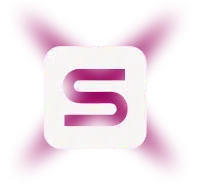
- Demo the exception path, not just the happy path: Ask what happens when an integration breaks, a control drifts, or evidence needs an attestation. The best platforms help you manage by exception rather than restart the evidence chase.
- Be intentional with AI assistance: AI can save time on summaries and questionnaire drafts, but make sure outputs are reviewable, traceable, and don’t create false confidence.
Don’t let your shortlist turn into a feature-checklist contest. In every demo, push vendors past the dashboard tour and into the messy stuff: access exceptions, new privileged users, broken integrations, stale evidence, and last-minute PBC asks. That is where real fit shows up.
Steps to pick a great Hyperproof alternative that works for you
The best Hyperproof alternative is the one that aligns with your program maturity stage and stack. It should not replace one set of workarounds with another six months from now. GRC is highly contextual: what works for one SOC 2 team can fail for another. The real friction lives in your evidence sources, ownership model, and how your auditor tests controls.
“9 in 10 respondents said compliance positively impacted customer trust.” ~ Excerpt from The Business ROI of Compliance 2026. When security is handled well, customers feel more confident choosing and staying with an organization.
Use the steps below to turn that into a short, testable shortlist. Then, validate each vendor with a proof-of-work pilot using your real controls, real evidence sources, and the auditor collaboration or reporting outputs you actually need.
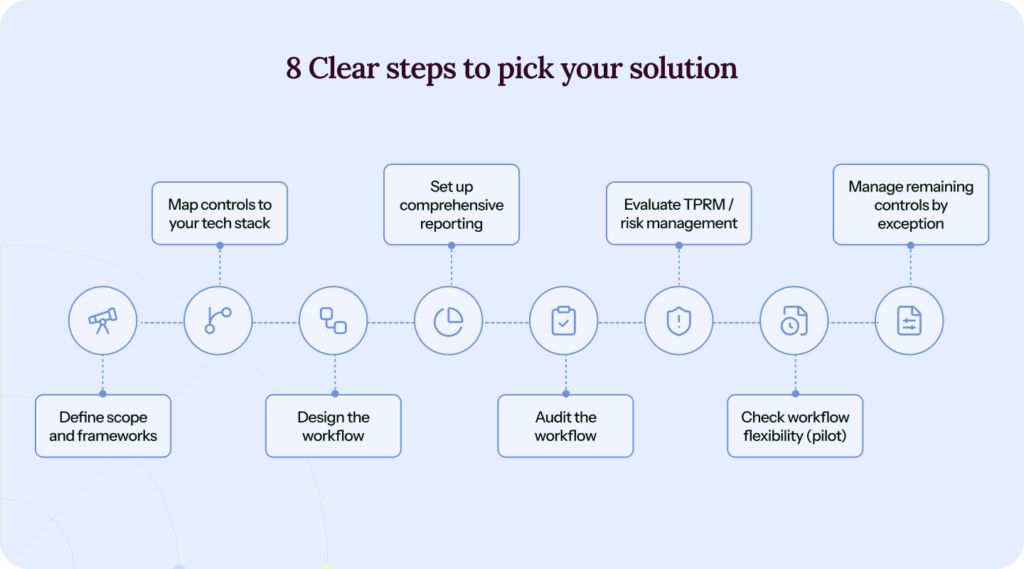
1. Write down why you’re switching or shortlisting
Are you outgrowing Hyperproof because you need deeper automation, right-sizing because it feels too complex or expensive, or just evaluating before buying? That answer determines your category: compliance automation, enterprise GRC, or TPRM.
Do a quick audit of your last audit. List the friction points: evidence collection, control design, stakeholder confusion, and where systems failed to talk to each other. Use that list as your demo script and migration requirements.
2. Define your program scope
Define what is in scope today and what will likely be in scope 12 months from now. That may mean entities, products, environments, and the systems that truly matter—especially identity and privileged access. Set cadence expectations up front (monthly, quarterly, annually by risk) so you are not renegotiating with auditors every cycle.
Also, be explicit about who the program serves and who needs access: auditors, sales, security-review responders, engineering control owners, and leadership. The right tool gives each group a useful view without turning every change into a coordination fire drill.
3. Map your evidence sources and must-have integrations
Your cloud provider, IdP, HRIS, ticketing tool, code repo, endpoint platform, and security stack determine how automated the product can be in practice.
When systems do not connect cleanly, every audit turns into a loop of manual reconciliation, follow-ups, and re-exports. Judge integration depth less by checkbox coverage and more by what happens when that loop breaks.
4. Choose your operating model: Product-led vs workflow-led vs service-led
- If you want fast outcomes with less configuration, choose a compliance automation tool.
- If you need custom workflows across many risk types, choose a configurable GRC platform.
- If you need hands-on help, consider platforms with strong expert or audit-partner layers.
Do not try to boil the ocean on day one. Start with the evidence flows that create the most toil, automate what you can, and manage the rest by exception. That keeps rollouts from stalling in analysis paralysis.
5. Pressure-test audit workflows with a real PBC list
Bring a real PBC list, ideally from your last audit, and have the vendor run it end-to-end. That reveals how well the platform handles real auditor requests, last-minute changes, and common edge cases.
Watch for features like automated access reviews, evidence collection and validation, exception handling, and the ability to generate an auditor-ready package without manual workarounds. Test missing integrations, screenshot requests, and proof of control cadence. You will quickly see which tools truly streamline audit prep and which ones merely track it.
6. Evaluate reporting from the perspective of leadership and auditors
You will want program dashboards for leadership and clear evidence and testing exports for auditors. Reporting is not just the dashboard; it is the translation layer. Your team needs a way to turn technical details into control stories that leaders, customers, and auditors can understand without adding more admin work.
7. Ask how AI is governed, and where it actually saves time
Look for AI in high-volume workflows such as questionnaires, evidence summaries, and control mapping. Then verify that human review, citations, and auditability are in place.
In compliance, AI can assist, but it should not be the only interface for requirements that need deterministic, auditable outputs. Also, ask what responsible AI means in practice for data handling, retention, and your exit path for exporting and deleting data.
8. Run a time-boxed pilot
Pilot one framework and one audit cycle’s worth of work. Measure time saved, evidence completeness, stakeholder effort, and audit-readiness confidence. Count how often you had to interrupt engineering or other control owners for evidence, and how many last-minute follow-ups your auditor needed. Good tooling should measurably reduce those interrupts.
A good pilot should end with fewer “hey, can you grab me a screenshot or export?” messages to engineering. Good compliance automation lets you collect evidence once, keep it up to date, and reuse it across audits and frameworks.
“Everything is in one place and there is a lot of automation that checks the status of technical and non-technical compliance. The support we had from staff was excellent. It was very quick to implement.” ~ Geoff C., Compliance Manager on G2
Conclusion
If you’re evaluating Hyperproof alternatives because your program is stretching beyond audit season, the biggest upside usually comes from moving from audit coordination to continuous compliance. The best tools keep evidence current, maintain clear ownership, and produce usable reports without constant manual cleanup.
Sprinto tends to resonate with teams trying to escape the ‘compliance coordinator’ trap of chasing evidence, herding stakeholders, and retelling the same audit story every quarter. In practice, the platform automates repetitive tasks, including continuous evidence pulls, control checks, reminders, hygiene tasks, and quickly flags exceptions, while keeping humans in the loop for what actually needs more context and decision-making: scoping calls, risk acceptance, and auditor-ready explanations.
The goal isn’t hands-free compliance. It’s fewer fire drills, fewer spreadsheets, and fewer late-night scrambles as your program and frameworks expand.
Some more reasons why Sprinto is ahead of Hyperproof:
- Reduce evidence courier work: Sprinto is typically evaluated when teams want evidence to be pulled, checked, and kept current via integrations. This way, your GRC team isn’t chasing engineers for artifacts every time an auditor asks for something. Also, results in fewer handoffs and last-minute scrambles.
- Multi-framework work that doesn’t double your workload: If you’re running SOC 2 and ISO (or sequencing them), Sprinto’s Common Control Framework can help teams reuse controls and evidence instead of recreating the same control narrative twice.
- Trust Ops for deal cycles: When security reviews and questionnaires are the bottleneck, the value shifts from audit tracking to answering buyers fast, consistently, and with approvals. Sprinto’s approach is designed to reduce the repetitive Q&A loop without forcing sales and security to export data into yet another system.
- Remediation that actually helps: Sprinto’s ‘Fix-it’ feature helps you close gaps, not just record them. When a monitor or check fails, Sprinto will flag it and also help you fix it with guided steps and ready-to-use remediation suggestions. This enables you to get back to continuous compliance faster.
If you want to see how Sprinto compares to Hyperproof for your frameworks and tech stack, schedule a demo with us and ask for a walkthrough using your real PBC list and evidence sources.
FAQs
Sprinto stands out as a top choice among alternatives to Hyperproof, offering effortless, built-in integrations that streamline the collection of evidence for both cloud- and on-premises applications.
Despite being highly favored for its customer support, simplicity, and effectiveness, the tool somewhat does not square up when it comes to its automation capabilities, as it leaves a lot to manual activities.
Hyperproof helps small- to medium-sized businesses manage their GRC program, meet auditing requirements, and automate a range of compliance processes.
Selecting a compliance and risk partner is not an easy decision. It requires thorough analysis, an in-depth understanding of the capabilities, and various internal factors.

Author
Sucheth
Sucheth is a Content Marketer at Sprinto. He focuses on simplifying topics around compliance, risk, and governance to help companies build stronger, more resilient security programs.Go beyond the surface and uncover the governance, risk, and compliance insights that actually matter.


Win digital goodies for boardroom success



Explore more









research & insights curated to help you earn a seat at the table.