TL; DR
| Secureframe is good for getting organized fast, but some teams hit friction once they move past the basics. Common pain points include manual setup for complex systems (Google Cloud, Jira, and GitHub), limited check customization that requires manual proof uploads, and integration noise that creates false positives or false negatives. If you are looking for deeper automation, cleaner evidence workflows, or fewer surprises as you scale, the alternatives below are worth comparing. Top 5 Secureframe alternatives in 2026: 1. Sprinto 2. Drata 3. Vanta 4. Hyperproof 5. Thoropass |
Picking for the perfect compliance automation tool is easier said than done—specially with alternative solutions tailor-built for different use cases. Even after hours of competitor analysis, scanning through features, mapping reviews, comparing scores, and more, you can drown in a sea of confusion.
To make your life easier, we did the hard work by compiling data from dozens of Secureframe competitors and hundreds of reviews to help you make an informed decision.
What is Secureframe?
Secureframe is a risk and compliance automation platform that helps businesses with end-to-end activities for SOC 2, ISO 27001, PCI DSS, HIPAA, GDPR, CCPA, and NIST.
It scans the IT ecosystem for vulnerabilities, assesses vendor risks, trains employees for security, and collects evidence to support seamless audits. Businesses can monitor their compliance status in real-time to gain actionable insights into the overall posture.
What is the price of Secureframe?
According to its AWS Marketplace listing, Secureframe’s 12-month contract is estimated as:
- Platform access (up to 100 employees): $7,500 per year
- First compliance framework (choice of any framework): $7,500 per year
This brings the baseline annual cost to around $15,000 for the platform plus one framework. For precise pricing based on your company size and compliance needs, you can request a custom quote directly from Secureframe’s team.
Why look for a Secureframe alternative?
With a solid G2 score of 4.7, Secureframe is one of the leaders in the security and compliance space. Nevertheless, the product has a few misses in terms of features and functionalities. As a GRC solution, Secureframe offers some but not full automation capabilities.
Users can expect to put in a considerable amount of manual effort compared to its core competitor products that do most of the heavy lifting.
A quick analysis of user G2 reviews surfaces these common concerns:
- Configuration of compliance for complex systems like Google Cloud, Jira, and GitHub requires some level of manual intervention
- Security checks cannot be customized and automatically assigns fail/pass value – users could overcome this by uploading manual proof
- Some users found minor bugs in the integration process that require manual intervention. False positives and false negatives often require manual test upload.
Reduce manual overhead with Sprinto’s autonomous GRC capabilities
👉 Book a demo →
Best 5 Secureframe competitors and alternatives
Let’s walk through the key capabilities and fallbacks of products similar to Secureframe.
Here are the 5 best Secureframe alternatives and competitors to look for:
Sprinto
Sprinto is an Autonomous Trust Platform built for teams that want controls, evidence, and audit readiness to stay connected as compliance becomes ongoing.
Its biggest advantage over lighter setup-led tools is not just automation. It is the way Sprinto helps teams reuse controls across frameworks, keep evidence current between audits, and reduce repeated follow-up work as the scope expands.
That makes Sprinto one of the strongest Secureframe alternatives for cloud-native teams that do not want to migrate again once frameworks, reviews, and audit cycles begin to stack up.
Sprinto Vs Secureframe
- Secureframe is optimized for guided simplicity. Sprinto is stronger when teams need the system to stay useful as frameworks, evidence, and audit cycles begin to overlap. Its modules are better connected around the tasks teams actually repeat: control reviews, risk follow-up, evidence collection, and audit preparation.
- Secureframe does not offer the required level of granularity and context into failing tests. Resolution steps clack clarity – you know if a check is failing – not why. Sprinto’s ticketing system goes beyond raising issues by altering teams before a check fails and shows a detailed history of the check to enable quick diagnosis. It then suggests an appropriate course of action and generating audit-proof.
- Secureframe’s platform is automated, but only to an extent – processes like uploading evidence, aligning requirements to the selected standards, and managing edge cases. In contrast, Sprinto’s platform is thoughtfully automated and eliminates the need for manual intervention, even for tasks that cannot be automated. Its ability to add custom APIs facilitates a higher level of automation.
| Features | Secureframe | Sprinto |
| User-friendliness | 9/10 | 9.2/10 |
| Support | 9.3/10 | 9.4/10 |
| Compliance monitoring | 9.4/10 | 9.5/10 |
| Auditing | 8.7/10 | 9.2/10 |
| Data governance | 8.9/10 | 9.3/10 |
| Workflow management | 8.9/10 | 8.9/10 |
Pros
Compliance programs are designed keeping auditor friendliness in mind. Auditors can collect, edit, and view evidence using a customizable dashboard
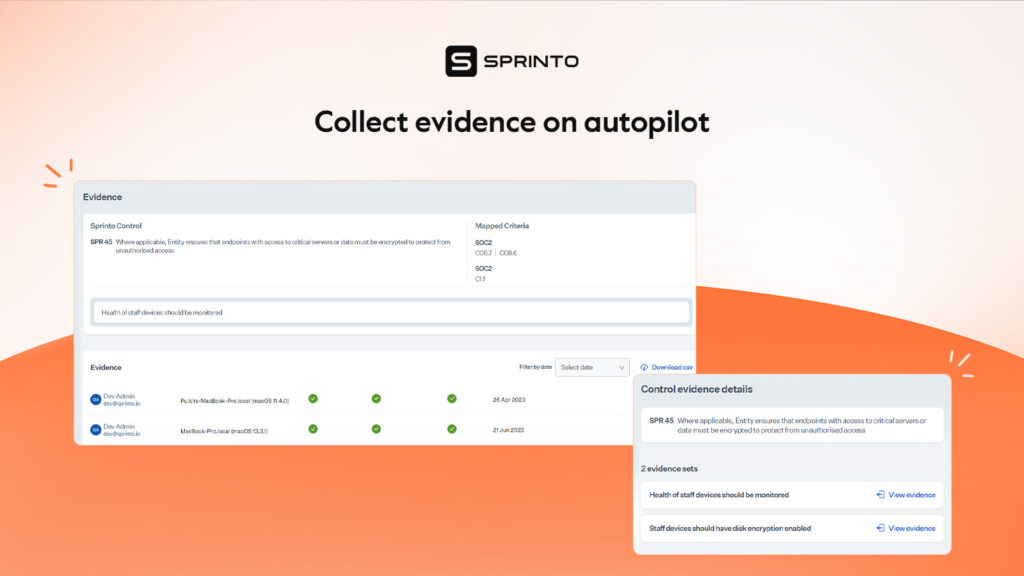
Liquidates costly incidents by supporting all entry-level preventive and defensive security controls
- Liquidates costly incidents by supporting all entry-level preventive and defensive security controls
- Facilitates users to set up role-based access controls to segregate tasks, minimize data usage, and avoid unintentional data tampering
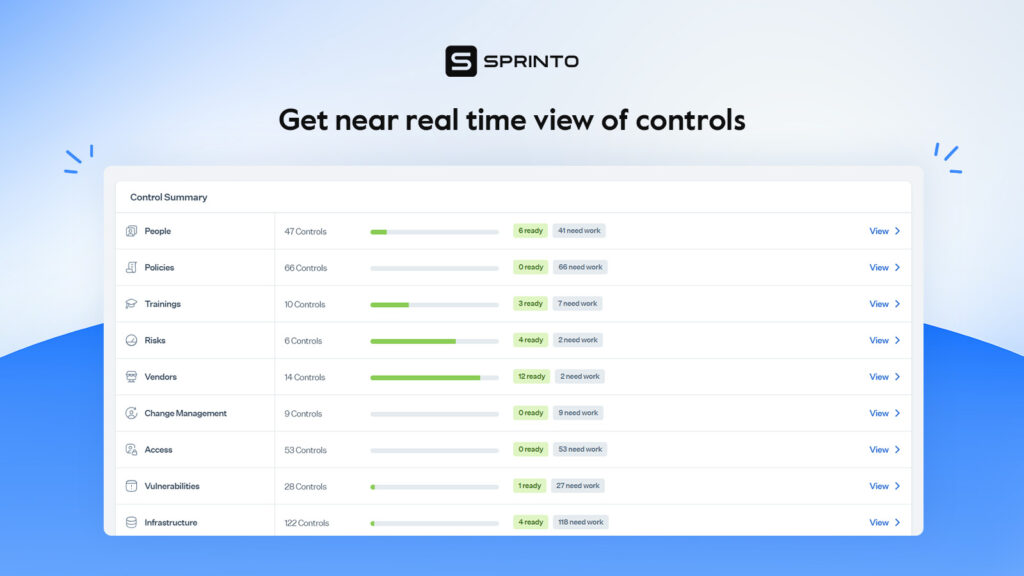
- Notifies and flags non-compliant activities in real-time. Escalates issues to accountable person with deep insight into the type of risk, recommended actions, and level of risk
- Offers comprehensive visibility into the IT environment to assist teams in identifying and triage assets
- The module automates up to 99 percent manual work using responsive integrations to ensure better control aggregation and testing.
- BYOF (Bring Your Own Framework) allows users to add and run any security framework of their voice. The magic mapping feature automatically maps custom custom checks to the control
- Offers AI-assisted suggestions to mark checks as exceptions. Users can leverage the snooze option to assign a time limit to manage exception checks
- The vendor management system allows users to mark the type of data exposed to vendors while providing a risk level based on data exposure
- Deeper integration like the code repository integrations for GitHub checks if codes are peer-reviewed and branch-level changes
- Offers one tap, adaptive, smooth integration with 100+ cloud applications and services
Read more: How Sprinto helped Kodif step up towards enterprise-readiness with compliance.
Cons
- The solution is designed keeping cloud hosted companies in mind, making the tool not highly accessible on on premise services
Drata
Drata helps companies streamline security and compliance efforts by automating monitoring and evidence collection. It supports regulatory frameworks like SOC 2, HIPAA, GDPR, ISO, etc.
Drata connects with existing tech to allow IT teams to build a compliance program using their proprietary control library and continuously monitor controls.
Secureframe vs Drata
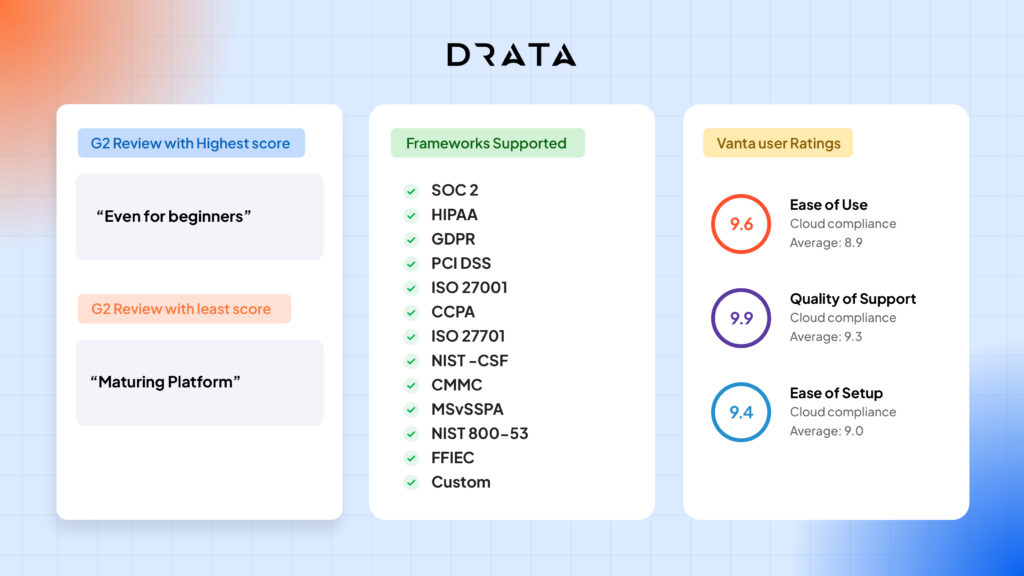
Users generally prefer Drata over Secureframe across multiple use cases. Reviewers noted that Drata meets their business needs better, offers better post-sales support, and releases feature updates. You can check a detailed comparison to know more about how each fares across auditing, evidence collection, control monitoring, risk assessment, and more.
| Features | Secureframe | Drata |
| User-friendliness | 9/10 | 9.4/10 |
| Support | 9.3/10 | 9.8/10 |
| Compliance monitoring | 9.4/10 | 9.5/10 |
| Data governance | 8.9/10 | 8.8/10 |
| Workflow management | 8.7/10 | 8.5/10 |
Pros
- Offers a comprehensive overview of compliance status of the current posture and pending requirements
- IT teams can easily create, edit, and track access privileges. Ensures data lineage and data encryption
- The level of customer support and technical assistance adequately meets user expectations
- The highly automated platform streamlines compliance certification process and reduces extensive paperwork
- Users can create and streamline workflows related to ticketing and services. IT teams can set security and data governance-related policies.
Cons
- Some users reported that features like policy management are clunky and not seamless
- Does not allow users to edit evidence once uploaded, creating duplicate evidence in the system
- Lack of transparency on the pricing model during the sales stage can create post purchase surprises. For example, users changred for add-on features face budgeting issues.
- Lack of transparency during pre-sales stage for add-on features can result in budgeting issues
- The system does not offer tiered escalation for critical and failing checks
Vanta
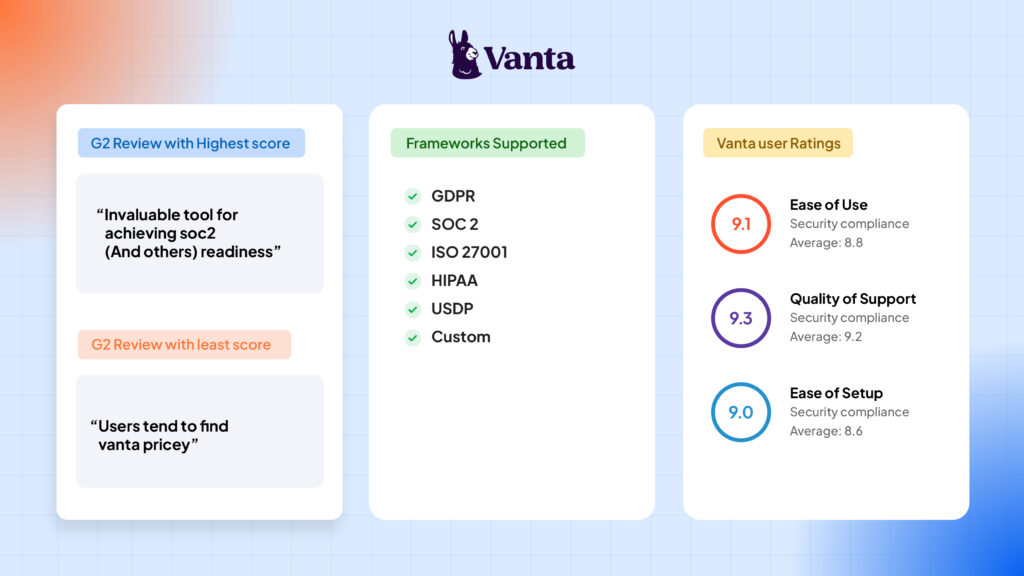
Vanta helps SaaS businesses scale and manage compliance programs like SOC 2, ISO 27001, and HIPAA. It automates compliance-related activities, surfaces risks across the ecosystem, collects evidence to reach audit readiness, continuously monitors the security posture, and helps to manage vulnerabilities.
Check out: List of Vanta Alternatives
Vanta vs Secureframe
Overall, users found both the solutions equally easy to set up, use, and manage. However, customers are more likely to prefer Secureframe when it comes to post-sales support and meeting the overall business requirements.
| Features | Secureframe | Vanta |
| User-friendliness | 9/10 | 9/10 |
| Support | 9.3/10 | 9.2/10 |
| Compliance monitoring | 9.4/10 | 9.5/10 |
| Data governance | 8.9/10 | 8.7/10 |
| Workflow management | 8.7/10 | 8.4/10 |
Pros
- Detects, remediates, and evaluates risks in real-time to show passing and failing checks
- Pre-built and custom templates help to easily track policies and ensure continuous compliance
- Simplifies and streamlines audit preparation process through automated compliance monitoring of security controls
- The centralized dashboard helps to manage security guidelines, policies, procedures, and track failing or non-compliance issues
Cons
- Some users felt that the onboarding and implementation process could be smoother and more efficient for first-time users
- The pricing module is not small organization or startup-friendly. Add on features are a potential drawback as they stretch user’s budget
- Despite offering a comprehensive set of capabilities, users noted that some features have limited customization options
- The platform lacks modularity, adding to the complexity of transferring SOC 2 tasks
Check out: Guide to compliance framework
Hyperproof
Hyperproof is a security compliance management tool that helps IT teams manage their organizational risks.
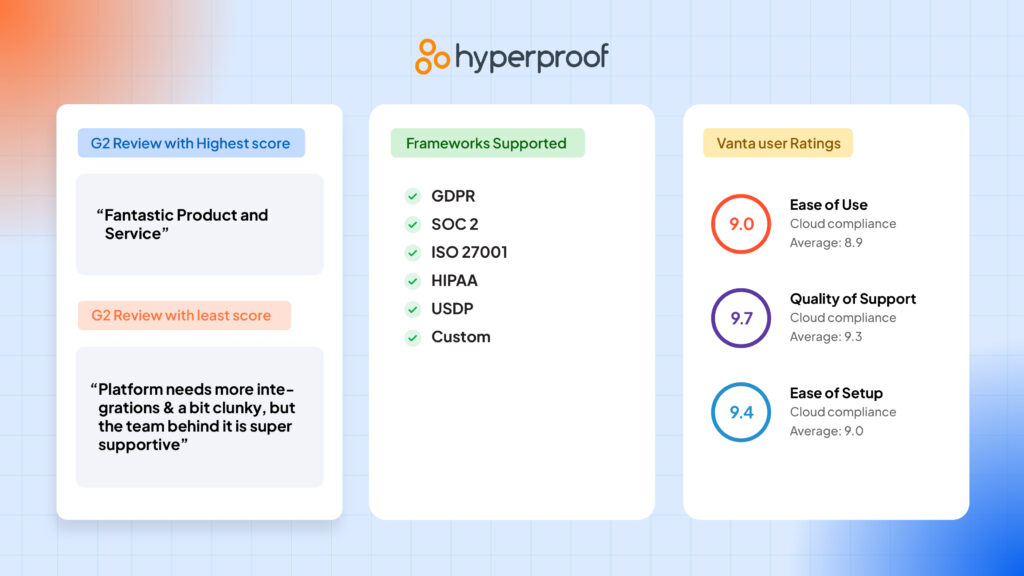
The solution integrates with common cloud services to manage risks, automate workflows, collect evidence, and prepare for audits. It enables users to map controls across frameworks like SOC 2, ISO, and NIST and collaborate with stakeholders from a centralized dashboard.
Hyperproof vs Secureframe
Secureframe offers better compliance monitoring capabilities, workflow management, and is more user-friendly. However, Hyperproof’s support is better.
| Features | Secureframe | Hyperproof |
| User-friendliness | 9/10 | 8.9/10 |
| Support | 9.3/10 | 9.6/10 |
| Compliance monitoring | 9.4/10 | 9.2/10 |
| Data governance | 8.9/10 | 8.2/10 |
| Workflow management | 8.7/10 | 8.6/10 |
Pros
- The all in one bundles solution offers training and learning resources to help new and existing employees
- Intuitive UI allows users to set up a compliance program without help from the technical support team
- Identifies and triages risks across the system based on human, technical, and external sources or based on the requirements of selected framework
Cons
- While most users found the UI to be intuitive, some reported minor bugs that limited the platform’s capability to operate seamlessly
- The overall solution lacks the desired level of granularity and comprehensiveness to facilitate a wide range of custom functions
- Some auditing functions are limited – auditors reported no function that enables them to upload, download, or edit request status from the dashboard
- The reporting system lacks the desired level of automation and requires manual intervention
Thoropass
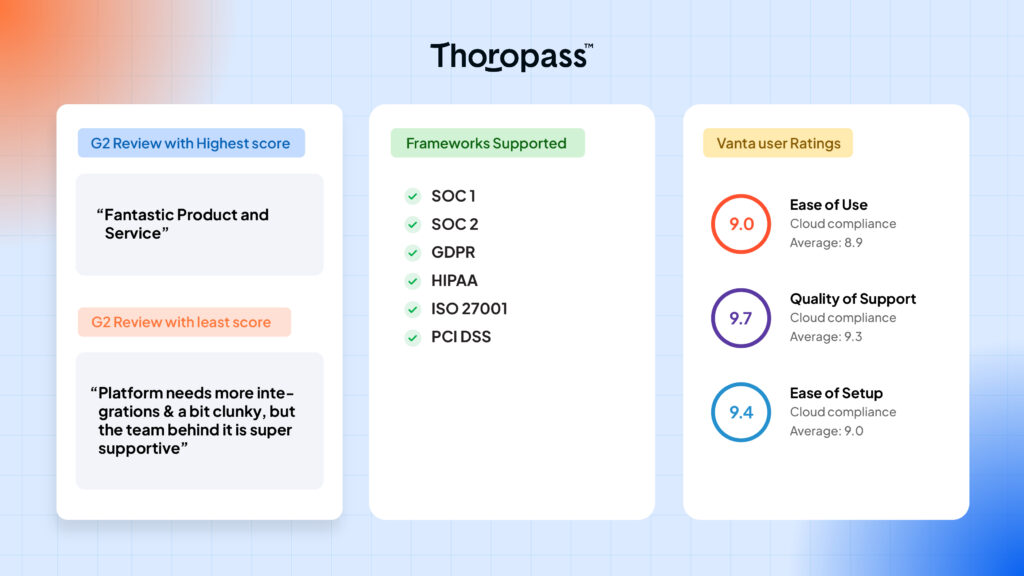
Thoropass (formerly known as Laika) integrates with existing systems to help IT teams continuously monitor their environment, easily pass audits, and demonstrate compliance with several infosec and privacy frameworks. Users gain a seamless auditing process, automate compliance-related activities, and complete due diligence processes using a single dashboard.
Thoropass vs Secureframe
Users preferred Secureframe over Thoropass for cases like user friendliness, feature updates, and business direction. However, Thoropass wins by small margin for meeting custom business requirements and quality of post-sales support.
| Features | Secureframe | Thoropass |
| User-friendliness | 9/10 | 8.9/10 |
| Support | 9.3/10 | 9.6/10 |
| Compliance monitoring | 9.4/10 | 9.2/10 |
| Data governance | 8.9/10 | 9.3/10 |
| Workflow management | 8.7/10 | 8.8/10 |
Pros
- Easily create custom policies related to data governance, set up role-based access, and manage access privileges
- Monitors the IT environment and generates reports based on violation or malicious behavior
- Streamlines audit process, trains employees, helps to respond to due diligence questionnaires, and tracks compliance-related activities
- Helps to manage SOC 2 compliance-related tasks
Cons
- Limited options for integrations. Users reported the integration system to be clucky and buggy
- Users from small organizations reported that the pre-built templates are custom made for large organizations and can be an overkill for their size
- The learning curve is high and frequently requires assistance from the support team
Choosing the right Secureframe alternative
Based on the pros and cons above, the best Secureframe alternatives include Sprinto, Drata, Vanta, Hyperproof, and Thoropass.
Sprinto stands out as the best Secureframe alternative for its high automation, deep SaaS integrations, and ability to bring multiple compliance frameworks under one roof. It eliminates most manual work, gives you real-time visibility into control status, and helps teams stay continuously audit-ready with minimal effort.
If you’re exploring beyond that, Drata offers solid automation and integrations, Vanta works well for teams prioritizing quick setup, and Hyperproof or Thoropass are better suited for advanced GRC or vendor-risk workflows.
How to evaluate your shortlisted tools:
- Connected workflows: Vendors, risks, access, and evidence work together instead of living in separate screens
- Better operational context: Teams can see why a check is failing, what changed, and what to do next
- Scale without rework: Common controls and automation reduce repeated manual setup as frameworks expand
- Less manual follow-up: Evidence collection, task routing, and review steps stay organized in one system
How does Sprinto compare to Secureframe?
Sprinto stands out for teams that want a more connected way to run trust work. It centralizes evidence, keeps controls monitored, and makes recurring compliance work easier to manage as frameworks, systems, and customer expectations grow.
In practice, Sprinto is a stronger fit when you want:
- Built for connected execution: Sprinto keeps controls, evidence, tasks, and workflows in one system.
- Continuous visibility: Teams can spot drift, evidence gaps, and review blockers early.
- Scale without extra admin overhead: Shared controls and automation reduce rework as frameworks expand.
- Ownership with structure: Teams keep control of the program without relying on fragmented manual processes.
Sprinto is a better fit for you if you want to own compliance without the overhead, while staying fully prepared across multiple frameworks.
| Take control of compliance with Sprinto. Book a demo |
| Disclaimer: The information on this page is based on independent research conducted by our team and on insights gathered from publicly available, user-first review platforms such as G2. We have summarized feedback to highlight commonly mentioned strengths and areas for improvement. While we strive for accuracy and balance, user experiences may vary, and we encourage readers to review the original sources for the most up-to-date feedback. This article was last updated in October 2025. |
FAQs
Sprinto is one of the best Secureframe alternatives that offers seamless, native integrations to help you collect evidence accurately, quickly, and comprehensively for cloud based and on premise applications.
Secureframe pricing varies based on company size. For 200 employees, costs range from $15,200 to $29,800 annually. For around 1,000 employees, expect to pay $24,300 to $48,900 per year. Source: Vendr
Despite being highly favored for their customer support, simplicity, and effectiveness, the tool somewhat does not square up against its competitors like Drata and Sprinto when it comes to automation. As the tool is not fully automated, it leaves a lot to be desired.

Author
Anwita
Anwita is a cybersecurity enthusiast and veteran blogger all rolled into one. Her love for everything cybersecurity started her journey into the world compliance. With multiple certifications on cybersecurity under her belt, she aims to simplify complex security related topics for all audiences. She loves to read nonfiction, listen to progressive rock, and watches sitcoms on the weekends.Go beyond the surface and uncover the governance, risk, and compliance insights that actually matter.


Win digital goodies for boardroom success



Explore more








research & insights curated to help you earn a seat at the table.