

| Modern GRC tools are built for continuous compliance, real-time risk visibility, and multi-framework alignment, not just passing audits. |
| Choose based on maturity stage: – Sprinto – Drata – Vanta – Secureframe – Delve – Scrut – OneTrust – ServiceNow GRC |
| The real differentiator is depth: strong GRC platforms integrate governance, risk, vendors, controls, and audits into a single operational system rather than isolated checklists. |
| The best GRC tool reduces responsibility, not just effort; it keeps you audit-ready and risk-aligned without constant manual coordination. |
If you’re evaluating GRC tools right now, you’re likely trying to solve for more than a single audit. You’re trying to build a governance, risk, and compliance program that holds up as your organization scales.
The pattern is clear: a company adopts GRC software to accelerate SOC 2 or ISO 27001 compliance. It works at first. Then vendor risk expands. A second framework is added. Enterprise buyers demand deeper evidence. Suddenly, what looked automated starts feeling operationally heavy.
That’s where the real difference between GRC platforms comes into play.
Modern governance, risk, and compliance software must do more than organize controls. The GRC tool you pick needs to support continuous monitoring, structured risk management, audit flexibility, and multi-framework alignment without increasing overhead.
In this guide, I’ll walk you through:
- What today’s GRC tools actually deliver
- How leading GRC platforms compare
- And how to choose the right platform for your stage of maturity
Here are the top 8 GRC tools based on my research:
| Tool | Best for | Enterprise GRC capabilities |
| Sprinto | Growth-stage to enterprise SaaS teams requiring continuous and autonomous GRC | Autonomous Trust Platform that centralizes all obligations (policies, contracts, etc.). Uses AI Agents to autonomously handle evidence collection, real-time monitoring, and audit readiness. |
| Drata | Companies needing deep automation and continuous monitoring at scale | AI-powered trust platform with real-time control testing and custom-designed no-code control tests. |
| Vanta | Startups to enterprises seeking a fast, comprehensive path to compliance | 400+ integrations, hourly automated tests, and multi-entity workspaces for complex organizations. |
| Secureframe | Early-stage to mid-market teams automating first-time certifications | AI-powered remediation (Terraform/CLI code fixes) and Workspaces for managing multiple business units. |
| Delve | Rapid SOC 2 certification for high-growth tech companies | AI-native predictive risk analysis and automated evidence collection to unblock enterprise deals. |
| OneTrust | Large global enterprises with complex privacy and ethics requirements | Unified “Trust Intelligence” platform integrating privacy, ESG, GRC, and data governance. |
| Scrut | Mid-market to enterprise teams needing a unified, scalable GRC program | SmartGRC platform with 1,400+ pre-mapped controls and white-glove expert support. |
| ServiceNow GRC | IT-centric risk management in very large, mature enterprises | Deep integration with IT Operations (ITOM), business continuity, and operational resilience management. |
What are GRC tools?
Governance, risk, and compliance software (GRC tools) are platforms that enable organizations to manage policies, monitor risks, and prove compliance in a structured, scalable way. At their core, they unify governance, such as policies and controls, risk management, including identification and mitigation, and compliance, including evidence and audits, into a single operational system.
If you were managing GRC half a decade ago, your world would revolve around spreadsheets, shared drives, manual evidence collection, and multiple back-and-forths with internal stakeholders. As regulatory pressure intensified, enterprise platforms emerged to centralize workflows. They brought structure through risk registers, policy management, and audit tracking, but were often heavy, expensive, and built for periodic reporting rather than continuous oversight.
Then came automation. API-driven integrations reduced manual evidence collection and made ongoing compliance more realistic for cloud-native companies. But the environment has shifted again. Vendor ecosystems are expanding, AI systems are introducing new risk categories, and regulatory scrutiny is increasing. Gartner projected in 2023 that nearly 45 percent of organizations would face material supply-chain or compliance risk exposure in the coming years, a projection that is already materializing in 2026.
As a result, modern GRC tools are no longer designed just to document compliance; they are built to operationalize it. Continuous monitoring, real-time risk visibility, multi-framework mapping, and embedded workflows have replaced static reporting cycles.
Legacy GRC tracked compliance. Modern GRC runs it.
Comparison of the most popular GRC tools as per use case, pros, and cons
While preparing this list of the best GRC tools and platforms for 2026, I didn’t rely solely on marketing claims. I evaluated each solution based on a combination of
- Audit flexibility and collaboration support
- Core product capability across governance, risk, and compliance
- Verified user reviews on platforms like G2
- Feature depth across GRC modules
- Automation maturity and evidence collection depth
- Enterprise adaptability and scalability
- Integration ecosystem breadth
Our Top Picks

Best all-in-one GRC Tool

Why trust us?
Use Sprinto to transform governance, risk, and compliance management – so nothing gets in the way of your moving up and winning big.
1. Sprinto: Best for autonomous trust & hands-free compliance
G2 rating: 4.8/5(1500+ reviews)
Sprinto is an autonomous compliance platform for teams that want to stop “doing” compliance and start “overseeing” it. Instead of just flagging a missing policy, Sprinto’s AI agents actually execute the work, such as mapping contracts, gathering evidence, and continuously monitoring controls to stay aligned without a human in the loop until judgment is needed.
Sprinto covers the full GRC stack: risk management, policy governance, vendor risk, and third-party management are all built into the platform, not bolted on as afterthoughts.
Key features:
- AI compliance agents: The AI agents handle the grunt work of evidence collection, gap remediation, and audit readiness across 200+ frameworks.
- Universal trust hub: It centralizes every obligation you have from SOC 2 requirements to specific security clauses in your customer contracts into one autonomous engine.
- Continuous trust: Your security proof stays ready at all times; buyers don’t wait for questionnaires as the platform gathers evidence continuously in the background.
- Infinite integrations: Connect unlimited tools via native integrations or flexible APIs to capture evidence and control data across your entire stack.
| Pros | Cons |
| Highly praised for its intuitive interface and clear, step-by-step roadmap. | It is designed as a cloud-native platform and does not support on-premise deployments. |
| Consistently noted for responsive, “above and beyond” customer success teams. |
“Earlier, we’d have to rely on multiple tools and spreadsheets to check if we could reuse controls and evidence across frameworks. With Sprinto, it’s seamless; you can see all the different audit frameworks and the percentage of completion within your controls environment, that does give you some intel on the next easiest thing to go after.” ~ David Mason, Director of Security at Anaconda.
2. Drata: Best for continuous control monitoring and audit readiness
G2 rating: 4.8/5(1100+ reviews)
Drata’s core strength is Continuous Control Monitoring. The platform runs 1,200+ automated hourly tests across frameworks, including auto-collecting evidence from over 170+ integrations with tools like AWS, GitHub, Okta, Jira, and Google Workspace. When a control fails, you’re alerted immediately, not at the next audit cycle. The Audit Hub brings all auditor requests, evidence submissions, and approvals into one place, replacing the usual chaotic back-and-forth email process.
Key features
- Compliance as code: Policy-as-code capabilities let engineering teams embed compliance controls directly into development workflows, keeping evidence fresh without pulling engineers into manual requests.
- Audit hub: All auditor interaction requests, replies, evidence uploads, and approvals live in one structured portal for clean, traceable audit management.
- Risk management module: An integrated risk register (available as an add-on) that links risks to controls and tracks remediation in the same platform.
| Pros | Cons |
| Responsive support with live in-app chat and a Compliance Advisory team staffed by former auditors. | Pricing escalates as teams grow, and renewal costs frequently surprise users at expansion. |
| Clean, real-time compliance dashboard that gives a single-pane view of control health across frameworks. | Integration catalog is strong but narrower than some competitors in certain developer tooling areas. |
3. Vanta: Best for fast, self-serve compliance at startup speed
G2 rating: 4.6/5(2000+ reviews)
IDC MarketScape recognized Vanta as a Leader in Worldwide GRC Software in 2025. Its Trust Management Platform automates and continuously monitors compliance, internal risk, third-party risk, and governance workflows in one place while keeping the self-serve setup speed it built its reputation on.
With 400+ integrations, 35+ frameworks, and a Vanta AI Agent that autonomously handles policy management, evidence evaluation, and questionnaire responses, the platform now covers meaningful GRC breadth, though it remains lighter on governance depth than enterprise-grade platforms like OneTrust or ServiceNow.
Key features
- Risk management with heat maps: Centralized risk registers, continuous risk scoring, quantification dashboards, and heat maps that give real-time visibility into IT-related risks across systems and processes.
- Vendor risk management: Automated vendor questionnaire scheduling, AI-generated risk summaries, and a Trust Center integration that keeps third-party posture visible without manual back-and-forth.
- Vanta AI agent: Autonomously handles policy management, evidence evaluation for audit prep, and security questionnaire responses; reducing manual GRC workflows without human handoff.
| Pros | Cons |
| Fastest self-serve onboarding in the category; teams consistently report getting started within hours of connecting integrations. | Some users have reported issues with high costs and “locked-in” binding contracts. |
| Widest integration catalog, particularly strong for modern cloud-native SaaS stacks. | If not finely tuned, the platform can produce a high volume of noise and “patch management” alerts. |
4. Secureframe: Best for guided compliance with strong policy management
G2 rating: 4.7/5(700+ reviews)
Secureframe covers the core GRC pillars: compliance automation, risk management, vendor oversight, and policy governance, with a particular emphasis on making each one approachable for teams without dedicated GRC expertise.
Its step-by-step, expert-guided workflows break complex frameworks into clear actions, while its policy management layer handles drafting, version control, approval workflows, and employee attestation natively. Secureframe feels like it was built by developers, for developers. While other tools focus on the “UI,” Secureframe focuses on the remediation. If a control fails, they don’t just tell you it’s broken; they often provide the Terraform code or CLI commands to fix it.
Key features
- vCISO test library: Pre-built, audit-ready automated control tests curated by compliance experts, covering technical, organizational, and governance controls across frameworks.
- Risk management: A centralized risk register with risk scoring, risk-to-control mapping, and gap surfacing, giving teams visibility into where risks sit relative to their current control environment.
- Vendor risk management: Automates vendor intake, security questionnaires, and ongoing monitoring, with controls linked to vendor risk findings for a connected view of third-party exposure.
| Pros | Cons |
| Strong customer support; users consistently report fast response times and hands-on guidance through technical questions. | Platform can feel rigid; it follows its own structure, which creates friction when your environment or governance processes don’t map cleanly to its defaults. |
| Covers compliance, risk, vendor management, and employee training in one platform, reducing the need for separate point tools. | Governance depth for complex, multi-entity programs or custom policy frameworks is limited compared to enterprise GRC suites. |
5. Delve: Best for AI-native predictive risk
G2 rating: 4.7/5(100+ reviews)
Delve is purpose-built around agentic compliance, deploying autonomous AI agents that handle evidence collection, code scanning, infrastructure monitoring, and security questionnaire completion without manual prompting. It is a strong tool for teams that want fast compliance without heavy customization.
In practice, Delve works well for lean security teams. But it may not offer the same depth of enterprise governance or complex vendor risk modeling. The white-glove support model, with dedicated compliance specialists accessible via Slack and Zoom, partially compensates for what the platform doesn’t yet automate on the governance and policy management side.
Key features
- CI/CD pipeline integration: Enforces compliant infrastructure standards directly through the deployment workflow, embedding risk controls into the engineering process rather than bolting them on afterward.
- Security questionnaire automation: Pulls from live compliance and risk data to auto-complete vendor security questionnaires and customer due diligence requests.
- Predictive risk scoring: Uses AI to forecast potential audit gaps before they manifest in a failed test.
- Audit simulation: It runs “mock audits” autonomously to ensure that when the actual auditor shows up, there are zero surprises.
| Pros | Cons |
| Known for an extremely fast and simple setup process that is perfect for first-time SOC 2 or HIPAA certifications. | Some users feel the reporting and Trust Center customization options could be more robust. |
| Excellent at pre-filling forms and documentation, saving massive amounts of time on administrative tasks. | Less suited for multi-framework programs with parallel certifications, complex risk registers, or deep auditor collaboration workflows. |
6. OneTrust: Best for privacy-first, global regulatory compliance
G2 rating: 4.6/5(100+ reviews)
OneTrust is the most genuinely full-spectrum GRC platform on this list. Where most tools start with security compliance and layer on risk and governance later, OneTrust is architected around a common data model that connects privacy, tech risk, third-party risk, AI governance, and policy management from the ground up.
Its strength is deepest for organizations where privacy governance is a primary driver. GDPR, CCPA, LGPD, and AI Act compliance are handled with a level of pre-built regulatory intelligence that no compliance-automation-first tool on this list can match. Across 50+ global regulations, the platform continuously monitors regulatory changes and maps them to your existing control and policy library, so gaps surface before your legal team learns of them from the outside.
Key features
- Trust intelligence platform: It bridges the gap between privacy, ethics, and GRC.
- Consent management: The gold standard for managing cookie consent and data subject access requests (DSAR) at scale.
- ESG cloud: A dedicated module for tracking carbon footprints and social impact, which is becoming a mandatory “control” for public companies.
| Pros | Cons |
| Powerful automation across risk, policy, and third-party workflows significantly reduces manual effort once the platform is configured correctly. | Initial setup is complex and time-consuming; users report spending weeks on configuration, and the platform is not intuitive without prior GRC experience or dedicated support. |
| Modular architecture lets organizations scale coverage across privacy, tech risk, vendor, and AI governance without switching platforms. | Customer support can be inconsistent, with delays reported in resolving technical issues, particularly during complex workflow configurations. |
7. Scrut Automation: Best for mid-market teams wanting risk-to-control coherence
G2 rating: 4.9/5(1200+ reviews)
Scrut’s approach to GRC is risk-first by design. Rather than starting with a compliance checklist and working backward, the platform begins with risk identification scanning across cloud infrastructure, code, applications, vendors, employees, and access and maps those risks directly to the controls and frameworks they affect.
The platform covers the full GRC spectrum: risk management, policy governance, vendor risk, compliance automation, and internal audit readiness, all from one interface. Its AI layer, Scrut Teammates, handles recurring tasks such as creating remediation tickets, assigning owners, prefilling vendor questionnaires, and proactively suggesting infrastructure-as-code fixes.
Key features
- Unified risk workspace: It maps 1,400+ pre-built controls across frameworks, significantly reducing “compliance fatigue.”
- Cloud security posture management (CSPM): Built-in tools to scan your AWS/Azure environments for misconfigurations that could lead to data breaches.
- Expert-led implementation: You aren’t just left with a login; they provide dedicated compliance experts to help navigate the audit.
| Pros | Cons |
| Customer support quality is exceptional and frequently cited as the top reason users stay. Monthly check-ins, proactive CSMs, and a team that treats your compliance program as their own. | Initial learning curve is steep; the terminology, risk categories, and dashboard structure can be confusing for teams approaching structured GRC for the first time. |
| Broad GRC coverage across risk, policy, vendor management, and compliance in a single interface reduces the need for multiple point tools. | Platform speed and sync reliability are recurring pain points; users report the Scrut agent taking longer than expected to reflect updates, and occasional page load issues. |
8. ServiceNow GRC: Best for enterprises already on the ServiceNow platform
G2 rating: 4.4/5(1200+ reviews)
If your company already runs IT and security on ServiceNow, adding ServiceNow GRC (Integrated Risk Management) is a no-brainer. It sits on the same Now Platform, so risks, controls, vulnerabilities, and remediation workflows are all connected. When something breaks in SecOps, it can automatically tie back to the right control and kick off action through the same ticketing system your teams already use.
It covers the full enterprise GRC spectrum, risk scoring, policy lifecycle management with attestations, internal audit, third-party risk, operational risk, and business continuity. Leadership gets live dashboards and heat maps across business units, not just audit-time reports. For large enterprises that want GRC tightly woven into daily operations, ServiceNow is one of the most architecturally complete platforms in the market.
Key features
- Operational resilience: It maps your controls directly to your CMDB (Configuration Management Database), so you know exactly which server or database is tied to which compliance risk.
- Policy & compliance management: Massive-scale policy distribution for organizations with 50,000+ employees.
- Business continuity management: It’s excellent at planning for “worst-case scenarios,” linking IT recovery directly to GRC controls.
| Pros | Cons |
| Enterprise-grade risk heat maps, real-time dashboards, and cross-module reporting give leadership genuine decision intelligence, not just compliance status. | Licensing is expensive and difficult to predict; costs escalate with modules, user counts, and customization needs, frequently leading to budget overruns. |
| Risk management capabilities are rated highest by users, with reviewers specifically calling out real-time monitoring, heat maps, and the ability to trace risk directly to incidents and assets. | Integrating GRC with non-ServiceNow systems, HR, financial, or specialized compliance tools can be difficult and create data silos that undermine the platform’s promise of a unified data model. |
How to choose a GRC tool for your organization?
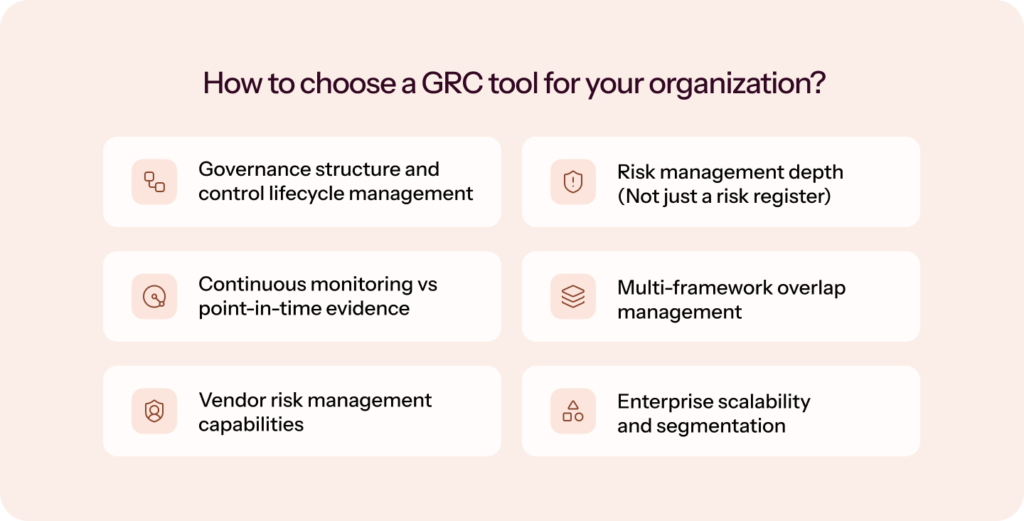
If you’re evaluating the best GRC tools today, the real question isn’t “Which platform has the most features?” It’s “Which platform can support my governance and risk model as it matures?”
I’ve seen teams choose GRC software based on a single audit requirement, only to outgrow it within a year. Choosing the right platform means thinking beyond certification and asking whether the system can scale with risk complexity, regulatory expansion, and enterprise scrutiny.
Here’s what I recommend you evaluate carefully.
1. Governance structure and control lifecycle management
At a minimum, your GRC tool should:
- Centralize policies and controls
- Support versioning and approvals
- Map controls across multiple frameworks
- Track control ownership and testing frequency
But more importantly, governance should not exist in isolation. Controls should connect directly to risks, vendors, assets, and audit requirements.
If the tool treats policies as static documents rather than living components of a risk model, you will eventually hit scale limits.
2. Risk management depth (Not just a risk register)
Many platforms advertise “risk management,” but what they offer is a simple risk log. If you’re serious about enterprise risk management, look for:
- Structured risk scoring models
- Risk-to-control mapping
- Treatment workflows with accountability
- Real-time risk visibility dashboards
- Residual risk tracking
The best GRC platform for enterprise risk management should help you move from compliance-driven checklists to risk-informed decision-making.
If your risk model can’t evolve as your organization grows, your GRC system becomes reactive instead of strategic.
Prometeia connected risks, assets, and controls, automated monitoring of two production lines and corporate IT, and reduced the number of active monitored controls from 1,500 to ~130 using a standard controls approach.
3. Continuous monitoring vs point-in-time evidence
This is where modern GRC tools separate themselves from legacy systems. Ask:
- Does the platform automatically collect evidence through integrations?
- Can it detect control drift in real time?
- Or does it rely on manual uploads before an audit?
Compliance that only activates during audit cycles creates operational bottlenecks. Continuous monitoring reduces audit fatigue and builds ongoing trust.
4. Multi-framework overlap management
If you plan to pursue more than one framework, and most organizations eventually do, your GRC software must support intelligent control reuse. Look for:
- Cross-framework mapping
- Deduplicated evidence reuse
- Single control mapped to multiple regulatory requirements
Without this capability, every new certification multiplies effort instead of leveraging prior work.
5. Vendor risk management capabilities
Third-party risk is no longer optional. Regulators and enterprise customers now expect formal vendor oversight.
A mature GRC tool should include:
- Vendor onboarding workflows
- Security questionnaire tracking
- Risk scoring and reassessment cycles
- Ongoing monitoring alerts
6. Enterprise scalability and segmentation
Even if you are not an enterprise today, you may operate like one tomorrow. Evaluate whether the platform supports:
- Business unit or product-level separation
- Role-based access control
- Executive-level reporting dashboards
- Customizable workflows
7. Audit flexibility and collaboration
The best GRC tools don’t just track audits, they orchestrate them. Look for:
- Dedicated audit workspaces
- Internal and external audit support
- Evidence request management (ERL)
- Direct auditor collaboration
If your platform still forces you into email threads and shared folders during audits, it is not truly modern GRC software.
8. Meaningful automation and AI capabilities
AI in GRC should not mean “automated reminders.” It should mean:
- Intelligent scoping
- Evidence validation
- Risk detection
- Gap identification
- Workflow automation
The difference between automation and autonomous compliance is the difference between assistance and execution.
Ultimately, the decision comes down to maturity:
- If you’re pursuing your first certification, prioritize automation and structured onboarding.
- If you’re layering multiple frameworks, prioritize control reuse and continuous monitoring.
- If you’re operating at enterprise scale, prioritize risk modeling depth and governance flexibility.
GRC implementation mistakes you’ll want to avoid – straight from the practitioners
Even the right GRC platform will underdeliver if the implementation goes sideways. These are the challenges I see come up most consistently, and what you can do about them.
1. No clear owner from day one
GRC programs stall most often not because of the tool, but because of ownership ambiguity. Someone has to be accountable for scoping the program, driving integrations, chasing control owners, and keeping the risk register up-to-date. In early-stage companies, this usually defaults to a founder or engineering lead who’s already stretched thin. In enterprises, it spreads across IT, legal, and compliance, with no single point of accountability.
What to do: Designate a named GRC owner before implementation begins, not after the platform is live. This doesn’t have to be a full-time hire. It does have to be someone with the authority to make decisions and the time to see the setup through.
2. Underestimating the scoping exercise
Most teams want to skip straight to connecting integrations and monitoring controls. The scoping exercise, defining what’s in and out of your compliance environment, feels administrative. But get it wrong and you’ll either over-scope (wasting resources on controls that don’t apply) or under-scope (missing gaps that auditors will find). Both outcomes are expensive.
What to do: Treat scoping as a dedicated task, not something you rush through. The best GRC platforms automate much of this. Sprinto’s Scoping Agent, for instance, maps your environment from the first call. For platforms that don’t, budget two to three weeks of dedicated scoping work before any controls go live.
3. Integration gaps that surface late
Teams often discover mid-implementation that a critical tool in their stack, a niche HR system, a custom-built internal application, or an ERP with limited API access isn’t supported by the platform they’ve chosen. At that point, you’re either manually collecting evidence for that system or paying for a custom integration.
What to do: Before signing a contract, map your full tech stack against the vendor’s integration catalog, not just the headline number. Ask specifically about the tools your engineering, HR, and security teams rely on daily. If something’s missing, get a timeline for when it’s coming and what the workaround is in the interim.
4. Low adoption from control owners
GRC platforms only work if the people responsible for individual controls actually use them. In practice, control owners, engineers, HR leads, and department managers are pulled in at audit time, handed a task they don’t fully understand, and asked to produce evidence in a system they’ve never used. The result is incomplete responses, missed deadlines, and compliance teams doing remediation work that was never theirs to own.
What to do: Involve control owners in the setup process, not just the audit. Show them what their responsibilities are on the platform before evidence collection begins. The best platforms are designed to minimize friction for non-compliant users. Choose tools that your control owners can navigate without a training session.
5. Treating implementation as a one-time project
The most common mistake I see, especially in first-time compliance programs, is treating GRC implementation as something you finish and then move on from. You go live, you clear the audit, and the platform gets left on autopilot. Then people join, systems change, vendors are onboarded, and six months later, the compliance posture you built is no longer accurate.
What to do: Build a recurring maintenance rhythm into the program from day one; quarterly risk reviews, annual policy attestation cycles, and continuous vendor reassessments.
6. Buying for today’s needs, not tomorrow’s
A tool that covers SOC 2 perfectly may not support the ISO 27001 or HIPAA program you’ll need in 18 months. Teams often select a GRC platform based on their immediate certification need, then find themselves re-platforming, migrating evidence, retraining teams, and renegotiating contracts when their compliance program matures.
What to do: Evaluate platforms against your two-to-three-year roadmap, not just your current requirement. Ask how multi-framework programs are managed, whether the risk module scales with your governance needs, and what the path looks like when you add a new framework. Re-platforming a GRC program mid-stride is far more disruptive than spending an extra few weeks on vendor evaluation upfront.
The future of GRC is continuous, and it starts with the right platform
If you’re searching for the best GRC tools today, you’re not just trying to pass an audit. You’re trying to build a governance, risk, and compliance function that scales with your business.
Compliance in 2026 is no longer episodic. Vendor ecosystems are expanding. Enterprise buyers demand structured proof of security maturity. Regulatory scrutiny continues to tighten. And risk is no longer confined to policy documents; it lives in your cloud stack, your integrations, your vendors, and your people.
That shift changes how GRC software should operate.
This is where Sprinto fits perfectly.
Sprinto is built as an autonomous compliance platform. It scopes your environment, configures the right controls, maps risks and policies, and maintains audit-ready evidence continuously. Instead of expecting founders, CTOs, or engineers to interpret frameworks and chase gaps, it runs compliance as an operating layer across your stack.
For early-stage fast-growing orgs entering compliance for the first time, this removes uncertainty. For growing organizations, layering multiple frameworks removes duplication. For companies facing enterprise scrutiny, it builds structured, defensible risk visibility.
Compliance stops being a fire drill. It becomes infrastructure.
If you’d like to see how an autonomous compliance model works in practice, explore Sprinto’s approach and evaluate whether it aligns with your organization’s next stage of growth.
Because the best GRC tool in 2026 isn’t the one that tracks compliance.
It’s the one that runs it.
Implement GRC with Sprinto in 3 easy steps:
1. Book a demo session with us – We will address your queries and determine an ideal solution.
2. Identify and analyze GRC gaps with detailed reports.
3. Employ automation and streamline your GRC processes.
Frequently asked questions
A SIEM analyzes security events and alerts. A CSPM checks cloud configurations for missteps. A GRC platform runs governance, risk, and compliance programs by mapping policies to controls, scheduling control tests, storing evidence, and producing auditor and board reports. Many teams connect SIEM and CSPM into the GRC platform to automate evidence and reporting.
It typically reads configuration states, activity logs, approvals, and attestations. It does not need to copy production customer data to prove control. Ask vendors to document each connector, the fields collected, retention windows, data residency options, and how evidence is hashed and time-stamped.
Less than you’d expect. Sprinto is specifically built for teams without a dedicated compliance hire. The platform handles scoping, evidence collection, control monitoring, and vendor assessments autonomously. Where it pulls humans in is for decisions that genuinely require judgment, approving a policy, signing off on a risk exception, or reviewing a remediation. Most customers get to audit-ready within two to four weeks, with the heavy lifting handled by Sprinto’s onboarding team and compliance agents, not yours.
You don’t start over. Sprinto’s common controls framework maps your existing controls across 200+ frameworks simultaneously. When you add ISO 27001, the platform identifies which SOC 2 controls already satisfy ISO requirements and surfaces only the gaps you actually need to close. In practice, most teams adding a second framework find that a significant portion of their control environment carries over, saving months of duplicate effort.
Sprinto has a built-in exception management workflow for exactly this scenario. You can log a time-bound exception, document the business justification, assign an owner, and set an expiry date all within the platform. The exception is tracked against the relevant control, so auditors see a documented, approved deviation rather than an unexplained failure. It reflects how fast-moving engineering teams actually operate, rather than enforcing a rigid pass/fail system that breaks down in practice.
Sprinto supports custom integrations through its open API and browser automation capabilities, which means proprietary or internal systems that don’t have a native connector can still be brought into the compliance program. For teams with unique SaaS stacks, this eliminates the manual evidence upload problem that limits most GRC platforms. If you have a specific integration question during evaluation, the technical team can assess feasibility before you sign.
Both. Sprinto has a network of 40+ independent audit partners you can work with directly through the platform, and if you already have an auditor relationship you want to keep, you can bring them in instead. Unlike platforms that bundle the audit with the software, Sprinto keeps the two separate by design. Your auditor works independently, which eliminates any perception of conflict of interest and gives you full flexibility on who conducts the assessment.
This is a fair concern and one worth understanding clearly. Auditors review your control environment over a defined audit period. They’re assessing whether controls were operating effectively during that window, not conducting a live spot check of your dashboard the morning of the audit. Sprinto’s continuous monitoring is designed to catch and remediate issues throughout the year, so temporary failures are resolved long before they become audit findings. The platform also gives you full visibility into your control history, so there are no surprises when the audit begins.

Radhika Sarraf
Radhika Sarraf is a content marketer at Sprinto, where she explores the world of cybersecurity and compliance through storytelling and strategy. With a background in B2B SaaS, she thrives on turning intricate concepts into content that educates, engages, and inspires. When she’s not decoding the nuances of GRC, you’ll likely find her experimenting in the kitchen, planning her next travel adventure, or discovering hidden gems in a new city.
Go beyond the surface and uncover the governance, risk, and compliance insights that actually matter.


Win digital goodies for boardroom success




Explore more







research & insights curated to help you earn a seat at the table.