




TL;DR
| Audit management software centralizes evidence, automates readiness, and helps teams stay continuously prepared for recurring audits without last-minute fire drills. |
| Vanta is template-led, Drata is a little too complex, AuditBoard and Workiva are audit-first, MetricStream is enterprise GRC, and Sprinto is built for versatile use cases and AI-driven continuous audits |
| To choose the right audit management platform, start with your audit persona, then prioritize scalability, evidence quality, automation depth, and how costs and effort grow as audit scope expands. |
Audits are no longer one-off events. For most growing companies, they’re recurring, multi-framework, and closely tied to revenue, trust, and regulatory expectations. As audit scope expands, manual processes built on spreadsheets, shared drives, and last-minute coordination quickly break down.
Audit management software centralizes evidence, tracks readiness, and reduces audit burden. Before selecting a platform for data center environments, understanding data center regulatory compliance requirements — which standards apply, what evidence each demands, and how client assessors review them — ensures the tool is configured to address the right control areas.The right tools not just help you pass audits but also keep you prepared as the business scales.
In this guide, we cover the 7 best audit management software options and how to choose the right one in 2026.
“Audit debt is nothing but those little inconsistencies, the small inefficiencies that snowball in your audit process over time… The longer it is ignored, the heavier it gets.”
— Sonali Samantaray, Senior Solutions Engineer at Sprinto → [Watch the episode]
Top 7 audit management software in 2026
Here are the top 7 audit management software options in 2026, evaluated across automation depth, scalability, and audit experience:
| Tool | Best for | Where it’s strong | Watch-outs |
| Sprinto | Scaling SaaS and mid-market teams running recurring audits | Continuous monitoring, AI-powered evidence validation, cross-framework reuse, auditor-ready views | Requires active internal ownership rather than full outsourcing |
| Drata | Fast-growing teams needing structured control monitoring | Pre-built frameworks, automated evidence collection, auditor familiarity | Less flexible for custom audits and growing complexity |
| Vanta | Early-stage and growth companies seeking speed | Guardrails, integrations, fast setup | High renewal costs and limited depth for mature programs |
| AuditBoard | Structured internal audit teams and SOX environments | Workpaper workflows, issue tracking, board reporting | Limited continuous evidence automation |
| MetricStream | Highly regulated global enterprises | Enterprise-wide oversight, regulatory alignment, portfolio visibility | Heavy implementation and resource requirements |
| Hyperproof | Teams managing multiple frameworks simultaneously | Clear ownership tracking, centralized evidence repository | Relies more on manual updates than automation-first tools |
| Workiva | Finance-led audit and public company compliance | Collaborative reporting, financial controls alignment, document versioning | More manual evidence workflows and less control monitoring automation |
1. Sprinto
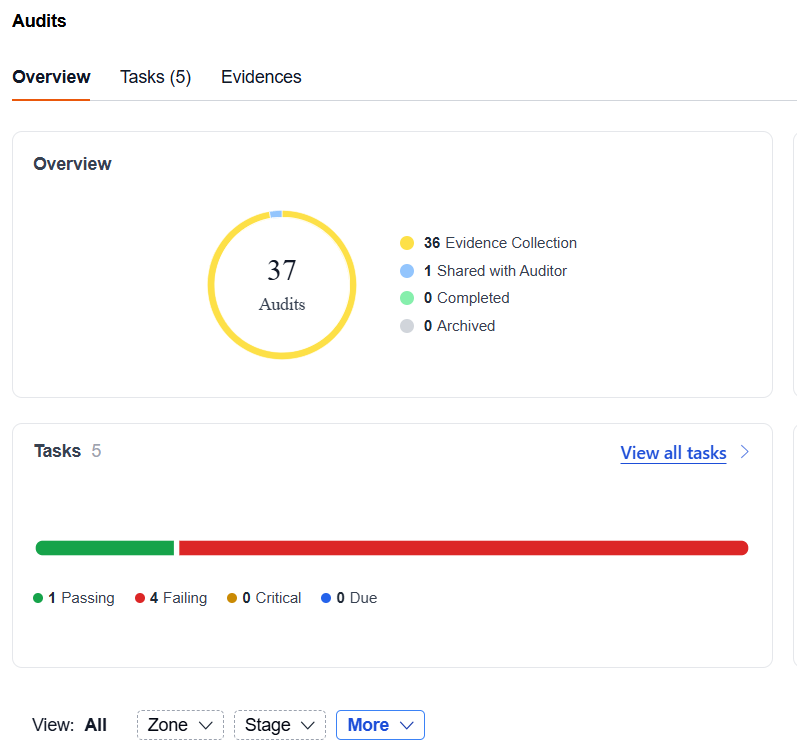
Sprinto is an AI-native audit management software built for teams running recurring audits across multiple frameworks. Instead of treating audits as periodic projects, Sprinto uses automation and embedded AI to keep audits always on, always ready.
Sprinto’s approach goes beyond checklist automation. AI continuously maps controls, flags evidence gaps, monitors drift, and supports audit readiness without manual follow-ups.
Key Features
- Automated evidence collection: Sprinto automatically collects, validates, and organizes audit evidence from 300+ integrations, keeping evidence continuously fresh and eliminating last-minute scrambles.
- AI-powered evidence gap analysis: Sprinto AI reviews uploaded and auto-collected evidence to flag missing, outdated, or irrelevant artifacts early, so gaps are fixed before auditors find them.
- Continuous control monitoring: Controls are continuously tested against real system data, giving teams real-time visibility into audit readiness rather than point-in-time snapshots.
- Evidence reuse across audits: Validated evidence is reused automatically across audit cycles and frameworks, reducing duplicate work for SOC 2, ISO 27001, HIPAA, PCI-DSS, and custom audits.
- Audit-ready dashboard: A dedicated auditor console presents controls, evidence, and audit status in an auditor-approved format, reducing back-and-forth and accelerating certifications.
- Preferred auditor network: Access 40+ vetted audit partners globally, or bring your own auditor. Sprinto ensures tooling compatibility and alignment from day one.
- AI-powered pre-audit readiness checks: Sprinto AI surfaces potential issues such as policy drift, stale evidence, or control failures before audits begin, helping teams avoid surprises.
Fyxer, an AI email assistant serving enterprise customers, cut audit preparation from 5 days to 2 hours with Sprinto — and avoided 3–4 dedicated compliance hires. “During one of my previous audits, I was on a Teams call for three days, and a lot of it was just dead air,” recalls Andy Wallace, CIO at Fyxer.“Sprinto provides everything we need — but in a way where I don’t need to recruit three or four compliance people to keep updating documents or managing audits.”
Pros
- Consistently audit-ready, backed by continuous evidence validation, AI-powered gap detection, and hands-on audit support
- Reduces audit prep time significantly through deep automation and evidence reuse
- Supports internal, external, and custom audits in one unified platform
- Built for mid-market scale without the cost and complexity of legacy GRC tools
Cons
- Built to enable teams, not fully outsource compliance
- Delivers best results with active internal ownership
Pricing: Custom pricing based on company size and compliance requirements.
2. Drata
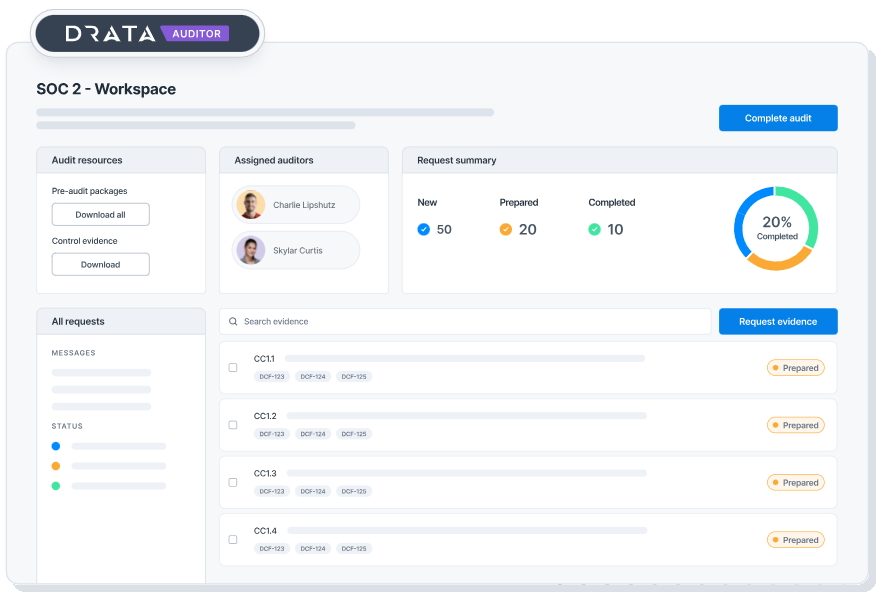
Drata is a compliance automation platform that helps organizations maintain audit readiness through continuous control monitoring. It is most commonly used by fast-growing and mid-market organizations running recurring audits that want visibility into control failures ahead of audits.
The workflows and control logic are framework-driven and less flexible to customize. So teams with growing audit complexity, custom controls, or internal audit needs may find their approach more constrained over time.
Key Features
- Continuous control monitoring: Drata continuously monitors configured controls across connected systems and flags failures so teams can address issues before audit deadlines.
- Automated evidence collection: Evidence is automatically pulled from supported integrations and mapped to controls, reducing the need for manual uploads during audits.
- Pre-built compliance frameworks: Drata offers out-of-the-box support for common frameworks such as SOC 2 and ISO 27001, enabling faster setup and audit preparation.
- Compliance readiness dashboards: Teams get a centralized view of control status, failed checks, and overall audit readiness across active frameworks.
- Auditor access to evidence: Auditors can review evidence directly in Drata, reducing back-and-forth and streamlining audit execution.
Pros
- Reduces dependence on spreadsheets and manual audit tracking
- Large auditor alliance, making it easier to work with auditors already familiar with the platform
- Supports cross-framework audits efficiently when requirements remain largely standardized
- Makes it easier to communicate audit progress and control status through standardized reports
Cons
- Costs can feel high for teams running relatively simple or narrow audit scopes.
- Less flexible for complex or custom audits
- Takes time for non-technical users to get up to speed
Pricing: Entry level plans start at $7500 for say SOC 2 Type 1 audit. As per Spendflo, for larger organizations, the costs can range from $20000-$100000
3. Vanta
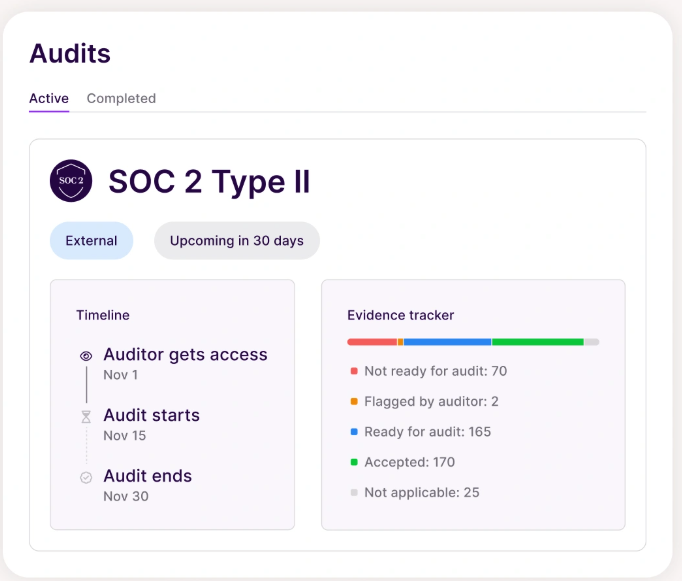
Vanta is another compliance and audit automation platform that takes a guided, template-first approach to audit prep. It focuses on speed and simplicity, using pre-built controls, workflows, and integrations to accelerate audit preparation.
Vanta works best when requirements are straightforward, infrastructure is standard, and teams prefer guardrails over flexibility.
Key Features
- Template-driven compliance setup: Vanta relies heavily on pre-built controls, policies, and workflows to help teams stand up compliance programs quickly without designing processes from scratch.
- Guided remediation tasks: When controls fail, Vanta generates recommended remediation steps and assigns tasks, helping teams understand what to fix and who owns it.
- Lightweight auditor collaboration: Auditors can review evidence and reports in-platform, reducing document sharing and email-based coordination.
- Dashboard for audit readiness: Centralized task list and document repository help teams prep for audits with limited context switching.
- Standard policy library: Offers pre-written policies and canned training content that align with common audit expectations
Pros
- Good for companies with standard workflows and low customization needs.
- Easy to adopt without deep compliance or GRC expertise
- Offers 350+ integrations for better connectivity across tools
- Supports lightweight AI features such as automated security questionnaires
Cons
- Users frequently cite high renewal costs and contract lock-in as major downsides.
- Support may feel more self-service at scale.
- Automated checks prioritize coverage over depth, which can limit insight into control effectiveness.
Pricing: Vanta pricing starts from $7500-$10000 for smaller teams and a single framework. As per Spendflo, medium to large organizations can expect a range of $30000-$80000.
4. Auditboard
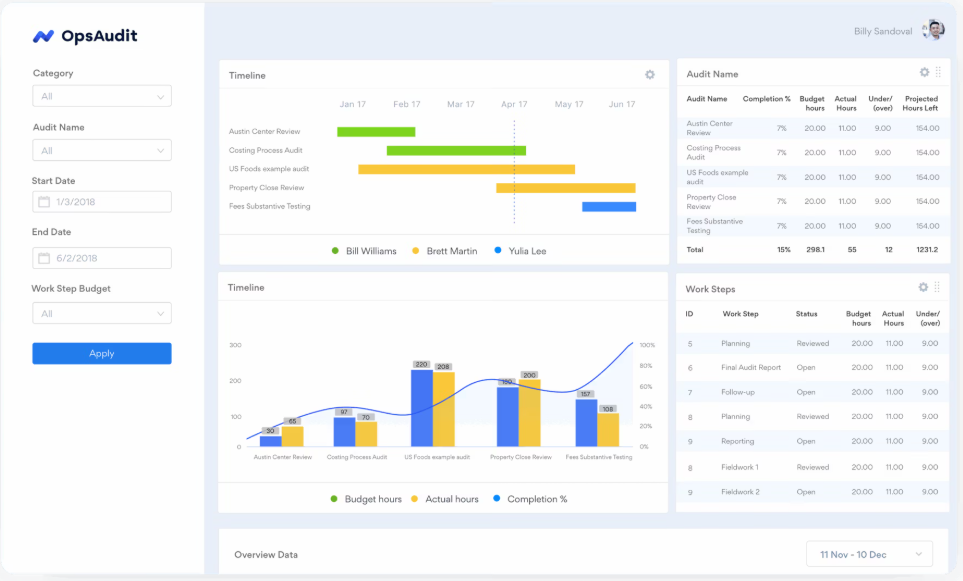
AuditBoard is an audit management tool built for internal audit teams, with a strong focus on audit planning, execution, issue tracking, and board-level reporting. It supports structured, risk-based audit programs and helps standardize how audits are run across large or distributed teams.
AuditBoard works best for organizations with established internal audit functions, clearly defined processes, and dedicated audit ownership, especially where governance, consistency, and executive reporting are priorities over automation depth.
Key Features
- Internal audit planning and execution: AuditBoard supports end-to-end internal audit workflows, including audit planning, fieldwork, issue tracking, and remediation follow-ups.
- Risk assessment and scoping: Teams can perform risk assessments and use them to scope audits, helping prioritize high-risk areas during audit planning.
- Issue and remediation tracking: Audit findings are tracked with owners, timelines, and status updates, providing structured oversight through remediation cycles.
- Enterprise-grade reporting: AuditBoard offers robust reporting and dashboards designed for audit committees, executives, and board-level stakeholders.
- Collaboration for audit teams: Internal audit teams collaborate in a centralized workspace to manage documentation, comments, and review cycles.
Pros
- Built with workflows that closely match how professional internal auditors actually work
- Strong choice for Sarbanes-Oxley (SOX) compliance, especially for public or pre-IPO companies
- Connects risk identification directly to audit execution and remediation workflows
- Integrates well with enterprise systems like ServiceNow and Jira for issue management at scale
Cons
- Limited automation for continuous evidence collection
- Heavier setup and administration compared to other mid-market tools
- Less suitable for compliance-focused or fast-scaling teams
Pricing: For mid-sized organizations, the range is usually $30000-$50000 annually. The median annual spend, as per sites like Vendr is $42,775.
Map once. Reuse everywhere.
👉 See how it works →
5. MetricStream
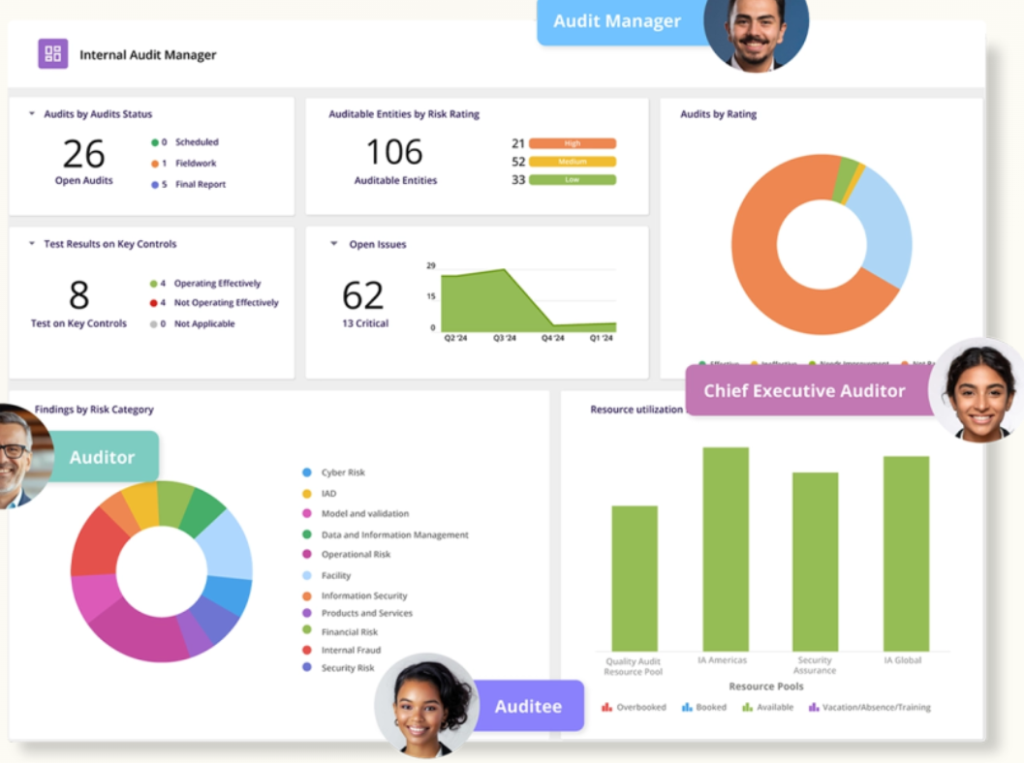
MetricStream is an enterprise GRC platform designed to manage audit, risk, compliance, and policy programs at scale. It is commonly used by organizations with complex regulatory obligations, formal governance structures, and dedicated GRC teams.
It works decently for highly regulated organizations that need centralized oversight across multiple business units. However, smaller or fast-moving teams may find it heavy to implement and maintain.
Key Features
- Enterprise audit management system: MetricStream supports end-to-end audit workflows, including planning, execution, issue management, and remediation across large audit portfolios.
- Integrated risk and compliance modules: Audit programs are tightly connected to risk assessments, compliance obligations, and policy management within a single GRC ecosystem.
- Multi-entity and global support: Designed to handle audits across multiple business units, regions, and regulatory environments from a centralized platform.
- Regulatory change management: Tracks regulatory updates and maps changes to affected controls, risks, and audits.
- Dashboard and reporting: Provides aggregated, enterprise-level views for leadership, regulators, and board stakeholders.
Pros
- Supports offline audits for environments with limited connectivity
- Strong alignment between audit, risk, compliance, and policy management
- Supports complex regulatory and multi-geography environments
- Centralized visibility across business units and audit portfolios
Cons
- Long implementation and onboarding timelines
- Requires dedicated GRC resources to operate effectively
- Can feel overly complex for mid-market or fast-scaling teams
Pricing: The tool is expensive, with costs starting from $75000 for medium-sized organizations as per Selecthub.
6. Hyperproof
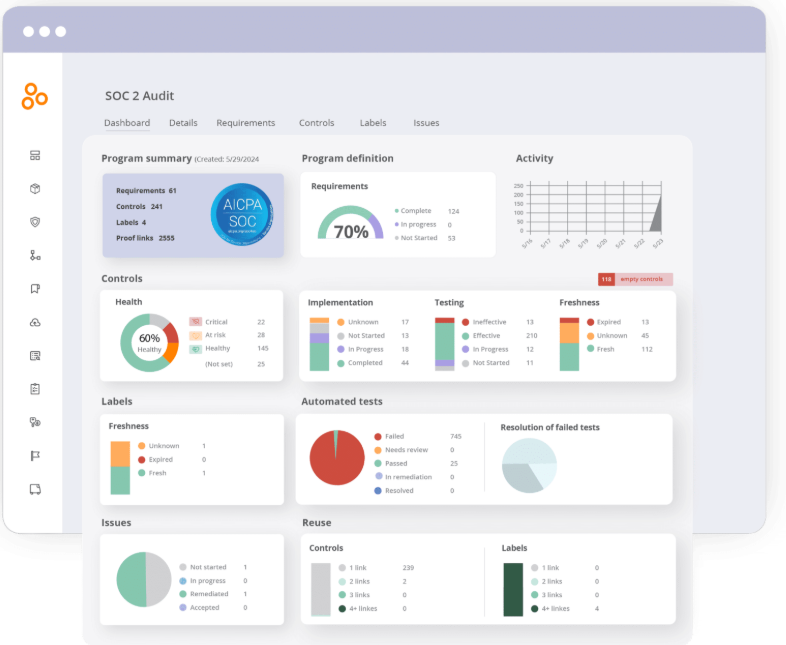
Hyperproof is a compliance and audit management platform that provides teams with clear visibility into audit status, evidence, and ownership. It is often used by mid-market and enterprise teams that want a centralized system of record for audits without adopting a full-scale enterprise GRC platform.
Hyperproof works best when visibility, coordination, and reporting across audits and frameworks are the top priorities. Teams looking for deep automation, continuous control testing, or AI-driven audit workflows may find its approach more manual as programs scale.
Key Features
- Centralized audit and evidence tracking: Hyperproof provides a single place to track audits, controls, evidence, owners, and deadlines across frameworks.
- Framework and control mapping: Controls and evidence can be mapped across multiple frameworks to reduce duplication and improve reuse.
- Task and ownership management: Audit tasks can be assigned, tracked, and followed up on, helping teams stay aligned during audit cycles.
- Audit readiness dashboards: Dashboards provide a real-time view of audit progress, open gaps, and upcoming deadlines.
- Reporting and exports: Teams can generate reports and export evidence packages for auditors and stakeholders.
Pros
- Useful for managing multiple frameworks in parallel
- Good fit for evidence-heavy audits that require frequent human input and coordination
- Provides clear ownership and accountability for audit tasks and artifacts
- Acts as a centralized system of record for audits across teams and frameworks
Cons
- Relies more on manual evidence updates compared to automation-first tools
- Limited support for continuous control testing
- Can require additional tooling as audit complexity increases
Pricing: As per GetApp, entry level subscription starts from $12000 a year. For companies with less than 200 employees, the range falls between $16000-$32000.
7. Workiva
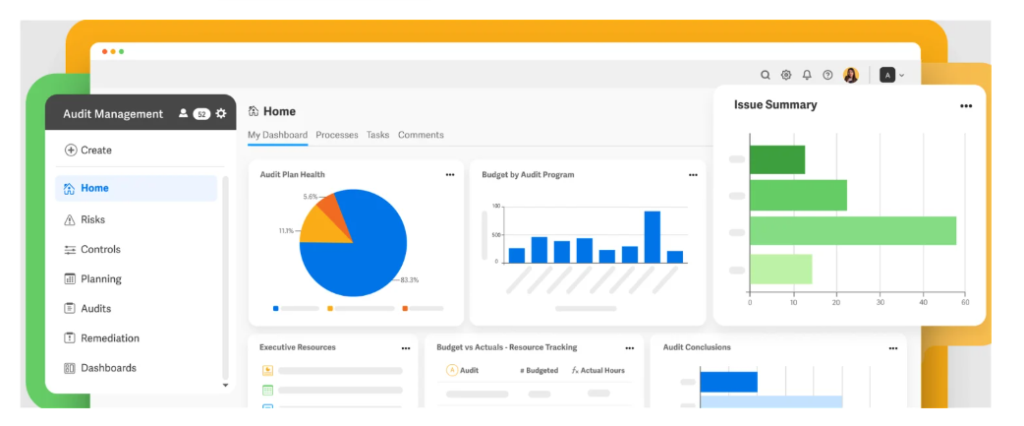
Workiva is a cloud-based platform designed for audit, risk, and compliance teams that place a strong emphasis on reporting, documentation, and regulatory disclosures. It is widely used by finance, audit, and compliance teams that need tight control over narratives, data accuracy, and versioning across audits and filings.
Workiva works best when audit management is closely tied to financial reporting, SOX compliance, and regulatory disclosures. Teams prioritizing automation-led evidence collection may find it more manual.
Key Features
- Collaborative reporting and documentation: Workiva allows teams to collaborate on audit reports, narratives, and supporting documentation in real time, with full version control.
- Strong SOX and financial controls support: The platform is commonly used for SOX compliance, linking controls, testing, and documentation to financial reporting processes.
- Data linking and consistency: Data can be linked across reports and documents, ensuring changes are reflected consistently and reducing manual rework.
- Workflow and review management: Supports structured review, approval, and sign-off workflows across audit and compliance documents.
- Audit trail and version history: Maintains detailed audit trails for edits, approvals, and changes to support regulatory scrutiny.
Pros
- Enables large audit teams to collaborate in real time on the same documents without losing control over access or changes.
- Supports custom dashboards for reporting-heavy audit and compliance programs
- Well-trusted by finance and audit leaders in public-company environments
- Feels like a modern, cloud-based blend of Excel and Word, giving auditors flexibility to build highly customized workpapers.
Cons
- Relies heavily on manual evidence inputs compared to automation-first tools
- Less focused on continuous control monitoring or evidence collection
- Can feel complex for teams without strong reporting or finance-driven needs
Pricing: Custom quotes ranging from $30000-$150000. According to sites like Vendr, the median price is $60000.
Turn audit chaos into a repeatable engine. Get the 12-pillar framework for planning, ownership, auditor collaboration, and cycle-time reduction.
How to choose the best audit management software in 2026
Choosing the right audit management software in 2026 requires looking beyond checklists and one-time certifications. Audits are now recurring, frameworks continue to expand, and leadership expects real-time assurance.
“It delivers on its promise to speed up audit exercises and certifications.” — Andre S., CTO, mid-market company (4.5/5, verified G2 review, Nov 2025). A Gartner Peer Insights reviewer (5/5, Sep 2025) described Sprinto as “a very competitive offering in the compliance automation space” for “companies that need to get audit-ready, establish continuous compliance, and streamline documentation.”
The market has shifted toward continuous assurance, automation depth, and AI-driven insights.
To choose the right tool, start with who you are and how audits actually run in your organization, then evaluate capabilities that will scale with you.
1. Identify your audit persona
Before comparing features, define how audits show up in your business. Most teams fit into one of these buckets:
- The Compliance Sprinter (Startups, early-stage teams): Focused on speed. You need SOC 2 or ISO 27001 quickly to unblock deals, with minimal process overhead.
Best fit: Sprinto, Vanta, Drata - The Continuous Compliance Operator (Scaling mid-market teams): Running recurring audits, adding frameworks over time, and looking to reduce audit fatigue through automation and evidence reuse, without heavy enterprise GRC.
Best fit: Sprinto - The Professional Internal Auditor (Mid-to-large organizations):Managing structured internal audits with formal workpapers, issue tracking, and risk-based planning.
Best fit: Auditboard - The Financial or Public Company Controller:Audits are closely tied to SOX, financial controls, and regulatory disclosures, where accuracy and traceability matter most.
Best fit: Workiva - The Global Risk Manager (Highly regulated enterprises):Overseeing audits, risks, and compliance across multiple business units, regions, and regulations with formal governance.
Best fit: Hyperproof, MetricStream, Sprinto
2. Evaluate tools using the 5-pillar checklist
Use these pillars to pressure-test tools during demos and trials.
- Integration depth: Does it connect to the systems you actually use, not just a generic list?
- Ease of use: Can non-technical owners submit evidence without extensive training?
- Auditor experience: Is there a dedicated auditor view that reduces back-and-forth?
- Scalability: Will costs and effort grow linearly, or exponentially, as scope expands?
- Traceability: Can you trace a reported result back to its original source quickly?
3. Common pitfalls to avoid
- Assuming full automation: Even the best tools need human judgment. Automation should reduce effort, not eliminate accountability.
- Buying for today only: A tool that works for your first audit may break under recurring audits or IPO pressure. Plan for where you’re headed.
- Over-indexing on templates: Guardrails help early, but rigidity becomes friction as programs mature.
How to evaluate audit management software when your audit scope is messy
Audit management software is easiest to evaluate when your scope is clean: one entity, one product, one cloud environment, one framework. Most growing teams do not operate that way for long.
AltiusHub, a supply-chain traceability platform for pharmaceutical and life sciences organizations, running ISO 27001:2022 and SOC 2 Type 2 in parallel, completed back-to-back audits with zero findings across both within two months, and cut weekly manual compliance effort from 10–12 hours to 3–4 hours. The team now maintains the whole program with two people. → [Read the AltiusHub story]
Before choosing a platform, check how it handles scope boundaries. The tool should let you define which employees, systems, vendors, cloud accounts, and legal entities are in scope for each audit, and support practical exclusions such as non-production environments, vendor-managed systems, inactive users, and business units that never touch customer data.
This matters because weak scoping creates audit noise. Teams end up chasing evidence for systems auditors do not need to review, missing evidence for systems that are actually critical, or mixing controls across entities and frameworks. A platform can look fully automated in a demo and still create manual cleanup every cycle if it cannot reflect how your business is structured.
When evaluating vendors, ask:
- Can we maintain separate audit scopes for different entities, products, frameworks, or business units?
- Can the platform distinguish staff, contractors, service accounts, vendors, and out-of-scope users?
- How does it handle production vs non-production systems and repositories?
- What happens when an integration is unavailable, such as for on-prem systems or niche tools?
- How are custom or regional frameworks priced? Is there a cap on how many we can build, and does each count as a separate framework in the contract?
- Can evidence be reused across SOC 2, ISO 27001, GDPR, PCI DSS, and custom audits without losing traceability?
- If different customers trigger their own audits, can the platform supply freshly dated evidence for each cycle rather than reusing artifacts from months ago?
- Will auditors see only the evidence relevant to their audit, or everything in the workspace?
The best platforms make scope boundaries visible, document exclusions with reasons, and keep evidence tied to the right audit context as your company adds products, regions, vendors, and frameworks.
One practical way to test all of this: migrate your smallest real artifact first. If your current system is a spreadsheet in a shared drive, do not scope the trial around moving everything. Pick something small, current, and exportable, a 90-row risk register moves in an afternoon, and run it through the platform. It proves the workflow with your real data, and it shows what staying current will demand of your team week to week. If a two-person team cannot sustain the upkeep, no feature list compensates.
Final thoughts: Choosing the right audit management software in 2026
Audit management in 2026 is no longer about passing the next certification. It’s about building a system that scales as audits become recurring, frameworks multiply, and expectations rise across security, finance, and risk teams.
Each tool in this list serves a different purpose. Some prioritize speed and templates. Others focus on internal audit rigor or enterprise-scale governance. The right choice depends on your audit persona, your growth trajectory, and how much automation you need to reduce operational drag.
If you’re looking for a platform built for continuous readiness rather than periodic prep, AI-native solutions like Sprinto are designed to keep audit work running in the background while teams focus on higher-value priorities.
Explore your options carefully, run a pilot, involve your auditors early, and choose a system that reduces effort as complexity increases.
Check out how MakeForms complied with 11 frameworks while cutting down 50% of audit costs.
Sprinto helps migrate controls and evidence without disruption.
👉 Talk to our migration team →
FAQs
Most will, but confirm before you buy. Modern platforms collect evidence through API calls, often storing it as structured data rather than the screenshots and exports that traditional audit firms are used to. Auditors who work regularly with automation platforms review this evidence directly in the tool and only request samples or screenshots for specific items. Older-school firms may still ask for raw reports, which means manual exports on top of your automation. Ask your auditor whether they accept platform-collected evidence, and ask the vendor which audit firms they’ve completed audits with.
The technical migration (policies, controls, mapped evidence) is usually the easy part; most vendors will import these during onboarding. The two things that actually trip teams up: cancellation-notice clauses in the incumbent contract, often 30 to 90 days before renewal, which can lock you in for another year if you miss the window, and the internal cost of retraining your team on a new system. Check your notice period before you start evaluating, not after you’ve picked a replacement.
The question is whether each integration pulls the specific evidence your controls need, or just connects to the app. A platform can legitimately claim a Google Workspace integration that covers one feature but not the one your auditor cares about. During the demo, pick three systems from your stack and ask the vendor to show exactly which checks run against each and what evidence gets captured. Also, ask what happens when an integration breaks mid-cycle, because babysitting broken connectors is a common hidden time cost.
Yes, and this is where platforms differ most on price. Frameworks tend to arrive in waves: teams finish SOC 2, then add ISO 27001, then a regional or customer-mandated framework within a year or two. Look for a common control framework underneath, so evidence collected once applies everywhere it overlaps, and ask three pricing questions: what’s included out of the box, what each additional standard framework costs, and how custom frameworks are priced.
Small teams arguably get the most out of it, but only if the tool routes work for you instead of through you. Two things to test: can failing controls be assigned to multiple owners, or to the actual person responsible, rather than a department head who then has to delegate everything manually? And how much recurring manual input does the platform need to stay current? A two-person team can’t sustain a tool that demands constant upkeep, no matter how good the dashboard looks.

Author
Payal Wadhwa
Payal is your friendly neighborhood compliance whiz who is also ISC2 certified! She turns perplexing compliance lingo into actionable advice about keeping your digital business safe and savvy. When she isn’t saving virtual worlds, she’s penning down poetic musings or lighting up local open mics. Cyber savvy by day, poet by night!Go beyond the surface and uncover the governance, risk, and compliance insights that actually matter.


Win digital goodies for boardroom success



Explore more








research & insights curated to help you earn a seat at the table.


