




TL,DR:
| An incident recovery plan restores business operations after a contained cyber threat. |
| It reduces downtime by defining owners, recovery steps, communications, and system priorities. |
| The article explains why plans need annual testing and updates after business changes. |
There’s a call no one wants to get — a cyberattack has hit your systems.
What do you do next?
Do you call for a complete shutdown? Call your security team? Notify customers?
Every paused second burns cash and trust, and you know it.
In those situations, an Incident Response Plan (IRP) saves the day. It’s a ready-made guide that names an owner, sets the order of operations, shows what to isolate first, and dictates who says what, when. You follow practiced steps, gather evidence as they go, and move from chaos to containment.
The outcome is faster recovery, fewer mistakes, and a clear path back to normal that keeps a bad day from becoming a brand crisis.
Read on as we break down this Incident Recovery Plan in detail.
What is an Incident Recovery Plan?
An Incident Recovery Plan is a structured approach to restoring business operations to a normal state after a security incident has been contained and eradicated. It typically covers key steps like identifying the breach, containing the threat, recovering affected systems, and preventing future attacks.
While the overall IRP addresses the immediate actions of identifying and containing a threat, the recovery plan focuses on the process of bringing systems and data back online safely and efficiently.
It’s often mistaken for a Disaster Recovery Plan, but the two are different. A Disaster Recovery Plan addresses large-scale physical events such as floods or fires, while an Incident Recovery Plan focuses on cyber incidents like ransomware attacks, data breaches etc.
For small businesses with limited resources, an Incident Recovery Plan should be a practical and actionable document. It just needs to be a clear, actionable guide that helps you deal with the aftermath of a cyber incident and get back to business as usual.
Why is an Incident Recovery Plan necessary?
An incident recovery plan is necessary to keep your business operations running smoothly, even during unexpected security breaches, system failures, or cyberattacks.
For anyone in charge of compliance, this plan is your proof that you’re taking your responsibilities seriously.
1. It saves you from financial ruin
The average cost of a data breach is $4.4 million in 2025. It’s not just about the potential ransom or theft; the real killer is downtime. Every hour your systems are down, you’re losing money.
A solid incident recovery plan is designed to slash that downtime. It helps you get back up and running in hours instead of days or weeks. When you hear that a majority of small businesses fold within six months of a major cyberattack, it’s often because the financial hit from the downtime was simply too much to absorb.
2. It protects your reputation
If your customers’ data gets stolen or they can’t rely on your services, their trust in your brand can vanish in an instant. How you handle the aftermath of an attack is the most important part.
If you have a recovery plan that includes clear, honest communication, you show your customers that you’re competent and in control, even during a crisis. Fumbling through the recovery, on the other hand, looks chaotic and unprofessional, and can send customers running to your competitors.
3. It keeps you compliant
More and more, laws and regulations demand that businesses have a plan to handle data breaches. You have to consider standards like
- GDPR (General Data Protection Regulation): If you have customers in Europe, this law requires you to protect their data and report breaches quickly.
- HIPAA (Health Insurance Portability and Accountability Act): For anyone in healthcare, it strictly requires having contingency plans to protect patient information.
- PCI DSS (Payment Card Industry Data Security Standard): If you take credit cards, you’re supposed to have an incident response plan ready to go if card data is compromised.
4. It makes you more resilient to threats
Finally, one of the best parts of having a recovery plan is the “lessons learned” phase. After you’ve recovered, you get to sit down and analyze exactly what happened and how you handled it. This process is invaluable.
You’ll find weak spots you never knew you had and find ways to strengthen your defenses. This turns a negative event into a powerful learning opportunity, making your business more resilient against the next threat that comes along.
Map recovery workflows and track RTO/RPO goals automatically.
👉 Book a Sprinto demo →
Key components of an effective Incident Recovery Plan
An effective Incident Recovery Plan is a practical guide that anyone on your team can pick up and follow in a crisis. A separate cybersecurity disaster recovery plan governs the longer-tail restoration work that follows the immediate incident response, covering system restoration sequence, data recovery objectives, and the third-party coordination that recovery-plan documents rarely address in enough depth.
Here are the essentials of a solid recovery plan:
- Defined roles and responsibilities: A proper Incident Recovery Plan clearly spells out who’s in charge of what part of the recovery. This includes technical staff, management, communications personnel, and legal counsel.
- System and data restoration procedures: The plan should detail the step-by-step procedures for restoring affected systems and data from secure backups.[ This involves prioritizing critical systems to be restored first to minimize business impact.
- Testing and verification: Before bringing systems back into full production, they must be thoroughly tested and monitored to ensure they are clean of any residual threats and are functioning correctly.
- Communication protocols: A clear communication strategy is vital for keeping internal stakeholders, customers, and regulatory bodies informed about the recovery progress.
- Post-incident analysis: After the recovery is complete, a thorough analysis of the incident and the response is necessary. This is where you figure out what went wrong, what went right, and how you can beef up your defenses so this doesn’t happen again.
Difference between Incident Response and Recovery Plan
It’s really common for people to use Incident Response and Incident Recovery interchangeably, but they are two distinct, though closely related, things.
Incident Response is the overall process for managing security emergencies, while Incident Recovery is the phase focused on restoring systems after the threat is contained. The Incident Response Plan covers the full incident lifecycle, and the Incident Recovery Plan is its subset, guiding the rebuild and return to normal operations.
Here’s a simple table to break down the differences:
| Incident Response Plan | Incident Recovery Plan | |
| Main goal | Find, contain, and stop the immediate threat | Safely restore business operations to normal after the threat is gon. |
| When it’s used | From the very first sign of trouble until the attacker is kicked out | After the attacker has been removed and the immediate danger is over |
| Key question | What’s happening right now and how do we stop it? | How do we get back to business safely and quickly? |
| Primary activities | Detecting the breach, identifying affected systems, isolating them to prevent spread, and removing the threat | Restoring data from backups, rebuilding servers, testing systems for functionality, and bringing services back online for users |
| Focus | Defensive and reactive; damage control and fighting the active threat | Methodical and restorative; carefully rebuilding and getting back to a known-good state |
| Who’s in charge | Often led by a security team or IT lead focused on neutralizing the threat | Often led by an IT operations or business continuity lead focused on restoration |
Steps to develop an Incident Recovery plan
Follow these steps to create a clear, actionable plan that will guide your organization through restoring operations after a security incident.
1.Identify critical business functions and assets
First, determine which business operations are absolutely essential. Make a list of all your key functions, such as processing sales, managing payroll, or running your production line.
For each function, identify the specific software, hardware, data, and personnel required for it to operate. This inventory of critical assets is the foundation of your plan, as it dictates what must be recovered first.
2.Assemble the recovery team and define roles
Designate a specific team responsible for executing the recovery plan. This team should include representatives from IT, management, communications, and legal departments.
Assign a clear leader for the team. For every member, document their specific roles and responsibilities during a recovery effort. Include a primary and a backup contact for each role, along with their up-to-date contact information.
3.Determine recovery time and point objectives
For each asset you identified in Step 1, you must establish
Recovery Time Objective (RTO): This is the maximum acceptable amount of time a system can be offline before it causes significant damage to the business. An RTO of 2 hours means the system must be restored and functional within two hours of the incident.
Recovery Point Objective (RPO): This defines the maximum amount of data loss that is acceptable. An RPO of 4 hours means you must be able to restore data from a backup that is no more than four hours old.
These objectives will dictate your backup strategy and the urgency of your recovery procedures.
4.Develop detailed restoration procedures
Create step-by-step instructions for restoring each important system and its data. This section should be highly detailed and written for a technical audience. It must include,
a) The location of secure, clean backups
b) The process for validating that backups are free from malware before restoration
c) The exact sequence for bringing systems back online to avoid conflicts
d) Procedures for rebuilding servers or workstations, if necessary
e) Instructions for re-establishing network connectivity and security configurations
5.Create a communications plan
Outline how you will manage internal and external communications during the recovery process. This plan should specify:
a) Who is authorized to communicate with employees, customers, suppliers, and the media
b) Pre-approved message templates for different scenarios and audiences
c) The channels to be used for communication (e.g., email, company website, social media)
d) The required frequency of updates to keep all stakeholders informed
6.Document the complete plan
Consolidate all of the above information into a single, formal document. The plan must be written in clear, concise language.
Ensure it is easy to navigate, perhaps with a table of contents and clear headings. Store the plan in a secure but accessible location where the recovery team can access it even if the primary network is down. Hard copies and secure cloud storage are good options.
7.Train the team and test the plan
A plan is only effective if the team knows how to use it. Conduct regular training sessions to ensure all members understand their roles. More importantly, test the plan at least annually.
You can conduct a tabletop exercise where the team walks through a simulated incident, or a more comprehensive failover test where you actually restore systems in a non-production environment. Testing identifies gaps and weaknesses before a crisis occurs.
8.Maintain and update the plan
Your business and technology environment are not static, and your recovery plan must keep up.
Review and update the plan at least once a year, or whenever significant changes occur, such as the implementation of new critical systems, changes in personnel, or new vendor relationships. An outdated plan can be as dangerous as no plan at all.
Prove recovery works — without spreadsheets or screenshots.
👉 Start your free consultation →
Integrating recovery into ISO 27001 or SOC 2
ISO 27001 embeds recovery inside the ISMS cycle of risk assessment, control selection, and continual improvement. In practice, that means you define RTO and RPO targets, maintain tested backups, and keep an audit-ready trail of tests, incidents, and fixes; all as living, reviewable evidence.
Manually keeping up with all that is a goliath task, and that’s where a compliance automation platform makes perfect sense.
A compliance platform like Sprinto plugs into that loop by continuously monitoring mapped controls, collecting time-stamped evidence, and surfacing gaps so they can be remediated quickly rather than discovered during a surveillance audit.
What does it look like in your day-to-day operations?
- Risk to control mapping that includes recovery controls such as backup, restoration, and incident response checkpoints, tied back to Annex A requirements.
- Continuous control monitoring so backup jobs, access hardening, and restoration runbooks don’t go stale between audits.
- Automatic evidence capture (artifacts, logs, and test results attached to the relevant ISO controls) so you can prove that recovery works, not just say it does.
SOC 2’s Trust Services Criteria, especially Availability and Security, expect you to demonstrate that you can detect incidents, restore systems within acceptable time frames, and document the entire chain from containment through post-mortem.
Sprinto helps by centralizing SOC 2 controls, integrating with your environment, and collecting auditor-grade evidence in the background so your recovery journey is supported by real telemetry
For SOC2 teams, this means
- One place to see control status across cloud, identity, repos, devices, and more, with alerts for control drift that could derail recovery.
- Automated evidence of readiness (for example, proof that backups are enabled, least-privilege is enforced, and restoration tests are run on schedule)
- Cleaner pre-audit weeks because screenshots and spreadsheets are replaced with continuously gathered, time-stamped evidence mapped to TSC
How Sprinto can help automate recovery documentation
Recovery documentation takes shape the moment an incident starts, and it keeps evolving until lessons learned are closed out. Sprinto automates that documentation end-to-end.
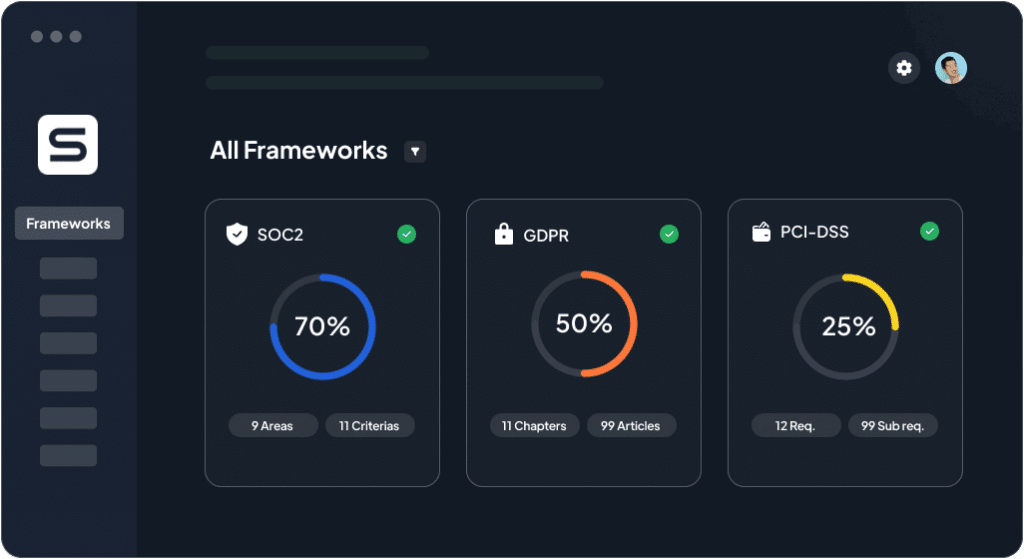
Sprinto integrates with your stack and maps controls to ISO 27001 and SOC 2 requirements, then runs automated checks in the background. As incidents happen or tests are completed, Sprinto attaches the right artifacts to the right control and creates a defensible, auditor-friendly record without manual copy-paste.
It automates
- Control-to-requirement mapping for frameworks, including recovery-relevant controls and tests
- Continuous monitoring of recovery enablers (backups, access, configurations) with proactive alerts when controls drift
- Evidence collection up to ~90% via integrations and rule-based workflows, with clear audit trails and timestamps
When something breaks, documentation should start instantly and follow the work through to closure.
Sprinto’s guidance emphasizes monitoring, escalation workflows, and evidence capture as the first automations to put in place; exactly the plumbing you need for reliable incident and recovery records that satisfy auditors and help teams improve.
Want to build an airtight incident recovery plan and stay compliant with the latest infosec frameworks? Speak to our experts today.
Map RTOs, test backups, and collect evidence automatically.
✔ Real-time monitoring | ✔ Fewer audit tickets | ✔ Continuous compliance
👉 See Sprinto in action →
Frequently asked questions

Author
Pansy
Pansy is an ISC2 Certified in Cybersecurity content marketer with a background in Computer Science engineering. Lately, she has been exploring the world of marketing through the lens of GRC (Governance, risk & compliance) with Sprinto. When she’s not working, she’s either deeply engrossed in political fiction or honing her culinary skills. You may also find her sunbathing on a beach or hiking through a dense forest.Go beyond the surface and uncover the governance, risk, and compliance insights that actually matter.


Win digital goodies for boardroom success



Explore more









research & insights curated to help you earn a seat at the table.


