You’re probably here because a customer asked for a SOC 2 Type 2 report, and now it’s on your plate. Expect the process to take four to five months. You’ll spend most of that time running your controls before an auditor even looks at them.
Three pitfalls tend to do the most damage during this time. The first is naming your observation window. You may have all policies in place, but if the practice turns out patchy once fieldwork starts, like a system nobody mentioned or vendor reviews nobody wrote down, those months are already part of the audit period. Any gaps will appear as exceptions, and you can’t fix them retroactively.
The second is operating evidence dated outside the window, which your auditor cannot use in either direction. The third is the periodic control: something that runs once a quarter or once a year, like an access review or a disaster-recovery test. It reads green on your dashboard because it did happen. The question is when. If your window runs 1 January to 30 June and your last access review was in December, the dashboard is green, and the auditor has nothing inside the period to test. Nothing looks broken, so nobody checks.
None of the three is a control-design problem, which is why they survive a readiness review and turn up in fieldwork instead. This guide covers what a Type 2 requires, the end-to-end process, what it costs, and what to check before you lock your dates.
What is SOC 2 Type 2 compliance?
SOC 2 Type 2 is a report from a licensed CPA firm confirming that your security controls were properly designed and operated effectively across a defined period. It’s not a certificate, even though people often say ‘SOC 2 certified.’ The deliverable is a detailed report covering a window of time, not a single date.
The report evaluates you against the AICPA’s Trust Services Criteria: security, availability, processing integrity, confidentiality and privacy. Security is mandatory and is the common criteria (CC), organized in nine categories numbered CC1 through CC9 and containing roughly 33 individual criteria.
The other four are optional. The test for adding one is what you have already promised in writing. Read your Master Service Agreement (MSA), your information security policies, and your terms of use before you decide. For instance, if you commit to 99% uptime with SLA credits, a buyer will expect availability in scope and will ask which controls support that number.
Most reports end up at security, availability, and confidentiality. If you select criteria that you did not promise, you would have to cough up more in audit fees and gather evidence for something no buyer asked you about.
A clean report tells a buyer three things. Your controls were designed correctly. They kept running for months while real people used real systems. And an independent firm tested that claim rather than taking your word for it./
Disclosure: Sprinto holds its own SOC 2 report, attested by Deloitte.
SOC 2 Type 1 vs Type 2: What is the difference?
Type 1 shows a buyer you designed the right controls. Type 2 shows how you ran them during the observation period.
| Dimension | SOC 2 Type 1 | SOC 2 Type 2 |
| What it tests | Control design on a single date | Control design plus operating effectiveness across a period |
| Period covered | One date | Typically three to twelve months |
| Evidence | Configuration and documentation as they stand | Evidence drawn from every month of the window, sampled |
| Typical elapsed time | Four to five weeks end to end | Four to five months end to end |
| Report length | Shorter, with no operating-effectiveness results | Longer, with a test and a result for every control |
| What buyers do with it | Accepted as an interim signal | What procurement asks for by name |
| Audit engagements | One | One, plus a separate one if you did Type 1 first |
Do you need a Type 1 report before a Type 2?
No, Type 1 isn’t required before Type 2. Many teams skip it. Type 1 is only useful if a customer needs proof quickly (in about five weeks). Otherwise, it’s an extra audit and extra cost you probably don’t need. Bundled pricing varies a lot by audit firm.
KPMG’s 2025 SOC reporting whitepaper notes that many organizations start with a readiness assessment or Type 1 before moving to Type 2, but this is about common practice, not a requirement. Type 1 is only helpful if your controls are brand new and untested. Don’t do it just because it seems safer.
If you take up Type 1 first, your Type 2 window can start the day after your Type 1 report date. There is no waiting period between them.
Turtlemint, a full-stack fintech solution, took this route with Sprinto. The insurance-distribution platform completed its control implementation, passed a Type 1 without exceptions, then moved straight into a Type 2 with a roughly six-month observation period, and cleared that with no exceptions, too. Now they’re working toward ISO 27001 certification, using the same set of controls, and it’s taking them about half the effort.
Who needs SOC 2 Type 2?
SOC 2 is a commercial objective, not a statutory requirement. You need one when you sell to mid-market or enterprise buyers, go through formal vendor risk reviews, or handle customer data in production. The cost of not having one is delayed deals, not fines.
There are no formal penalties if you don’t have a report, but the real cost shows up in stalled deals, repeated security questionnaires, and procurement cycles that drag on much longer than necessary.
Here are a few things you need to know that will help you better understand who would need a SOC 2 Type 2:
1. Cloud marketplaces do not require it
AWS, Microsoft, and Google Cloud don’t mandate a SOC 2 Type 2 report or an ISO 27001 certificate to list a SaaS product. They set functional and operational requirements: Microsoft requires Microsoft Entra ID single sign-on, PCI DSS where card data is handled, and prompt reporting of security incidents. Google Cloud requires hosting on Google Cloud and no known vulnerabilities. AWS requires production readiness and defined support processes. The pressure for a SOC 2 comes from the buyer side, not the marketplace.
2. A Type 1 report is not treated as temporary by every buyer
Some businesses accept Type 1 as an interim signal for a long time. Others name Type 2 in the contract before the first call. The only way to know which you are dealing with is to ask the buyer. The answer decides whether that engagement is a useful dry run or simply a fee you pay twice.
PwC’s Global Digital Trust Insights survey, found 78% of executives expect their cyber budget to rise over the coming year. These rising budgets bring more vendor scrutiny, and in the US market, a SOC 2 report is the standard way to address that scrutiny.
3. The deadline is usually someone else’s renewal season
Buyers will rarely need a ‘Type 2 soon’. They need it before a specific procurement season. For instance, take an ed-tech business planning for university contracts that renew next summer. They would want the report in hand before the season begins, not during it. A first Type 2 runs four to five months end to end, so a report needed for a March procurement season requires a program that starts in October. Find the renewal season your buyers run on, then count backward.
How long does SOC 2 Type 2 take, and what does it cost?
Four to five months and $6,000 to $60,000 for most companies under 500 people. But three choices you control set both numbers: the observation window you name, the audit route you opt for, and how ready your controls are when you start. This section will discuss all three.
How long should your observation window be, and who picks it?
You decide how long it should be, and your auditor confirms it in the engagement letter. The dates will appear in two places: the engagement letter and management’s written assertion.
In SOC 2, “observation window,” “audit period,” and “evidence collection period” all mean the same thing: the months the auditor examines.
| Window | When it fits | The trade-off |
| 3 months | A deal is waiting on the report | Fastest route; the thinnest track record a buyer will see |
| 6 months | You have the room, first report | Fewer months of exception risk than twelve, more history than three |
| 12 months | The norm from the second cycle onward | In year one, twelve chances to fail a test you would have passed later |
Because you choose it, the question becomes which months to name. Two rules do most of the work:
1. Name the months in which your controls were operating
A control that passed in month one and drifted in month two will lead to a finding. Auditors test operation over time, not configuration on a single date. Naming a period where you did not meet the control’s requirement is the most expensive avoidable mistake in a first audit.
2. Check that your annual and quarterly activities fall inside it
Unlike ISO 27001, SOC 2 Type 2 is a continuous record. If key activities like disaster recovery testing happened before your audit window, auditors may require a longer period to ensure the evidence falls within scope. Fixing a control mid-window won’t erase gaps; those months will still be reported as non-compliant.
There’s no official minimum for a SOC 2 Type 2 audit window, but three months is the shortest you’ll usually see. Longer periods mean more chances for things to go wrong. Twelve months gives you twelve chances to slip up. If you need speed, pick three months. If you have time to build confidence, go for six.
Not sure where your controls stand today?
A readiness assessment tells you which controls would fail if the window opened tomorrow, and it is the cheapest audit you will ever run.How long does the whole SOC 2 Type 2 process take?
Plan on four to five months for a first report. Allocate about four to five weeks of readiness work, a three-month observation window, then three to six weeks for audit and issuance. Renewals move faster on the readiness side because the controls and evidence pipelines already exist.
| Phase | What happens | Typical duration |
| Readiness | Scoping, gap assessment, remediation, documentation, evidence pipelines | 4 to 5 weeks on an automated platform; considerably longer manually |
| Observation window | Controls operate and evidence accumulates | 3 months in year one; 12 months thereafter |
| Fieldwork | Auditor samples evidence, tests controls, raises questions | 3 to 6 weeks, longer for larger scopes |
| Draft, response, issuance | Draft review, management responses, CPA attestation, final report | 1 to 4 weeks after fieldwork closes |
Happay’s first Type 2 ran close to that shape: five weeks to readiness, four months of observation, audit completed within a month of kickoff.
The scrutiny of SOC 2 engagements increased through 2026, so if your auditor asks more questions than the last one did, the market is correcting rather than your program failing.
How much does it cost?
Most companies under 500 people spend roughly $6,000 to $60,000 in year one, and the range is that wide because there are different possible audit routes rather than one price. Which routes you take changes your SOC 2 compliance cost further, along with your headcount.
The first is how you get audit-ready. You can use a compliance platform, your own team doing the evidence work (DIY), or a consultant at $10,000 and up. The second is which CPA firm audits you. The first constrains the second, because the cheapest audit firm tier is typically reached through a platform’s partner network. DIY or consultant-led preparation means engaging a firm directly, at the two higher tiers.
Three audit tiers are available to you: a CPA firm from your compliance platform’s partner network, in the low thousands; a smaller US firm engaged directly, at $5,000 to $15,000; and a larger traditional firm, at $15,000 to $80,000.

What are the SOC 2 Type 2 requirements?
SOC 2 requires you to design, document, and operate controls that satisfy the Trust Services Criteria you have scoped in. Then you need a licensed CPA firm to test that you operated those controls across your observation window.
| Criterion | What it proves | Evidence auditors sample |
| Security (mandatory) | Systems block unauthorized access | MFA configuration, firewall rules, incident tickets, access reviews |
| Availability | You meet uptime and recovery commitments | Recovery plans, tabletop notes, restoration proof, capacity monitoring |
| Processing Integrity | Data is processed completely and accurately | Change tickets, automated quality checks, reconciliation reports |
| Confidentiality | Sensitive data stays protected end to end | Encryption settings, data-loss prevention rules, quarterly access reviews |
| Privacy | Personal data is handled per stated commitments | Notice and consent records, data subject request workflows, retention schedules |
Security is mandatory for every organization undergoing SOC 2. Typically, technology companies tend to scope three of the five: security, availability, and confidentiality. Processing integrity and privacy usually come into play only when a customer asks by name.
Underneath security sit nine categories of common criteria, roughly 33 in all, traced from policy through to proof: control environment (CC1), information and communication (CC2), risk assessment (CC3), monitoring (CC4), control activities (CC5), logical and physical access (CC6), system operations (CC7), change management (CC8), and risk mitigation, covering disruption and vendors (CC9).
Two Type 2 requirements questions that come up constantly in our customer conversations:
Is a penetration test required?
No. It appears in the Trust Services Criteria at CC4.1 as one example of a separate evaluation, not a mandate. That said, many audit firms expect some independent evaluation, and many enterprise buyers ask for a pen test report regardless. Budget for it because your buyer wants it.
Does the AICPA approve your report?
No. The AICPA sets the standards and peer-reviews the firms; it does not review individual reports. Your report is issued by your CPA firm, on its own opinion.
What counts as evidence, and what gets challenged?
The rule is blunt, but under-communicated. Operating evidence dated outside your observation window does not count. If you complete remediation the week after your window closes, the auditor can’t use it. That will belong to next year’s report. Auditors test the period they were engaged for, and no amount of after-the-fact explanation changes that.
One caveat is that point-in-time artifacts still count from outside the window. Think of a background check for a hire five years ago; it will still be accepted. The rule applies to controls tested over the period: access reviews, change approvals, monitoring, training, incident handling.
Even good teams tend to stumble on periodic controls. It looks fine on your dashboard; maybe it’s marked as ‘passing’, but the evidence for it is actually from before your audit window. Everything shows green, so nobody double-checks, but the auditor can’t see any proof. If a gap does show up inside your window, it’ll be noted as an exception, not a total failure.
Based on customer and audit partner conversations, here’s a quick look at what survives fieldwork and what does not:
| Evidence auditors accept | Evidence auditors challenge |
| Continuous-monitoring exports with visible timestamps | Screenshots with no timestamp |
| Ticket-system records | Templates that read as templates |
| Access-review records with reviewer and date attached | Anything rebuilt after the period closed |
| Meeting minutes with attendee list and version history | Evidence that looks identical to last year’s, untimestamped |
Confidential records such as background checks and performance reviews are handled differently. Rather than uploading every report, you share a list of everyone the control covers (names and dates, not the documents); the auditor selects a sample, and you produce the full records only for the sampled people. The list proves the control covered everyone; the sample proves it ran.
What does the SOC 2 Type 2 process look like, step by step?
The SOC 2 Type 2 process has eight main steps. The first five happen before your official observation window even starts. If you treat these early steps as just paperwork, you can easily lose weeks without realizing it.
Let’s look at what each checkpoint entails:
1. Define the scope so the auditor knows where your responsibility ends
Your auditor can test only what sits inside the boundary. List every production workload, data flow, and third-party tool that touches customer information, decide which optional criteria your buyers care about, and document sub-service carve-outs. Over-scoping burns budget; under-scoping produces a report a vendor risk team reads once and rejects.
The scoping mistake auditors hear most is not a wrong boundary but no boundary. Teams often arrive with blinders on. You can’t just tell auditors that everything is in the cloud, and hope to settle the question. The real scoping exercise is what follows: how did the data get there, and where do that cloud’s boundaries sit?
Three scoping questions come up in almost every first audit. Do contractors count? Generally, yes: they need the same policies, training, and access controls as employees, and excluding them based on employment status is a common mistake. Is staging in scope? Yes, if it holds customer data. Does a multi-entity group take one audit or several? That is your auditor’s call, not your platform’s.
2. Run a readiness assessment to find what would fail today
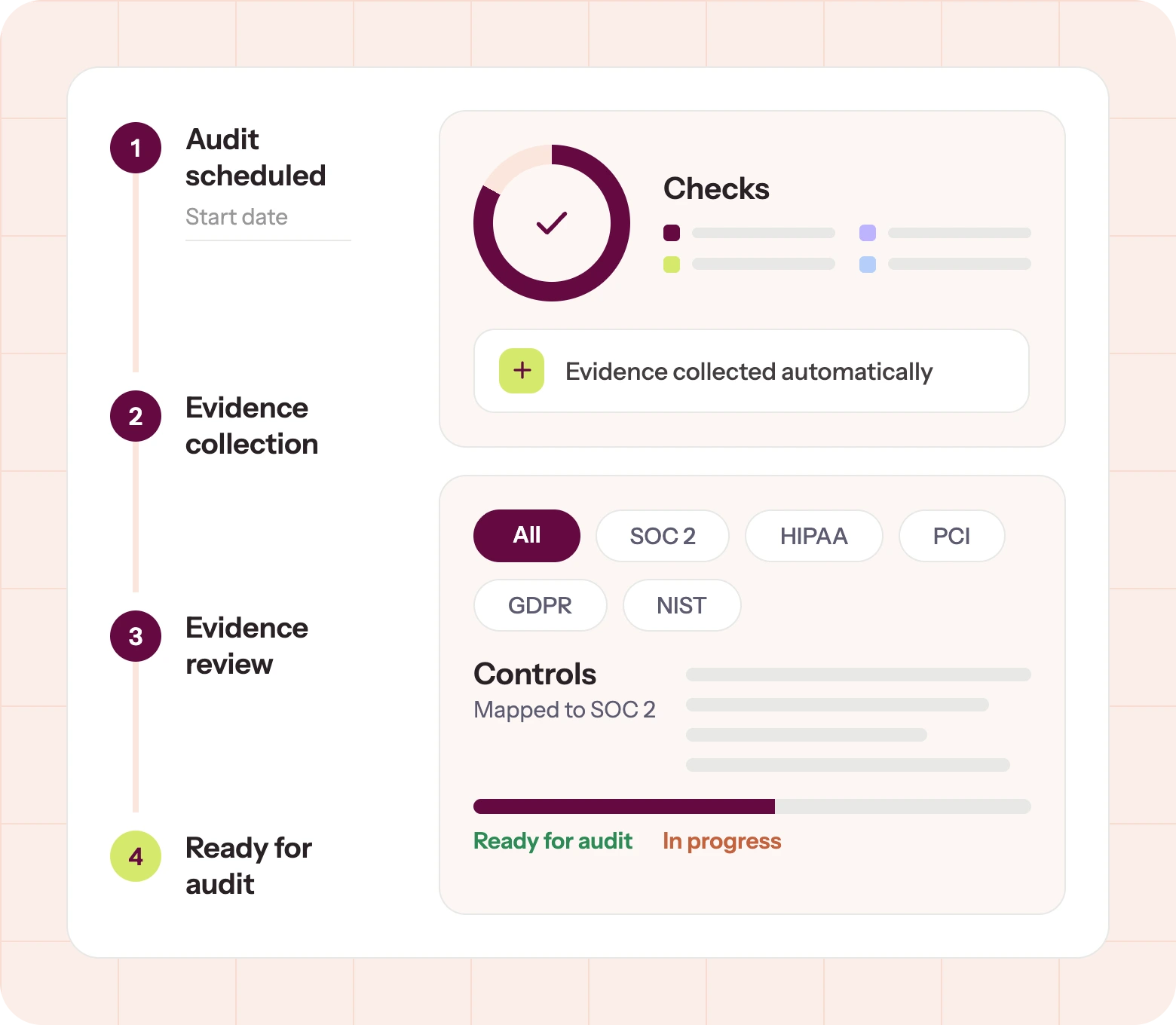
A readiness assessment is a dry run of the audit. For each criterion you scoped, does a control exist, is it written down, and can you produce evidence it ran? Think about a leadership that meets but keeps no minutes, or another policy that doesn’t match day-to-day practice. Each gap becomes a row in a remediation register (its criterion, a risk rating, an owner, a date), and at fieldwork that register answers the question once (found, fixed, dated) instead of reopening it.
One sequencing move saves more rework than anything else here. Once you’ve identified the control set, take the list to your assessor for a read before building the testing steps around it; then validate those in a second round, because discovering a third of your controls need reworking after the evidence pipeline is built will be a nightmare.
3. Remediate, and expect the gaps to be people rather than architecture
Close what the register found. Tighten access rules, enforce MFA, document incident response, fix offboarding. Keep the tickets and change logs from that work, because the remediation itself becomes evidence.
The failure mode is rarely control design. It is people and integrations: an endpoint agent uninstalled months ago, an employee back from leave who never completed security training, a departed engineer’s account kept alive because it owns a shared calendar. All of it produces findings.
Vendor management is one of the most common sources of exceptions in attestation reports. Startups build their own controls carefully and never build a repeatable way to read their vendors’. If your remediation register has no vendor line, that is the gap.
Need a starting point for reading your vendors?
Sprinto’s Vendor Category Landscape 2026 scores 201 vendors across 16 categories on the criteria a risk reviewer checks — including whether they hold a SOC 2 Type II.
4. Set up evidence collection from the authoritative system
For each control, the auditor wants evidence from within the period under review. Map each control to a concrete artifact, then retrieve it from the system of record so the timestamps are the system’s, not from a screenshot.
This could involve identifying MFA logs, ticket IDs for change approvals, and storage inventory for backup encryption. Doing this manually is possible, but that could also be the difference between a four-month project and a year-long one.
5. Select your audit firm on peer review, not price
Start early, ideally a couple of months before the observation window you plan to fix begins. Auditor onboarding takes time, and good firms often have a backlog.
The filter that matters is AICPA peer review. Remember, a CPA firm can be enrolled in the program without having completed a review. So, when you approach a firm, ask for the current peer review report in writing before you sign.
This matters more in 2026, given that AICPA has been publicly concerned about SOC report quality all year. In May, its Peer Review Board directed reviewers to sample a firm’s SOC 2 engagements and compare them for identical reports, risk assessments, and testing procedures.
The choice matters beyond credentials too. If you build your controls to the bare minimum and show them to ten different firms, about half might approve them while the other half could send you back to make fixes. The firm you pick is a variable in your outcome, not a procurement formality. Ideally, you should try to find independent references to understand the firm’s approach.
Also confirm the firm has cloud-native clients, works from evidence exports rather than demanding everything rebuilt in its own format, and ask how they write up exceptions. You settle the window here too as the dates go into the engagement letter. But nothing signed earlier (a platform contract, a proposal) sets them. Remember to name only months your controls held.
6. Auditor comes back with questions
At the end of the window, the auditor analyzes your evidence, tests each control against its criterion, and comes back with questions. Recurring requests often include specific users’ access records for privileged-access testing, restoration proof rather than backup proof, and written explanations for incidents closed outside SLA.
Your system description, the part of the report that explains what your service is and how it runs, is read before anything else and frames how everything after it is interpreted.
7. Draft report and management response
The auditor then issues a draft listing each control tested, the result, and any exceptions. You can review it before it is finalized. This is the standard, not a favor. An exception is a control deviation found during sampling. But getting one is not failing. You can attach a management response giving the root cause, the corrective action with an owner and a date, and how recurrence is prevented. Written well, that response does more for a reader than a report with nothing in it.
Buyers tend to want a current report. So, plan for an annual audit. More on what changes in year two later in the article.
What is in a SOC 2 Type 2 report?
The report has four sections, plus an optional fifth. The auditor’s report and opinion, management’s assertion, your system description, and a table of every criterion, control, test, and result. The fifth holds material the auditor did not examine, so read it as unaudited.
| Section | What it is |
| 1. Auditor’s report and opinion | The CPA firm’s signed conclusion on whether your controls were suitably designed and operated effectively across the window; the opinion type lives here |
| 2. Management’s assertion | Your management’s signed claim that the system description is accurate and the controls met the criteria, carrying the dates of your window |
| 3. System description | Your account of the service: infrastructure, people, processes, data flows, and where the system’s boundary sits |
| 4. Tests and results | One row per control: what the auditor tested, how, and what they found, including any exceptions |
| 5. Other information (optional) | Material the auditor did not examine, often management’s responses to exceptions or planned improvements: read it as unaudited |
Opinions come in four kinds:
- Unqualified: the one people mean by passing
- Qualified: where specific controls failed
- Adverse: where the failures are pervasive
- Disclaimer: where the auditor lacked the evidence to opine at all.
Do note that an unqualified opinion does not mean zero exceptions. Exceptions are recorded test by test in the report’s results table. At the same time, the opinion judges the control system as a whole, so isolated failures with credible management responses can still fall within a clean opinion. That is why careful buyers read the testing table, not just the opinion page.
Our SOC 2 report example guide walks through each section, including the nine checks a vendor-risk reviewer runs.
What can you show buyers before the report exists?
You can show three things: a letter of engagement from your audit firm confirming the audit is underway, a Type 1 report if you hold one, and a trust center with your policies and current control status. A fourth instrument, the bridge letter, solves a different problem: your last report’s period has ended, and the next one is not out yet.
| Instrument | What it does | Who issues it |
| Letter of engagement | Confirms you are engaged and in an observation period | Your audit firm |
| Type 1 report | A dated opinion that your controls existed and were suitably designed | Your audit firm |
| Trust center | A live view of policies and current control status | You |
| Bridge letter | Covers the stretch between your last report’s period and today; most run three months or less | Your management, not your auditor |
The letter of engagement is the most underused of the four: it moves deals, and not every firm issues one, so ask when you sign. What it must contain is covered in our bridge letter guide.
What changes at SOC 2 Type 2 renewal?
A control that drifts in March is a finding in the report issued the following January.
| Year one | From year two | |
| Observation window | Commonly 3 months | The full 12, with no quiet stretch between audits |
| Where the cost sits | Fees: readiness, implementation, the first audit | Attention: every month is inside the period being tested |
| Evidence rhythm | A concentrated sprint before the audit | Continuous, across the whole year |
A year-one trap shows up in year two as well. If your team commits to twice-yearly penetration testing or a quarterly risk assessment, which the framework never asked for, you would be audited against the same cadence. Only promise what you can hold.
One scheduling detail to fix early. If your coverage window ends in August and the new report issues in late September, there is a stretch where the old report is stale and the new one does not exist. That is what a bridge letter is for; plan it when you set your dates.
How do you maintain compliance year-round?
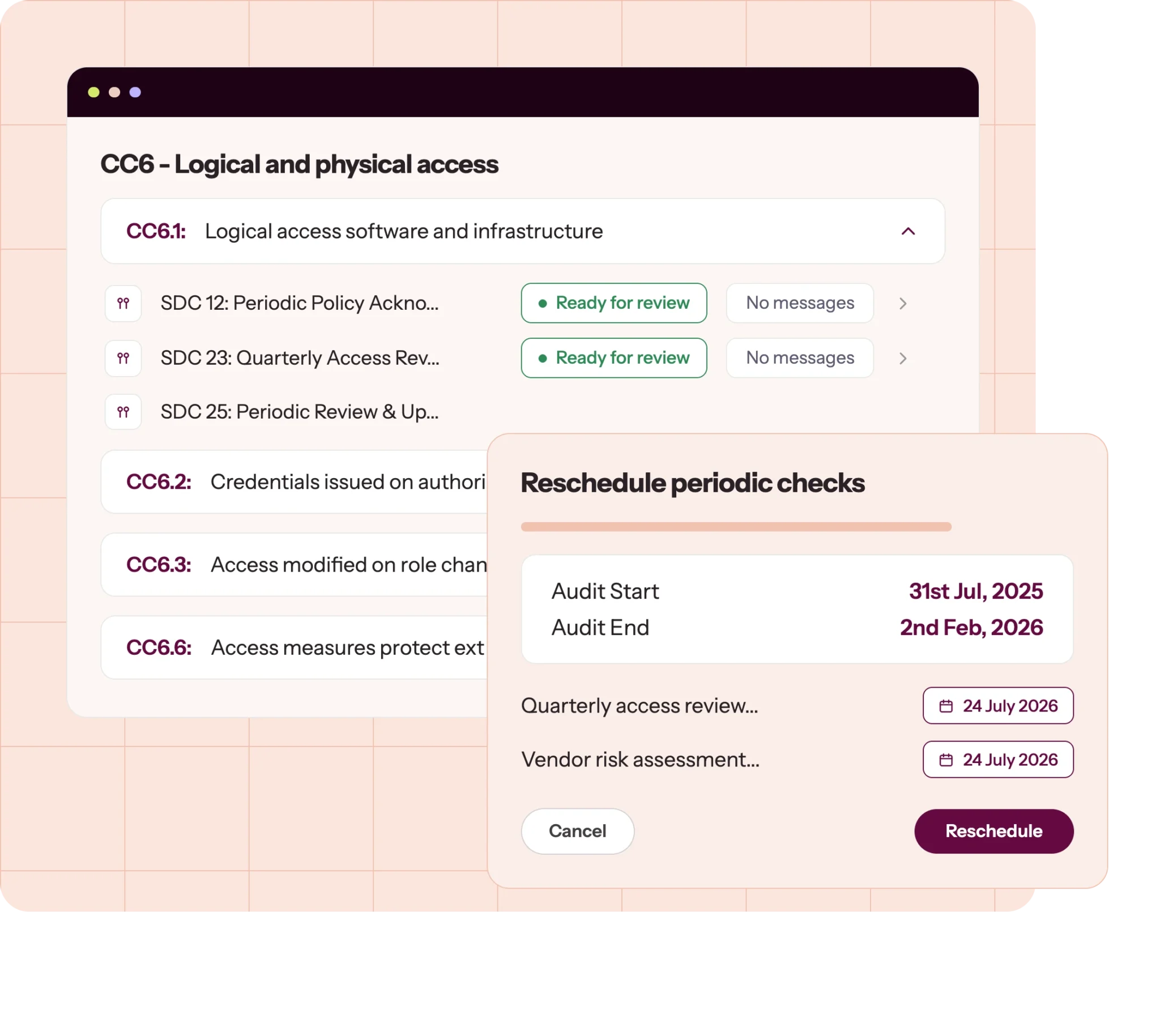
Year-round maintenance is three continuous motions: checks that catch controls drifting, evidence filed as it is produced, and a review cadence you can hold. Run those all year and renewal is a formality; save them for the weeks before fieldwork and every year feels like the first audit.
Seven habits make it concrete.
- Automate the control checks that drift: Configuration, access, offboarding, and training status rot quietly between manual reviews.
- Collect evidence continuously and file it by control: Otherwise, you’ll rebuild a year of proof in the four weeks before fieldwork.
- Enforce change management with approvals and audit trails: Peer-reviewed pull requests are the easiest evidence to produce and the most commonly sampled.
- Run risk assessments on a real cadence: A risk register with default scores and no rationale gets challenged.
- Keep training and policy acknowledgment current: Auditors check dates; this is the most frequent people-side finding.
- Test and remediate against your own SLAs: If policy says high-severity vulnerabilities close in 30 days, the auditor checks whether they did.
- Review internally before you share access: SOC 2 does not mandate an internal audit the way ISO 27001 does, but a readiness review catches the findings you would rather fix than explain.
A better approach is to submit your evidence every quarter instead of saving it all up for the end of the year. This way, you’ll catch problems early while there’s still time to fix them, and your auditor will see that your program is running smoothly. Just make sure to check with your assessor first, since some evidence needs to be current at the time of the audit. Submitting old proof from the first quarter in the fourth quarter is a common mistake.
If you’re running everything manually, it’s easy for things to slip through the cracks: a control drifts, someone forgets to offboard a user, or a review gets skipped. With manual checks only happening every quarter, these issues might go unnoticed for months. By the time you catch them, those missed steps are already part of your audit window, and the exception is locked in.
The same clock runs on an external consultant. The deliverables carry into year two, but without a retainer, nobody is watching in the months between engagements.
How does Sprinto help with SOC 2 Type 2?
Sprinto is an Autonomous Trust Platform that validates your controls against your live infrastructure, works out what is at risk, and closes the gap with your approval rather than just filing a ticket for you.


For a SOC 2 Type 2, that difference matters. A Type 2 covers three months at the short end and twelve at the long end, and your auditor tests whether each control worked for all of it. What disrupts Type 2 audits are often controls that passed in week two, but broke in week nine, and stayed broken until fieldwork found it.
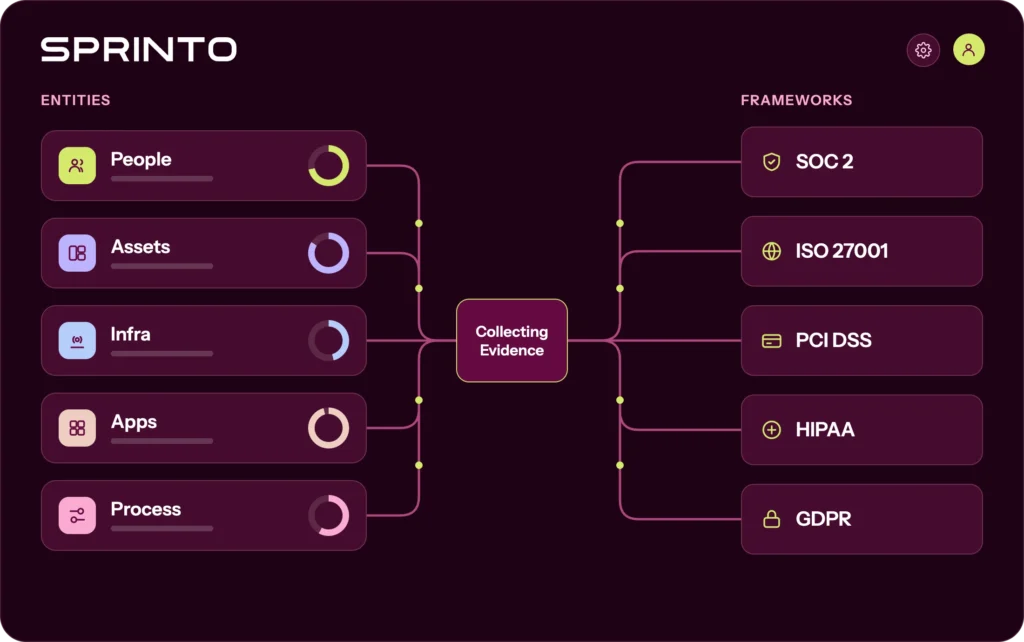
Here’s what Sprinto offers to support you through the SOC 2 Type 2 process:
- Continuous monitoring: Sprinto checks your controls against your connected stack and shows you what is passing and what has drifted. When something breaks, you get an alert while there is still a window left to fix it.
- Evidence collected as controls run: Evidence is checked for completeness and freshness and organized against your framework, so when your window closes, the library is already assembled.
- Readiness support in the package: A certified compliance expert works alongside your team from onboarding through your first audit on one framework. For a first-timer, that is usually the difference between finding your footing and stalling.
- Your auditor, your choice: No revenue sharing with audit firms, separate contracts, round-robin allocation, and a directory you pick from independently. If you have already engaged a CPA firm, simply import their request list into a Custom Audit, and the evidence you upload syncs straight back to the matching request.
- Reuse across frameworks: Controls and evidence built for SOC 2 carry over to ISO 27001, HIPAA, and NIST CSF. The savings show up in your team’s hours before they show up on an invoice.

See what your own SOC 2 Type 2 would involve
Bring your own stack and your own window, and we will walk the controls, the evidence, and the gaps you would be closing.FAQs

Author
Pansy
Pansy is an ISC2 Certified in Cybersecurity content marketer with a background in Computer Science engineering. Lately, she has been exploring the world of marketing through the lens of GRC (Governance, risk & compliance) with Sprinto. When she’s not working, she’s either deeply engrossed in political fiction or honing her culinary skills. You may also find her sunbathing on a beach or hiking through a dense forest.Go beyond the surface and uncover the governance, risk, and compliance insights that actually matter.


Win digital goodies for boardroom success



Explore more SOC 2 articles
SOC 2 Compliance Overview
SOC 2 Preparation and Documentation
SOC 2 Audit and
Reporting
SOC 2 Differences and Similarities
SOC 2 Updates & Management
SOC 2 Industry-Specific Applications
research & insights curated to help you earn a seat at the table.