Most businesses don’t seek out a SOC 2 report on their own. In over 150 buyer conversations I reviewed in August and September 2026, almost half said someone else asked for the report first: a customer, a prospect, an RFP, or sometimes a market they could not sell into without one.
This only counts buyers who told us directly. The real number is likely higher. Most businesses are working to someone else’s deadline for SOC 2, not their own.
This guide walks through a SOC 2 report example section by section, whether you’re about to receive your first report or you’ve just been sent a vendor’s. It covers what each section contains, why the fifth one is different, where to find a real report, and the ten checks to run before you sign off on someone else’s.
What is a SOC 2 report?
A SOC 2 (System and Organization Controls 2) report is the document a licensed Certified Public Accountant (CPA) firm issues after a SOC 2 examination. It gives the firm’s opinion on whether your controls were suitably designed and, in a Type 2, whether they operated effectively over a period. It has four sections, plus an optional fifth.
A Type 1 covers control design as of a specific date. A Type 2 covers whether those controls worked over a period, commonly three to twelve months, though no AICPA (American Institute of Certified Public Accountants) rule sets the length. When someone asks for your report, assume they mean the Type 2.
The report lets your customers, and often their customers, assess the risk of working with you without running their own audit. It comes at the end of the wider SOC 2 compliance process: scoping, controls, evidence, then the examination.
SOC 2 ends with an attestation report from a CPA firm, and there’s no SOC 2 certificate. That’s where it differs from ISO 27001, which ends in a certificate.
Who needs a SOC 2 report?
Any company that stores, processes, or supports customer data for other businesses will usually be asked for one. No law requires a SOC 2 report. The requirement comes from buyers: a security review, a procurement questionnaire, or a contract clause that names it. This is why most teams start SOC 2 evidence gathering on someone else’s deadline.
The requests come most often to:
- Software-as-a-service and cloud providers, whose customers put their own data into the product.
- Health tech and healthcare service providers, such as billing and patient-data platforms, alongside any obligations under HIPAA, the US Health Insurance Portability and Accountability Act.
- Payments and fintech companies, where a SOC 2 sits alongside the Payment Card Industry Data Security Standard (PCI DSS).
- Managed service and IT providers with administrative access to client systems.
Deal stuck in a security review?
Learn when to start SOC 2, whether to go Type 1 or straight to Type 2 under a deadline, the five myths that create the most rework, and a live walkthrough from connecting your stack to audit-ready.
What does each section of a SOC 2 report contain?
A SOC 2 report has four main sections: the independent service auditor’s report with the opinion, management’s assertion, the system description, and the table of criteria, controls, tests, and results. An optional fifth section holds information management wanted to include, but the auditor didn’t examine, which is why it reads differently from the rest.
Most reports lead with the auditor’s report and put management’s assertion second, but not by much. Of the eight real company reports we read in September 2026, five opened with the auditor’s report and three with management’s assertion. The AICPA’s own 2014 illustrative Type 2 report, built with the Cloud Security Alliance’s Cloud Controls Matrix, also puts the assertion first as Section 1 and the auditor’s report second.
No attestation standard fixes the order, and that illustrative report says so directly. The AICPA guide specifies the components of a SOC 2 report and the information to be included in each component, but it does not specify the format for these reports, and the document calls its own format illustrative rather than prescriptive (AICPA, Illustrative Type 2 SOC 2 Report). So check the contents page of the report in front of you, and read any guide that calls a section ‘section 1’ as describing one convention among several.
| Section | What it contains | How to read it |
|---|---|---|
| Independent service auditor’s report | The CPA firm’s opinion, the scope, each party’s responsibilities, and the inherent limitations of the examination | Start here. Read the opinion type, then the basis for it if it’s anything other than unqualified |
| Management’s assertion (some reports title it “Management Assertion”) | Management’s signed statement that the description is accurate and the controls were suitably designed and, in a Type 2, operated effectively | Written by the company. It’s a claim, and the auditor’s report is the opinion on that claim |
| System description | Infrastructure, software, people, procedures, data, subservice organizations, and any criteria scoped out | Also written by management. It tells you whether the report covers the service you buy |
| Criteria, controls, tests and results | Every control, the test the auditor ran, the result, and any exception, line by line | Where the opinion is evidenced, and where any exceptions are listed |
| Other information (optional) | Management’s response to exceptions, planned remediation, future context | Unaudited. The auditor didn’t examine it. Read it as the company’s own statement |
Pay close attention to the last row. The other-information section sits in the same PDF and format as everything above it, and carries none of the auditor’s assurance.
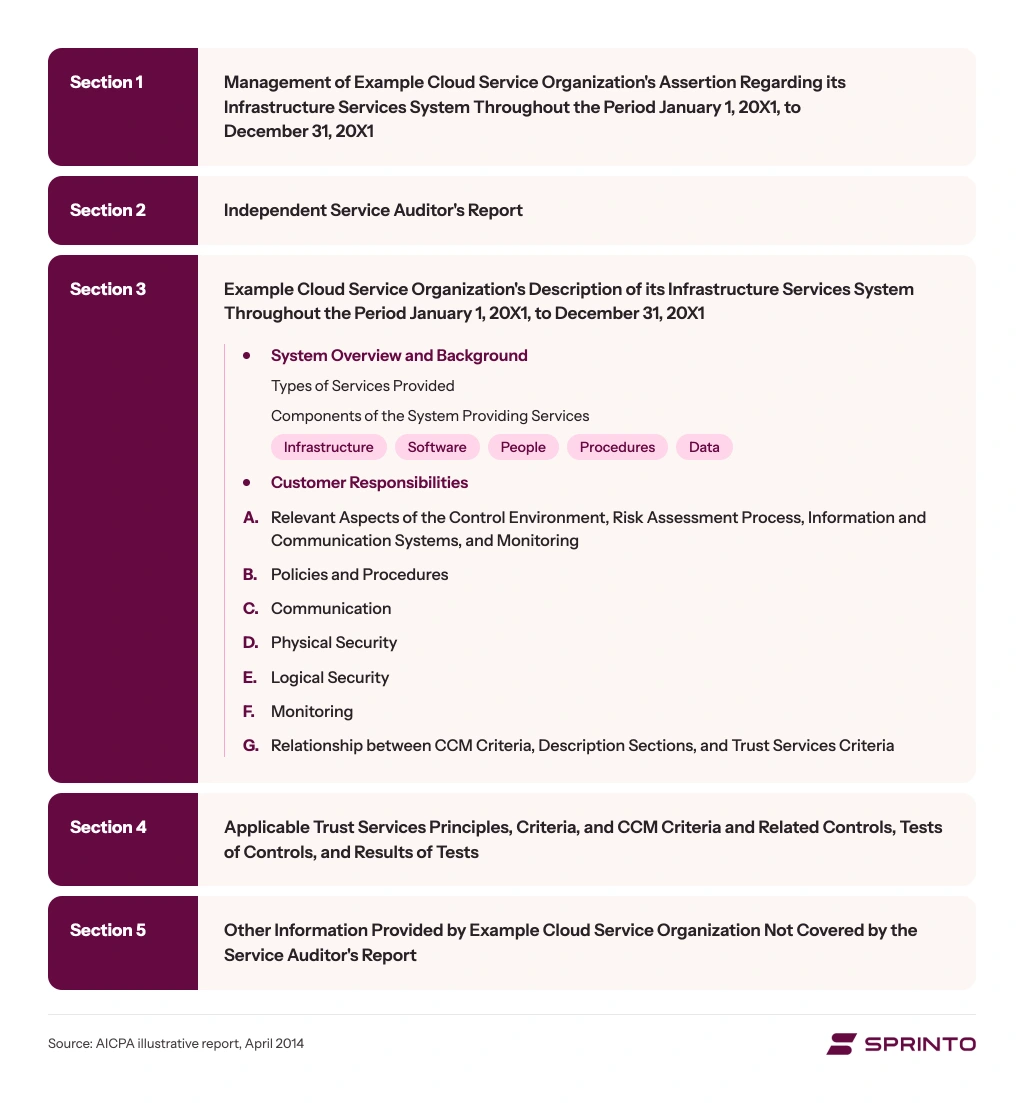
Here’s what each section holds, in the order most reports use.
1. The independent service auditor’s report
It gives the CPA firm’s formal opinion on whether your controls were suitably designed and, for a Type 2, whether they operated effectively over the period. It also sets out the scope and what management and the auditor are each responsible for, and lists the limits of any examination, including human error and someone working around a control.
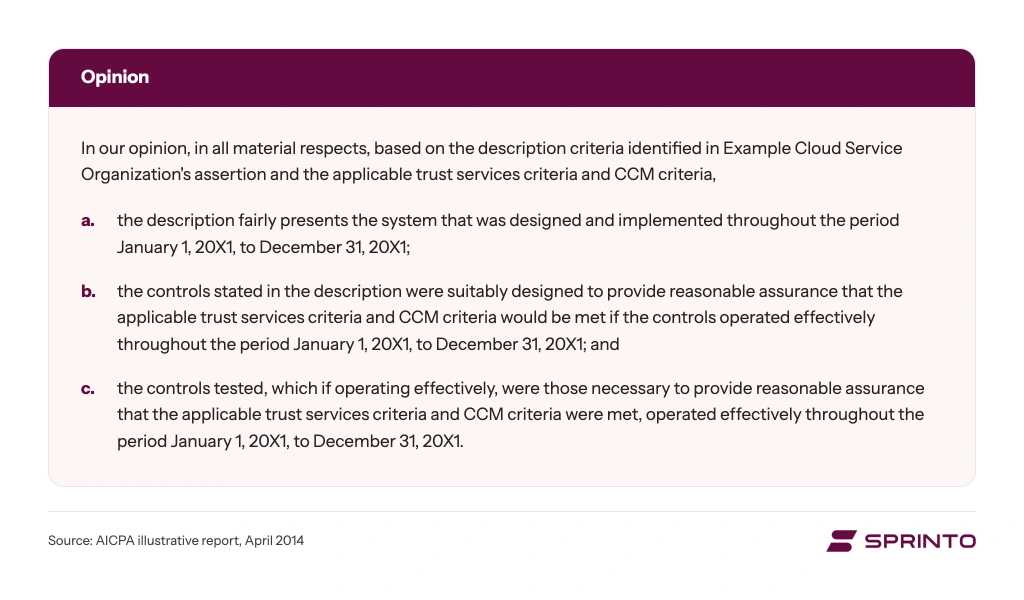
Four opinions are possible:
- Unqualified. The system description, control design, and, in a Type 2, control operation met the applicable criteria in all material respects. It doesn’t mean there were no exceptions. If the test results list any, read their scope and management’s response before deciding whether they matter to you.
- Qualified. The auditor has a reservation. How much that matters depends on which controls fell short and whether you rely on them.
- Adverse. One or more criteria were materially not met. The controls, as tested, didn’t do what the description says they do.
- Disclaimer of opinion. The auditor couldn’t gather enough evidence to form an opinion, usually because access or information was missing.
This section gives you the verdict. The reasoning is in the test results.
2. Management’s assertion
It’s a signed statement from the audited company’s leadership saying the system description is accurate and the controls were suitably designed to meet the criteria. In a Type 2, it also says those controls operated effectively throughout the period. It’s deliberately short and non-technical, and it names any applicable criterion that wasn’t met, with the reason.
The detail lives in the system description.
Read the assertion and the auditor’s report together: the assertion is the company’s claim, and the auditor’s report is an independent firm’s opinion on that claim.
3. System description
The services provided and the system components behind them: infrastructure, software, people, procedures and data, plus the control environment, risk assessment, control activities, information and communication, and monitoring. It’s the longest section and the one that decides whether the report is useful to you, because it defines what was in scope.


Management writes it against the AICPA’s description criteria. If your vendor runs on a particular cloud provider, this is where you’ll see it.
Six things to read closely:
- Overview of services: Confirm the service you buy is inside the scope. A report covering a different product line tells you about somebody else’s controls.
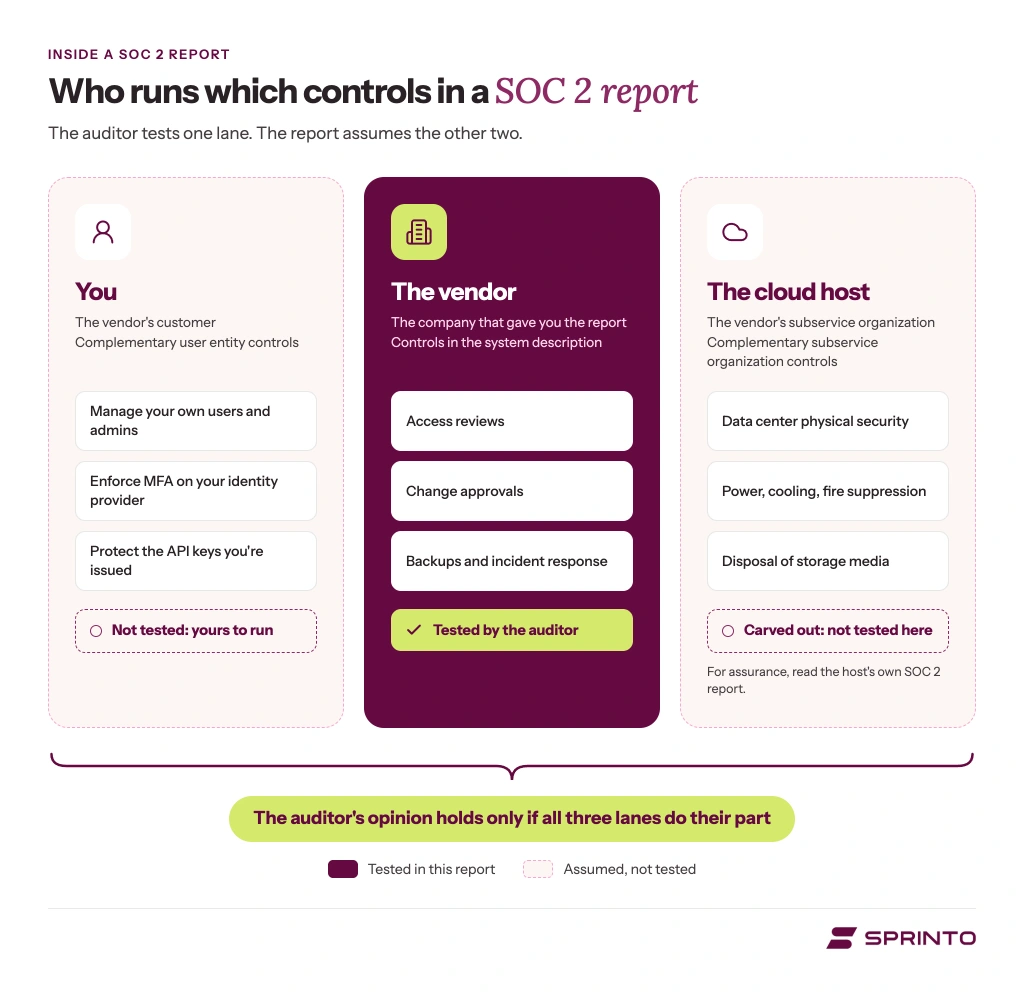
- Complementary user entity controls (CUECs): Controls the vendor assumes you would run on your side, such as managing your own administrators, enforcing multi-factor authentication (MFA), and reviewing user access. All nine reports we read (the eight company reports plus the AICPA illustrative one) carried a CUEC list. However, the description criteria call for one only when the vendor’s design depends on customer controls. When a list is there, it stays your job even under a clean opinion.
- Complementary Subservice Organization Controls (CSOCs): These are controls expected to be performed by third parties on which the service organization depends, such as cloud providers, data centers, support tools, or managed service providers.
- Subservice organization treatment: Check whether important third parties are included in the audit scope or excluded from the auditor’s testing. If they are carved out, the report should still explain the services they provide, the controls they are expected to perform, and how the organization monitors those dependencies.
- Significant system changes: In a Type 2 report, this section should describe major changes during the audit period that could affect the system, such as an acquisition, a cloud migration, a major architectural change, a new service launch, or a change in key subservice organizations.
- Relevant incidents: If the organization failed to meet its service commitments or system requirements during the period, the system description should provide report users with enough context to understand what happened and why it matters.
Even when the report has a clean opinion, some control responsibilities may fall outside the vendor’s organization. This section helps you identify which controls the vendor manages, which your team must operate, and which depend on a subservice organization.
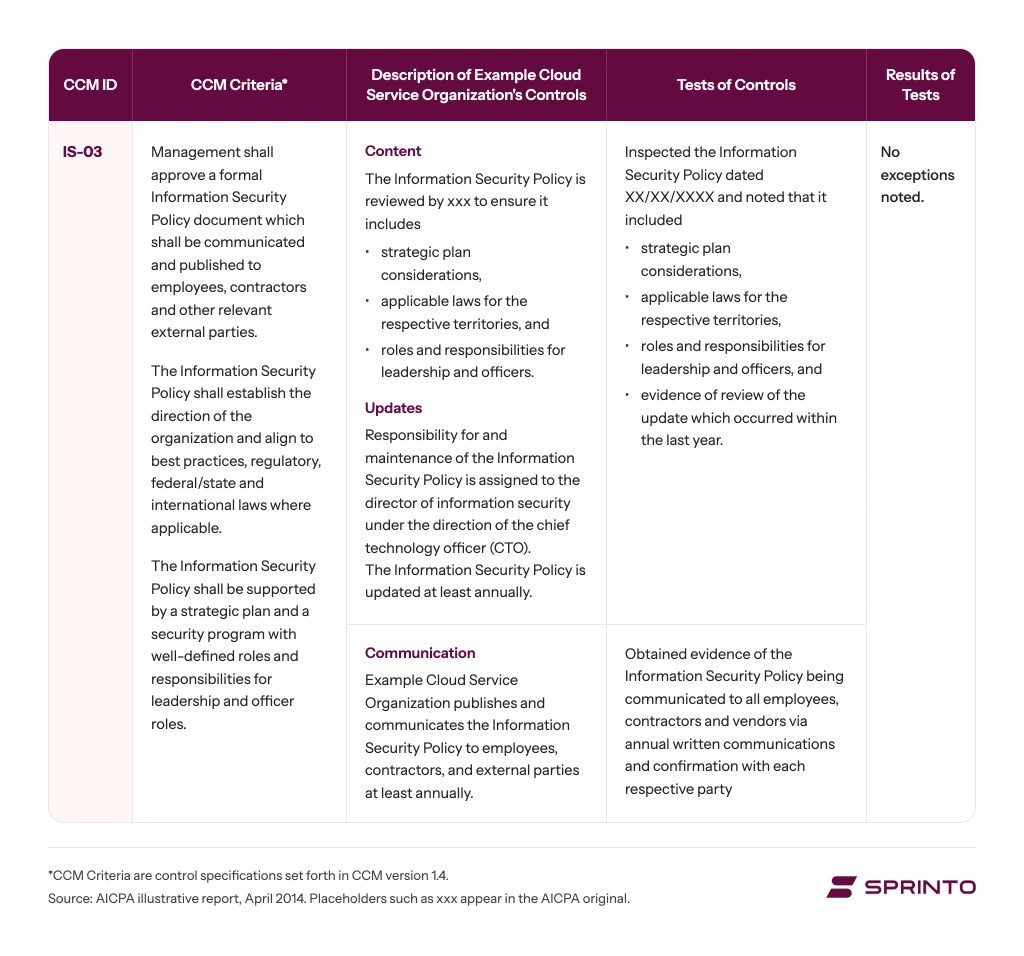
4. Criteria, controls, tests and results
The evidence behind the opinion is laid out in a table. Each row gives the criterion, the control number, the control as the company describes it, the test the auditor ran, and the result. Exceptions are called out line by line here, so when a report is qualified or adverse, this is where you’ll find out why here.
5. Other information
Usually, management’s response to any exceptions includes the root cause, what’s being done about it, and how they’ll stop it from recurring. It can also include future plans that affect the control environment. The section is optional and unaudited, and the unaudited part is the one to remember while you read it.
A well-written management response can tell you more about a vendor than a clean report with nothing in it, because it shows whether they understood the finding and what they did about it. Just read it knowing the auditor didn’t test any of it.
Map out your first SOC 2 report
Get a readiness checklist to see where you stand, a timeline and audit roadmap, and a breakdown of what the audit, tooling, and your team’s time will cost.
What are exceptions in a SOC 2 report, and how serious are they?
An exception is a control deviation the auditor found while sampling: they tested a control, and one or more instances didn’t hold. Most teams just call them findings. A report with exceptions can still carry an unqualified opinion, and four things printed on the report tell you how much any one exception matters.
SOC 2 confuses people coming from ISO 27001 here, and the confusion is fair. ISO 27001 grades what an auditor finds, from observations and opportunities for improvement up to minor and major nonconformities. SOC 2 has no graded scale. A chief information security officer (CISO) four cycles into his company’s SOC 2 program told us he couldn’t tell what the SOC 2 findings he’d just received meant for his program.
Since no standard scale exists, weigh each exception on these four:
- How many instances, out of how many tested: The test result states this. One deviation out of forty samples reads differently from six out of ten.
- Which criterion does it fall under: An exception around a logical access control (CC6 in the Trust Services Criteria) is a different conversation from one on a communication control (CC2). Read it against what you rely on the vendor for.
- Whether it changed the opinion: This tells you the most. An unqualified opinion despite exceptions means the auditor concluded the criteria were still met in all material respects; a qualified one says the opposite.
- What management said about it: The response usually sits in the other-information section, and some reports print it beside the exception; the opinion doesn’t cover it either way. A response that names a root cause, an owner, and a date reads differently from one that restates the finding.
Worth knowing: it takes very little to produce an exception. If a new joiner in the auditor’s sample skipped induction or security training, it could appear in the report as an exception. You also can’t pass or fail a SOC 2 examination.

If you’re the company receiving the report, raise any disagreement while it’s still in draft. An exception is written against the evidence the auditor sampled, so share any evidence from inside the period they didn’t see; evidence dated after the period closed won’t count.
If you’re reviewing a vendor’s SOC 2 report, zero exceptions don’t automatically make it the strongest. Auditors have to report every deficiency they find, so a clean report shows only what the tests covered. Check how deep the testing went before you compare. So a vendor’s report with an exception in it isn’t a red flag by default. A qualified opinion is more serious, and nobody publishes how often one is issued, so distrust any frequency claim you read.
If the exception is in your own report, focus on how you respond to it.
When does a SOC 2 report stop covering what you buy?
When the system it describes stops being the system you’re buying. No standard sets an expiry date; buyers usually treat a report as current for about twelve months after the end of the period it covers. That convention is about age, though, and a material change can leave a recent report describing something the vendor no longer runs.
If you hold a report, tell your auditor when something material changes rather than waiting for the next annual cycle. Notify the external auditor right away and ask whether an interim audit is needed. An acquisition, a cloud migration, a new product line, or a new legal entity all count.
If you’re reviewing someone else’s report, ask directly if anything material has changed since the period ended. A report from a company that has since acquired a competitor and migrated clouds may still be within the usual twelve months and no longer describe what you’re buying.
ISO 27001 handles this differently. An ISO certificate has to be updated when the company’s name, entity, or legal structure changes, because it makes a claim about the organization as it stands today. A SOC 2 report describes a period that has already ended, which makes it more flexible after a corporate change and much easier to treat as current when it isn’t.
SOC 2 Type 1 vs Type 2 reports: What is the difference?
The auditor’s report, the assertion, and the system description look similar in both types, but the opinion and assertion wording differ. A Type 1 covers whether the controls are designed well, meaning set up to meet the criteria, on one date. A Type 2 covers that design plus whether the controls operated effectively across a period.
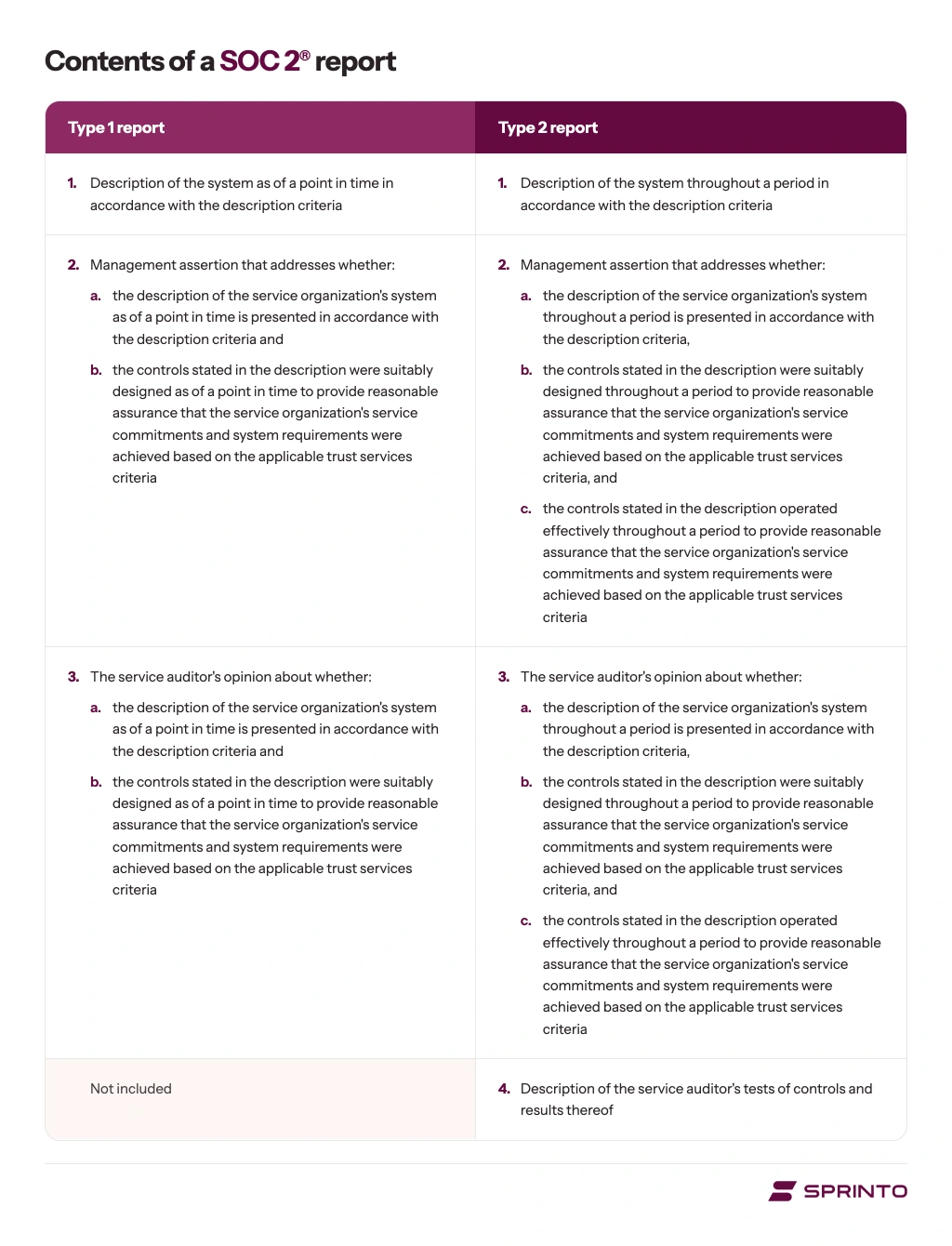
You need to know where the two diverge in structure. The table below shows that.
| Where they differ | Type 1 report | Type 2 report |
|---|---|---|
| What is tested | Control design on a single date | Control design plus operating effectiveness across a period |
| Period covered | One date | Commonly three to twelve months |
| Test results contain | The controls and the auditor’s assessment of their design | The controls, the auditor’s tests, the result of each, and any exceptions |
| What it tells a reviewer | The right controls existed on that date | The controls kept working while people used the systems |
| Typical use | An interim report while a first Type 2 window runs | What most security reviews ask for |
A Type 1 report contains no operating-effectiveness results because there’s no observation window to test, and that is why it’s shorter.
How do you get a SOC 2 report?
You prepare your controls, then an independent CPA firm examines them and issues the report. In practice, that means scoping the system and criteria, closing gaps, choosing an audit firm, and then either a Type 1 on a single date or a Type 2 over an observation window, followed by fieldwork and the report.
Timelines vary with scope and how much remediation you need. The observation window sets most of the pace, which is why planning your SOC 2 Type 2 timeline early helps.
A first SOC 2 report for companies with fewer than 500 people costs between $6,000 and $60,000. This covers the compliance platform and audit, but not your team’s time. For teams of fewer than 50 people, the cost is likely below $15,000. For teams of 51 to 200 people, it ranges from $10,000 to $23,000; for 201 to 500 people, it ranges from $20,000 to $60,000. The total SOC 2 compliance cost also includes readiness, tooling, and your team’s time.
Where can you find a real SOC 2 report?
There are three routes. The AICPA publishes illustrative SOC 2 reports, the closest thing to a sample you can read end to end, and many software-as-a-service (SaaS) companies publish a trust page with a request process. Otherwise, you ask the vendor directly, which is how most reports change hands.
1. Illustrative reports
If you want a sample SOC 2 report to study, start with the AICPA’s Illustrative Service Auditor’s SOC 2 Type 2 Report and its Illustrative SOC 2 Report with Illustrative System Description. The Cloud Security Alliance, working with the AICPA, released a version built on its Cloud Controls Matrix in August 2022. All three show real structure and opinion wording with invented content.
One thing to note: The PDF that circulates most widely is the April 2014 AICPA version, which still says ‘trust services principles’. The term was replaced in 2017 by Trust Services Criteria. You can still read it for structure, but use the current terminology from the 2022 version.
2. Public trust pages
Many SaaS companies publish a trust or compliance page describing which attestations they hold and how to request the report. Some of the ones I checked for this article have the full SOC 2 report behind a login, a request, or a non-disclosure agreement (NDA), usually through a trust center.
A SOC 3 is the usual open exception, and it’s a different document: it comes from the same examination and carries far less detail, with no control-by-control test results.
3. Ask the vendor
This is how SOC 2 reports are typically shared. You request it during procurement or a security review, sign an NDA, and receive the PDF. A vendor whose report period ended a while ago should be able to give you a bridge letter covering the gap.
The reports are confidential by design. Occasionally, smaller vendors post one anyway, so treat anything advertised as a library of real reports as either a renamed illustrative document or something the publisher shouldn’t be distributing.

Answering the same security questions every week?
Put your certifications, policies, and security posture on a single page that you can share via a link.What can you share instead of the full SOC 2 report?
You have four options, and the right one keeps a security review moving while the report stays confidential: a SOC 3 report for anyone who can’t sign an NDA, a trust center for the repeat questions, a letter from your audit firm if your first audit is still running, and a bridge letter once a report period has ended.
This comes up more than most teams expect. Roughly one in seven teams we speak with ask for something to show a customer before their first report is ready.
- A SOC 3 report: The AICPA describes SOC 3 reports as “general use reports” that “can be freely distributed,” covering the same criteria as SOC 2 without the same level of detail (AICPA & CIMA). You ask your auditor for it as a separate deliverable from the same examination, and it’s worth adding when buyers can’t sign an NDA.
- A trust center: Your policies, certifications, current control status, and a request process for the documents that need one. It’s what many SaaS companies run, and it turns a repeated email thread into a page.
- A letter confirming you’re in progress, if your first audit hasn’t finished: Before your first report exists, there’s nothing for a bridge letter to bridge, so buyers usually accept a letter that says where you stand. Your audit firm can issue an engagement letter once you’ve signed with them, and if you use Sprinto, you can download a Letter of Engagement from the app that confirms you’re in the readiness phase and will be audited by an independent CPA firm.
- A bridge letter: Also called a gap letter, covering the stretch between your last report’s period and today. Your own management writes and signs it, and most cover no more than three months.
Note: Neither letter is an audit opinion, and neither promises a finish date. If a buyer wants more, give them the date your audit window opens and offer a call with your security lead.
People often ask about sharing a redacted report, and it’s an option to handle with care. There’s no standard for redacting a SOC 2 report, and the auditor’s report still limits who may receive it, so talk to your auditor before sharing any edited version. For a buyer who can’t sign an NDA, the SOC 3 is usually the better answer.
How do you review a SOC 2 report a vendor sent you?
First, check the report type and period, the criteria in scope, the opinion, and then the exceptions. Then three parts that are easy to skip: the complementary user entity controls you have to run yourself, whether the vendor’s critical subservice providers were tested or carved out, and who signed the report.
Here are the ten checks, in the order a reviewer works through them.
- Report type: Type 1 shows design on a date; Type 2 shows operation across a period. If your requirement says Type 2, a Type 1 doesn’t satisfy it.
- Audit period: Confirm the period ended recently enough for whoever is asking. A report has no expiry date, and most buyers ask for a newer one about twelve months after the period it covers ended.
- Criteria in scope: Security is always there; availability, confidentiality, processing integrity and privacy appear only if they were scoped in. If you’re buying on an uptime commitment and availability isn’t in scope, the report doesn’t cover it.
- The opinion: Read the auditor’s report. If it’s anything other than unqualified, read the basis for it before going further.
- The exceptions: Go to the test results, read the affected controls and management’s response, and use the four questions above to decide whether the issue touches how you use the product.
- Complementary user entity controls: Listed in the system description. Assign an owner on your side for each one.
- Subservice organizations and carve-outs: Also in the system description. If a critical dependency was carved out of testing, read what the report says about how the vendor monitors it.
- Significant changes and incidents during the period: Judge whether what’s described affects the service you buy, and ask what has changed since the period ended.
- Gap coverage: If the report period ended more than a few months ago, ask for a bridge letter.
- Who signed it: The report is only as good as the firm behind it, so confirm the CPA firm is licensed, ask for its most recent peer review report, and check that it has examined companies similar to the one you’re assessing.
Steps 6 and 7 catch people because a clean opinion doesn’t mean someone tested every control you depend on. Some sit with the vendor, some with a third party, and some with you, and handing a process to a vendor leaves the risk in it with you.
A small side quest worth doing: book the review with some lead time. A report handed to your team the day before a decision leaves no room to compare the auditor’s tests with how you’d have tested the same controls, and that comparison is the useful part of a review. It gets easier once the review is part of a repeatable vendor management process.
How does Sprinto help with your SOC 2 report?
Sprinto is an Autonomous Trust Platform that offers AI-driven automation and deep integrations to monitor controls in real time, collect and map evidence automatically, and flag risks before they turn into audit issues. Instead of chasing screenshots and reconciling gaps at the last minute, teams get a system that keeps SOC 2 reports accurate, complete, and audit-ready year-round.
Here’s more on how Sprinto helps on either side of the audit:
- Evidence that matches the system description: Sprinto continuously collects audit-grade evidence, maps it to the relevant controls, and preserves timestamps and history, so what the description says and what your systems do stay in step.
- A pre-audit review: Before your evidence goes to the auditor, a Sprinto specialist goes through what you’ve collected against your auditor’s request list and tells you what’s missing, so you close the gap on your side rather than have it written up as an exception in the report.
- Implementation support in the subscription: An industry expert works with your team from onboarding through your first audit on one framework, with no separate retainer.
- Your auditor, billed directly: You pay the audit fee to the CPA firm with no markup. Choose from Sprinto’s audit partner network or bring your own auditor; either way, the audit fee and the platform subscription are separate bills.
- A Trust Center for the other side of the conversation: When customers ask for your report, the Sprinto Trust Center lets you publish your security profile with compliance reports, documents and controls, and handle access requests in one place.
FAQs

Author
Sucheth
Sucheth is a Content Marketer at Sprinto and holds CompTIA Security+. He helps security and GRC teams to navigate audits: what each framework requires, what auditors ask for, and what it costs to maintain.Go beyond the surface and uncover the governance, risk, and compliance insights that actually matter.


Win digital goodies for boardroom success



Explore more SOC 2 articles
SOC 2 Compliance Overview
SOC 2 Preparation and Documentation
SOC 2 Audit and
Reporting
SOC 2 Differences and Similarities
SOC 2 Updates & Management
SOC 2 Industry-Specific Applications
research & insights curated to help you earn a seat at the table.