TL;DR
| Built for enterprises, not lean teams. OneTrust is comprehensive, but that depth comes with real complexity and cost that most small teams can’t justify. |
| Expect a pricing conversation, not a price tag. Everything is custom-quoted, costs scale fast with modules, and the median customer spends around $11,500/year. |
| Powerful once set up, getting there is the hard part. Most teams spend weeks in configuration before seeing any real value, and the UI doesn’t make it easy. |
If you’re evaluating OneTrust, you already know the name. Founded in 2016 by Kabir Barday in direct response to GDPR, it’s grown into one of the most recognized GRC platforms globally, serving thousands of enterprises across 100+ countries.
But a strong reputation doesn’t tell you whether it’s the right fit for your team, your budget, or your compliance goals. OneTrust is powerful and expensive, and the gap between “great platform” and “great for us” is wider than most reviews let on.

So we did the legwork. This review pulls together verified user feedback from G2, Capterra, Software Advice, and Trustpilot, community discussions from Quora and Reddit, pricing data from Vendr and Spendflo, and OneTrust’s own product documentation to give you an honest picture of what it actually delivers, and what it doesn’t.
OneTrust verdict: Our rating
Verdict: 7.5/10
OneTrustis a powerful, feature-rich platform with strong regulatory coverage and broad integrations. But the platform has a steep learning curve, complex and opaque pricing, and inconsistent support, making it a poor fit for teams without dedicated GRC resources.
| Category | Our rating | Source |
| Features & Functionality | 8/10 | Product analysis + G2 |
| Ease of Use | 6/10 | G2, Capterra, Software Advice |
| Customer Support | 6/10 | G2, Capterra, Trustpilot |
| Pricing & Value | 6/10 | Vendr, Spendflo data |
| Integrations | 8.5/10 | OneTrust product docs |
| AI capabilities | 7.5/10 | G2, OneTrust AI governance docs |
| Overall | 7.5/10 | Aggregate of the above |
OneTrust pros:
- Comprehensive coverage of 50+ pre-mapped compliance frameworks and 300+ global jurisdictions
- Broad integration ecosystem connecting 200+ enterprise tools, including Microsoft Purview, ServiceNow, Snowflake, and Databricks
- Strong privacy management suite like GDPR, CCPA, LGPD, HIPAA, and more in a single platform
- Modular architecture lets you start with what you need and expand over time
- Robust third-party risk management with the Third-Party Risk Exchange (formerly Vendorpedia),integrating RiskRecon, SecurityScorecard, and HackNotice for continuous monitoring across 20M+ cyber risk insights
- AI Governance module for managing AI model inventories, risk, and compliance
- Industry-leading regulatory research via DataGuidance covers 300+ jurisdictions with real-time updates
OneTrust cons:
- Steep learning curve, setup requires significant time, training, and often professional services
- Modular pricing escalates quickly; many key features require additional paid modules
- No transparent public pricing; all contracts are custom-quoted
- Reporting and customization options are limited across multiple modules
- Cross-module integration is incomplete in some areas, creating workflow gaps
- Inconsistent customer support quality depending on account tier
- Annual contracts only; no month-to-month option available
- Poor fit for startups and SMBs without dedicated GRC resources
OneTrust product overview
OneTrust organizes its platform into six solution areas:
- Consent & Preferences
- Privacy Automation
- Third-Party Management
- Tech Risk & Compliance
- AI Governance
- Data Use Governance
These are accessible through a single platform instance, and buyers can select individual modules within each area rather than purchasing an entire cloud package.
The platform currently serves more than 14,000 customers globally and holds over 300 patents. Its core value proposition is consolidation; bringing privacy, risk, data governance, and compliance workflows under one roof so that teams don’t have to stitch together multiple point solutions.
Who is OneTrust best for?
- Large enterprises managing multi-jurisdictional privacy programs across GDPR, CCPA, LGPD, APPI, and other frameworks
- Organizations with a dedicated privacy or GRC team that can manage onboarding, ongoing configuration, and administration
- Businesses that need deeply integrated data discovery, consent management, and third-party risk in one platform
- Companies in regulated industries, such as healthcare, financial services, and tech, with mature and complex compliance programs
- Multinationals that need real-time regulatory intelligence across 300+ jurisdictions without constant legal research
Who should look for OneTrust alternatives?
- Startups and SMBs with lean compliance teams or limited GRC budgets
- Teams seeking fast, self-serve paths to SOC 2 or ISO 27001 certification
- Organizations that need quick time-to-value without heavy implementation involvement
- Companies whose primary need is developer-centric security automation
Quick take: OneTrust is powerful by design, but that power demands investment. If your team doesn’t have the bandwidth to implement and manage a complex platform, the ROI can take a long time to realize.
OneTrust key features
OneTrust is a broad platform, and that breadth can make it hard to understand what it actually does day to day. Here’s a breakdown of each core feature area, what problem it solves, and what you should realistically expect from it.
1. Privacy management & consent
This is where OneTrust started, and honestly, it’s still where the platform is strongest. The core job here is helping your organization stay on the right side of privacy laws without having your legal or compliance team manually track every rule change.
In practice, here’s what that looks like. When a customer emails you saying, ‘delete my data,’ that triggers a Data Subject Request (DSR). Without a tool like this, someone on your team is manually hunting through databases, emailing other departments, and hoping nothing gets missed. OneTrust automates the entire workflow, so you have an auditable, consistent process instead of a fire drill.
Beyond DSRs, the module handles Privacy Impact Assessments (PIAs) when you launch new products or data processing activities, keeps your data inventory up to date so you always know what personal data you hold and where it lives, and manages your privacy notices across multiple websites and languages.
The platform’s privacy and consent management key capabilities include:
- DSR automation, from intake, identity verification, and data discovery, to secure response workflows
- PIAs/DPIAs with pre-built templates and guided workflows
- Centralized data inventory with automated data mapping and flow visualization
- Privacy notices management across multiple properties and languages, with full version control and publishing workflows
- Consent and preference management across web, mobile, and CTV
I really like that OneTrust Privacy Automation is a comprehensive all-in-one platform. It saves me from jumping between different tools for tasks like cookie consent mapping and DSARs. The regulatory intelligence feature is a game changer because it provides real-time updates on global laws.
— Verified user, G2 — OneTrust Privacy Automation
2. Compliance automation (SOC 2, ISO 27001, GDPR, HIPAA)
If you’ve ever been through a SOC 2 or ISO 27001 audit, you know how painful the evidence collection process can be. That’s exactly the problem Tugboat Logic was built to solve. Founded in 2017 and backed by In-Q-Tel and Emergence Capital, it built an AI-driven tool to automate certification readiness across SOC 2, ISO 27001, HIPAA, CMMC, and PCI DSS, complete with a pre-built library of 40 compliance policies and automated responses to security questionnaires.
OneTrust acquired them in 2021, and that engine is now what powers OneTrust’s compliance automation capabilities today
Note: OneTrust acquired Tugboat Logic on September 9, 2021. The deal brought 800 customers, 140 employees, and Tugboat Logic’s proprietary evidence framework into the OneTrust portfolio. This framework, now covering 50+ frameworks, became the engine for OneTrust’s Compliance Automation module.
As a result of this integration, OneTrust’s compliance automation capabilities now include:
- Pre-built framework templates with mapped controls and evidence requirements for 50+ frameworks
- Automated evidence collection with one-time collection mapped across multiple frameworks
- Audit management with centralized evidence storage and audit trails
- Policy lifecycle management covering drafting, approval workflows, version control, and employee attestation
- Continuous control monitoring and gap analysis that flags gaps before your auditor does
3. Third-party risk management (TPRM)
OneTrust’s TPRM module handles the full vendor lifecycle.
When a new vendor comes in, OneTrust automatically risk-tiers them, so your team knows upfront where to focus. A payroll processor handling sensitive employee data receives a more thorough assessment than a software vendor with minimal data access. You’re not applying the same scrutiny to everyone; the platform helps you allocate effort where the actual risk is.
Assessments go out as structured questionnaires, and AI-assisted evidence ingestion reduces the back-and-forth of getting vendors to respond. And because you can’t just rely on what vendors tell you about themselves, the platform connects to RiskRecon, SecurityScorecard, and HackNotice for continuous external cyber risk ratings, an independent check that runs in the background without your team having to chase it. Here’s what you get:
- Vendor onboarding with risk tiering to guide assessment depth
- Customizable questionnaires across security, privacy, ethics, and compliance domains
- AI-assisted evidence ingestion to reduce questionnaire response effort
- Fourth-party risk management for sub-processor visibility
- Ongoing monitoring with reassessment triggers and issue tracking
The Third-Party Risk Management module in OneTrust has significantly altered the way we approach and monitor third parties. The flexibility of the risk assessment templates and frequent monitoring tools have enabled us to have updated information about inherent risks.
— Verified user, Capterra
4. Data governance & classification
OneTrust’s data governance module is designed to discover, classify, and govern sensitive data. It automatically scans your data stores, classifies what it finds by sensitivity and regulatory category (personal data, financial records, health information, etc.), and builds a map of how that data flows across systems.
For teams running Snowflake or Databricks, OneTrust’s integrations can enforce policies directly at the data layer, applying row filters and column masking without needing your data engineering team to build custom controls. Key capabilities include:
- AI-driven discovery across structured and unstructured data stores
- Automated classification by sensitivity, type, and regulatory applicability
- Data flow mapping to visualize how personal data moves across systems
- Snowflake and Databricks integrations for automated row filtering and column masking
- Data Policy Enforcement to apply governance controls at the data layer
5. Cookie consent management
OneTrust’s Consent Management Platform (CMP) is one of the most widely deployed cookie consent solutions globally.
OneTrust scans your website and automatically detects every cookie and tracker running on it, cross-referencing a database of 45+ million pre-categorized cookies. It then generates a consent banner customized to the visitor’s location. A user in Germany sees a GDPR-compliant banner, a user in California sees a CCPA-compliant one. Every consent decision is stored as a record, so you have proof if a regulator ever asks.
It also handles:
- Cross-domain and multi-property consent management via API
- CMP Compliance Assistant: proactive scanning and real-time alignment monitoring
I like the geolocation feature for presenting different cookies and policies depending on the region. For example, one policy for Europe/GDPR, and another for Singapore/PDPA. The initial deployment is a little tricky, but once you do one, you can do the rest.
— Verified user, Capterra
6. GRC & risk assessment
For a large organization, this module replaces what might otherwise live across multiple spreadsheets, risk registers, and standalone audit tools. You get a centralized risk register with consistent scoring, an IT asset inventory, automated evidence testing for control management, and board-ready reporting dashboards.
It also covers adjacent workflows that most teams don’t think about until they’re needed, such as business continuity planning, whistleblower case management, and ethics compliance.
Here’s what you get:
- Enterprise risk register: standardized scoring, prioritization, and owner assignment
- IT asset inventory: assets, data stores, and processes consolidated in one place
- Control management: automated testing, evidence collection, and continuous monitoring
- Business continuity and DR planning: scenario management and response workflows
- Ethics and whistleblower case management: intake, investigation, and resolution tracking
- Executive dashboards: board-ready risk and compliance reporting
OneTrust integrations
OneTrust connects to external systems through pre-built application connectors, APIs, SDKs, and data feeds. Major integration categories include:
- IT and security: ServiceNow, Jira, Microsoft Purview, Microsoft Sentinel, AWS, Azure, Google Cloud
- Cloud data platforms: Snowflake, Databricks (added in 2025)
- Identity and directory: Active Directory, Okta, and major SSO providers
- Marketing and web: Adobe Experience Manager, WordPress, Drupal, Salesforce
- HR and ITSM: Workday, SAP, and enterprise service management platforms
- Developer access: Full REST API and SDKs for custom integrations via the OneTrust developer portal
The Microsoft integration is particularly deep. OneTrust natively connects with Microsoft Purview and Sentinel, enabling privacy teams to enrich Sentinel’s data lake with privacy signals and orchestrate remediation through Security Copilot.
| One important caveat from user reviews: while the breadth of integrations is impressive, connecting OneTrust to existing enterprise systems can require significant technical effort. An out-of-the-box setup is not always seamless. |
Read how Scylla hit GDPR compliance in 4 weeks and saw a 3X boost in sales using Sprinto.
OneTrust pricing
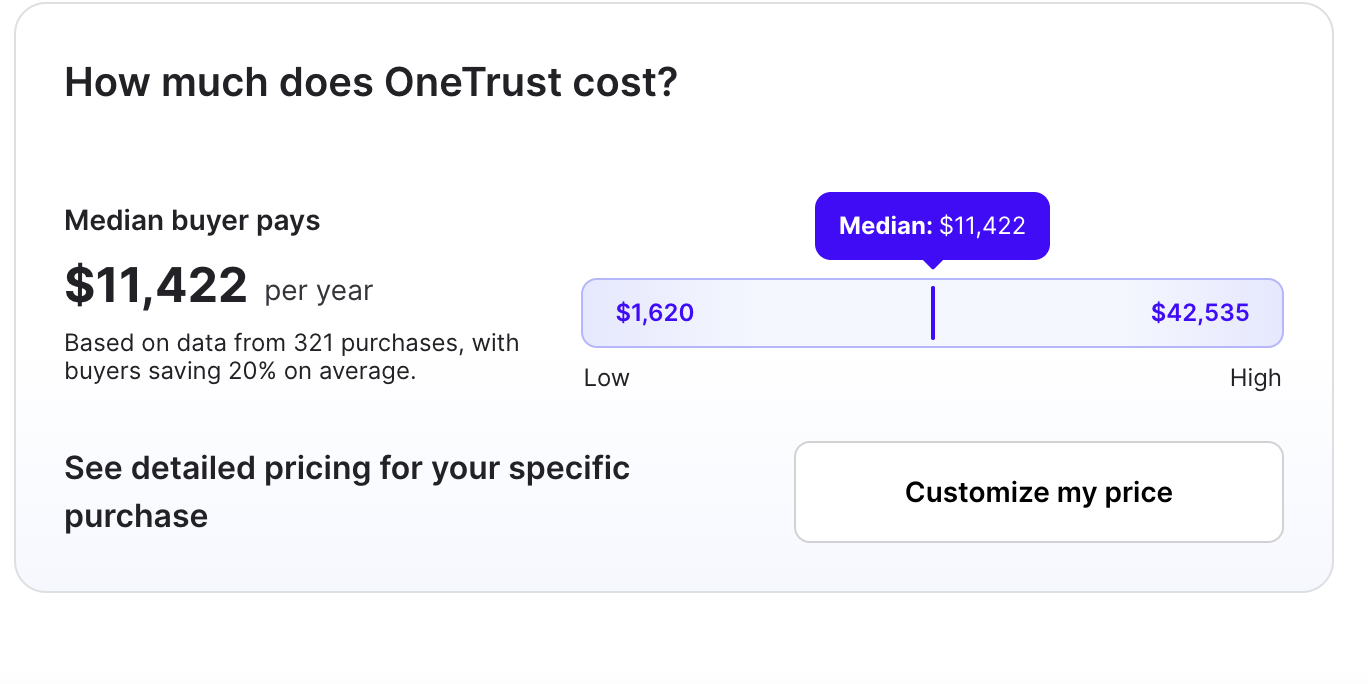
OneTrust does not publish pricing on its website. All contracts are custom-quoted based on the modules selected, company size, number of domains, users, and data volumes. I dug into procurement intelligence data from Vendr and Spendflo to give you a realistic sense of what people are actually paying. Here’s what I found as of March 2026:
| Module/Plan | Approx. price | Source |
| Consent & preference essentials | ~$827/month | Spendflo |
| Cookie consent + preference management | ~$1,100/month | Spendflo |
| Privacy essentials suite (data mapping, TPRM, PIA, incident management) | ~$3,680/month | Spendflo |
| CCPA compliance add-on | ~$1,125/month | Spendflo |
| GDPR compliance add-on | ~$2,275/month | Spendflo |
| Enterprise GRC (Tech Risk & Compliance) | Custom quote | OneTrust |
| AI Governance Module | Custom quote | OneTrust |
| Median annual customer spend | ~$10,514/year | Vendr (278 transactions) |
A few things worth knowing before you go into a pricing conversation. Each module is billed on its own metric; your CMP plan is based on average daily visitors, while privacy automation and GRC plans scale with admin users and asset inventory. That means your bill can climb in directions you didn’t anticipate as your team or data footprint grows. And implementation services? Those are typically a separate cost on top of licensing.
Heads up: OneTrust’s modular pricing can feel reasonable at first, but it can balloon once you add the modules you actually need. One former user on Quora put it plainly: ‘I had the feeling I was paying a lot of bucks for functionality that I did not need but was included.’ Before you get into a negotiation, map out your full compliance scope, what frameworks you need, how many domains, and how many admin users, so you’re not hit with surprise add-ons six months in.
OneTrust: Ease of use & interface
Where OneTrust stands out
If you’re coming in with GRC experience or have used platforms like Archer or ServiceNow, OneTrust’s interface will feel familiar. The single dashboard is genuinely useful once everything’s wired up: risk posture, compliance status, vendor flags, and regulatory updates all in one view without toggling between tools.
A few areas where users consistently say it clicks:
- The centralized dashboard approach is praised for improving visibility across IT systems, vendors, and risk posture
- Pre-built regulatory guidance surfaces requirements across 300+ jurisdictions without manual legal research
- The PIA/DPIA automation workflow is frequently highlighted as intuitive once configured
- AI Governance Program Center (2025) provides a clear interface for managing AI model inventories
It’s not a one-size-fits-all setup. You can build out your program using only the modules you need, which made it easier to scale gradually. We started with basic data mapping and DPIA workflows, and later added vendor risk assessments and AI governance tools.
— Data Privacy Consultant, Pharmaceuticals, 2+ years, Software Advice
Where OneTrust falls short
Here’s the honest part. If you’re not a GRC veteran, OneTrust’s interface can feel like walking into a cockpit without a flight manual. This comes up again and again across review platforms; it’s not our characterization, it’s what users say repeatedly:
- Most teams spend weeks just getting workflows configured before they see any real value from the platform.
- The UI has too many layers; settings are buried inside settings, and navigation isn’t always intuitive for people outside traditional GRC roles.
- Reporting is a recurring sore spot; the dashboards aren’t flexible enough for teams that want to slice data their own way.
- Moving between modules can feel disconnected. The experience isn’t always as unified as the platform’s marketing suggests.
To be honest, it’s a very complex process. It’s not an upload and play tool, and you need a lot of time and training to configure everything correctly. It’s not easy to set up at first — we had to spend several weeks just configuring the workflows and mapping our data.
— Verified user, G2
OneTrust customer support
On paper, OneTrust’s support offering looks solid: 24/7 live support, chat, phone, email, a knowledge base, and community forums. That’s the kind of list that looks reassuring during a sales process.
In practice? It’s more complicated. Support quality is one of the most polarizing topics in OneTrust reviews, and the split seems to come down to the size of your account and which CSM you land. Larger enterprise accounts with dedicated success managers tend to report positive experiences. Smaller teams often feel like an afterthought once the contract is signed.
If you’re a small or medium-sized company, I strongly do not recommend working with OneTrust. Their support structure seems designed for large enterprises, and they don’t care when smaller clients are stuck. The team was very proactive when it came to contract renewal. But once the contract is signed and paid for, you’re left alone.
— Verified user, Capterra
Inconsistent customer support is another drawback, as it can delay problem resolution and make the user experience less reliable.
— Verified user, G2
Trustpilot tells an even starker story. Multiple reviewers describe the sales team as highly proactive at renewal but slow or unresponsive after contract signing. One reviewer described waiting three weeks without receiving a simple invoice or concrete proposal from the sales team.
On the positive side, several Capterra and G2 reviewers report positive experiences with implementation consultants, describing the team as helpful and responsive. Support quality appears to vary significantly by account tier and assigned CSM.
Before you sign anything, ask OneTrust directly: ‘Who will be my dedicated customer success manager, what’s their response SLA, and what happens if I need to escalate?’
OneTrust customer reviews & ratings
OneTrust holds strong aggregate ratings on major review platforms, though individual experiences diverge significantly:
- G2 rating: 4.4/5 (250+ reviews)
High ratings, with the regulatory intelligence and all-in-one coverage drawing the most praise
- Capterra: 4.3/5 (50+ reviews)
Listed as a ‘Best Software’ product, strong scores for privacy management capabilities
- Trustpilot: 1.5/5 (20+ reviews)
Noticeably more negative, the complaints here cluster around sales experience and post-contract support
What users love
When OneTrust works, it really works. Here’s what users consistently highlight as genuine strengths:
- Not having to juggle five different tools, privacy, risk, vendor management, and compliance in one place is the single most cited advantage.
- Regulatory intelligence that keeps itself current, teams say, this alone saves hours of legal research each week.
- High-volume task automation, DSR processing, and vendor questionnaire management in particular free up significant team time.
- The AI Governance features are getting praise as genuinely ahead of the market; one 20-year GRC veteran called it a platform with ‘really good features’ that others haven’t caught up to yet
Over the last 2 years I have tested other software with similar functions to OneTrust, and I confirm that OneTrust is still the best software to run and record a privacy programme among the ones I have personally tried. I really appreciated the new AI Governance features, which allow recording of AI models in use, datasets, and even single data fields.
— Data Privacy Consultant, 2+ years, Software Advice
Common complaints
Now for the stuff the vendor won’t tell you. These aren’t edge cases; they come up across multiple platforms from different kinds of users:
- The setup is genuinely hard. This is the single most common complaint; teams report spending weeks just configuring workflows before the platform starts pulling its weight.
- Costs grow faster than expected, and the modular model looks affordable until you add the things you actually need.
- Reporting is a persistent weak point; compliance teams want flexible, custom dashboards and consistently say the platform doesn’t deliver that.
- One user switched vendors entirely when implementation became too difficult after trying to add an automated CCPA form; it wasn’t a minor inconvenience, it was a dealbreaker.
- Even finding your invoice requires contacting support; that’s the kind of friction that adds up over a long contract.
- Subscription model changes were pushed to existing customers without much notice
The most substantive community thread we found was on Quora, where former OneTrust users discussed alternatives. The dominant theme: pricing complexity, unexpected cost growth, and frustration with being locked into modules they didn’t fully need.
OneTrust alternatives
Sprinto vs OneTrust: A better fit for growing teams
If you’ve read this far and you’re thinking ‘this sounds like more than we need right now,’ you’re probably right. OneTrust is built for large, complex compliance programs. For most growing companies, especially those pursuing SOC 2, ISO 27001, or HIPAA, there’s a faster, more affordable path.
That’s where Sprinto fits. The platform is an autonomous, continuous security compliance platform designed specifically for teams that need to get audit-ready without hiring a full GRC team or spending months on implementation. Here’s how the two compare:
| Feature | OneTrust | Sprinto |
| Best For | Large enterprises | Growth-stage to enterprise SaaS teams requiring continuous and autonomous GRC |
| Setup Time | Weeks to months | Days to weeks |
| Pricing Model | Modular, per-solution | Bundled, predictable |
| Starting Price | ~$25,000/year | ~$8,000/year |
| Compliance Frameworks | 50+ | 200+ |
| Automation | Strong (after setup) | High, out-of-the-box |
| Integrations | 200+ | 400+ |
| Customer Support | Inconsistent (Trustpilot, G2) | Fast, responsive |
| SMB Suitability | Limited | High |
With its infinite integration capability, Sprinto connects directly to your existing cloud stack and starts pulling evidence automatically from day one. You’re not starting from a blank slate, as you may often do with OneTrust. And because Sprinto uses a single control framework that spans multiple certifications, you don’t have to rebuild your compliance program every time you add a new framework.
The bottom line: if your primary goal is getting certified and staying certified efficiently, Sprinto is the more practical choice. If your compliance program is genuinely enterprise-scale, multi-jurisdictional, with privacy requirements, large vendor ecosystems, and a dedicated GRC team, OneTrust’s breadth may be worth the investment.
If OneTrust feels like more than your team needs right now, Sprinto offers a faster, more affordable path to compliance, with automation-first workflows, 400+ integrations, and dedicated support from day one. See Sprinto in action
Other OneTrust alternatives worth considering
Depending on what’s driving your compliance program, here are a few other tools worth putting on your shortlist:
- Vanta: great for engineering-led teams moving fast toward SOC 2 or ISO 27001; strong automation and clean UI
- Drata: compliance monitoring with deep integrations and a code-first approach; well-suited to developer-centric orgs
- Secureframe: fast certification track with solid usability; good for lean teams who want less hand-holding
- TrustArc: the closest alternative to OneTrust in the pure privacy space; strong for enterprise GDPR and CCPA programs
- ServiceNow GRC: makes sense if you’re already a ServiceNow shop and want TPRM living inside your existing ITSM workflow
- AuditBoard: worth looking at if audit management and reporting flexibility are pain points with OneTrust
FAQs
OneTrust is a GRC (Governance, Risk, and Compliance) platform that helps organizations manage data privacy, security risk, third-party risk, and regulatory compliance. In day-to-day terms, that means things like handling GDPR and CCPA compliance, managing cookie consent banners, automating data subject requests, running vendor risk assessments, classifying sensitive data, and tracking AI model governance. It serves more than 14,000 customers globally across industries, including technology, healthcare, financial services, and retail.
The honest answer is: it depends, and they won’t tell you until you ask. OneTrust doesn’t publish pricing publicly, everything is custom-quoted. Based on Vendr’s data from 278 real transactions, the median annual spend is around $10,514. Individual module pricing starts at about $827/month for a single-domain CMP plan, and climbs to $3,680/month for the full Privacy Essentials Suite. Enterprise GRC and AI Governance are quoted separately. The key thing to know: costs tend to grow as your compliance needs expand, so go in with a clear picture of what you’ll actually need.
Yes, this is genuinely one of its strongest suits. OneTrust covers 300+ global jurisdictions and 50+ compliance frameworks, including GDPR, CCPA/CPRA, LGPD (Brazil), APPI (Japan), PIPEDA (Canada), HIPAA, SOC 2, ISO 27001, and PCI DSS. The regulatory intelligence is powered by DataGuidance, which tracks law changes in real time. For teams managing compliance across multiple countries, this saves a significant amount of legal research time.
Honestly, not really, at least not in most cases. OneTrust is designed for mid- to large-sized enterprises with dedicated compliance resources. If you’re a startup or a lean team, the cost, setup complexity, and time investment required to get value from the platform are working against you. The community feedback on Quora and Capterra backs this up consistently: OneTrust is best when you have the people and the budget to actually manage it. If you’re at an earlier stage, tools like Sprinto, Vanta, or Drata will get you to your first certification much faster, at a fraction of the cost.
Yes, and the integration list is legitimately impressive, 200+ pre-built connectors covering ServiceNow, Jira, Microsoft Purview, Sentinel, AWS, Azure, Google Cloud, Salesforce, Workday, Snowflake, and Databricks, plus a full REST API and SDKs if you need custom connections. The one caveat worth flagging: ‘integration available’ and ‘integration is seamless to set up’ are different things. Multiple user reviews note that connecting OneTrust to complex enterprise environments requires significant technical effort, and cross-module integration within the platform isn’t always as smooth as the feature list implies.

Author
Radhika Sarraf
Radhika Sarraf is a content marketer at Sprinto, where she explores the world of cybersecurity and compliance through storytelling and strategy. With a background in B2B SaaS, she thrives on turning intricate concepts into content that educates, engages, and inspires. When she’s not decoding the nuances of GRC, you’ll likely find her experimenting in the kitchen, planning her next travel adventure, or discovering hidden gems in a new city.Go beyond the surface and uncover the governance, risk, and compliance insights that actually matter.


Win digital goodies for boardroom success



Explore more








research & insights curated to help you earn a seat at the table.