| Top GRC tools in 2026 include Sprinto (best for autonomous trust and hands-free compliance), Drata (continuous control monitoring), Vanta (fast self-serve compliance for startups), and Secureframe (guided compliance with policy management). |
| Modern GRC platforms automate evidence collection by integrating with cloud infrastructure and SaaS apps to continuously monitor the security and compliance posture. |
| Key features to look for include framework cross-mapping (SOC 2, ISO 27001, HIPAA, GDPR), audit-ready evidence repositories, and centralized risk registers with vendor management. |
Best GRC tools by use case (2026)
|
If you’re evaluating GRC tools right now, you’re likely trying to solve for more than a single audit. You’re trying to build a governance, risk, and compliance program that holds up as your organization scales.
The pattern is clear. A business adopts GRC software to accelerate SOC 2 or ISO 27001 compliance. It works at first. Then vendor risk expands, a second framework is added, and enterprise buyers demand deeper evidence. What looked automated starts to feel operationally heavy. That’s where the real difference between GRC platforms shows up.
41% of organizations say more than half their customers now treat compliance as non-negotiable.
Modern governance, risk, and compliance software must do more than just organize controls. The GRC tool you pick needs to support continuous monitoring, structured risk management, audit flexibility, and multi-framework alignment without adding overhead.
In this guide, I’ll walk you through what today’s GRC tools actually deliver, how the leading platforms compare, and how to choose the right one for your stage of maturity.

Here are the top 8 GRC tools based on my research:
| Top GRC Tools | Best for | Enterprise GRC capabilities | Ideal org size | Go deeper |
| Sprinto | Growth-stage to enterprise SaaS teams that want continuous, autonomous compliance across multiple frameworks | Autonomous Trust Platform that centralizes obligations (policies, contracts, and more) and uses AI agents to handle evidence collection, real-time monitoring, and audit readiness | Growth to enterprise | Sprinto review → |
| Drata | Teams needing deep automation and continuous monitoring at scale | AI-powered trust platform with real-time control testing and custom no-code control tests | Growth to enterprise | Sprinto vs Drata → |
| Vanta | Startups to enterprises wanting a fast, comprehensive path to compliance | 400+ integrations, hourly automated tests, and multi-entity workspaces for complex organizations | Startups to mid-market | Sprinto vs Vanta → |
| Secureframe | Early-stage to mid-market teams automating first-time certifications | Guided workflows and developer-friendly remediation (Terraform/CLI fixes) with workspaces for multiple business units | Early to mid-market | Sprinto vs Secureframe → |
| OneTrust | Large global enterprises with complex privacy and regulatory needs | Unified “Trust Intelligence” platform integrating privacy, ESG, GRC, and data governance across 50+ regulations | Mid-market to enterprise | Sprinto vs OneTrust → |
| Scrut Automation | Mid-market to enterprise teams wanting risk-to-control coherence | Risk-first GRC with 1,400+ pre-mapped controls and hands-on expert support | Mid-market to enterprise | Sprinto vs Scrut → |
| ServiceNow GRC | IT-centric risk management in very large, mature enterprises | Deep integration with IT operations (ITOM), business continuity, and operational resilience | Large enterprise | Sprinto vs ServiceNow → |
| Optro | Large enterprises running internal audit, SOX, and IT/third-party risk as connected programs | Connected-risk core with modules for audit management, SOX, IT risk, third-party risk, and ESG | Enterprise | AuditBoard alternatives → |
What are GRC tools?
GRC software unifies governance, risk, and compliance into a single operational system, connecting policies, controls, risk management, and audit evidence in one place. Instead of managing compliance across spreadsheets, shared drives, and manual back-and-forth, a GRC platform centralizes everything and keeps it continuously monitored.
What has changed in GRC tools in recent years?
A few years ago, GRC meant risk registers, policy documents, and audit prep that kicked off once a year. Enterprise platforms brought structure, but they were heavy, expensive, and built for periodic reporting rather than ongoing oversight.
Then came API-driven automation, and compliance became more realistic for cloud-native teams. The environment has shifted again. Vendor ecosystems are expanding, AI is introducing new risk categories (ISO 42001 for AI management systems is now a live buyer request, not a future one), and regulatory scrutiny keeps tightening.
Modern GRC tools are built for this reality. Continuous monitoring, real-time risk visibility, multi-framework mapping, and embedded workflows have replaced static reporting cycles. The difference is fundamental: legacy GRC tracked compliance, and modern GRC runs it.
“Earlier, we’d have to rely on multiple tools and spreadsheets to check if we could reuse controls and evidence across frameworks. With Sprinto, it’s seamless; you can see all the different audit frameworks and the percentage of completion within your controls environment, that does give you some intel on the next easiest thing to go after.”
The 8 best GRC tools and platforms, compared
While preparing this list for 2026, I evaluated each solution against a combination of:
- Audit flexibility and collaboration support
- Core product capability across governance, risk, and compliance
- Verified user reviews on platforms like G2, Capterra, and Gartner Peer Insights
- Feature depth across GRC modules
- Automation maturity and evidence-collection depth
- Enterprise adaptability and scalability
- Integration ecosystem breadth
Here are the top picks:
1. Sprinto: Best for autonomous trust and continuous compliance
G2 rating: 4.8/5 (1,500+ reviews)
Sprinto is an autonomous compliance platform for teams that want to stop doing compliance and start overseeing it. Instead of only flagging a missing policy, Sprinto’s AI agents execute the work: mapping contracts, gathering evidence, and continuously monitoring controls to stay aligned, without a human in the loop until judgment is needed.
Sprinto covers the full GRC stack. Risk management, policy governance, vendor risk, and third-party management are built into the platform, not bolted on afterward.
Key features of Sprinto
- AI compliance agents: handle the grunt work of evidence collection, gap remediation, and audit readiness across 200+ frameworks.
- Universal trust hub: centralizes every obligation you have, from SOC 2 requirements to specific security clauses in customer contracts, into one engine.
- Continuous trust: keeps your security proof ready at all times, gathering evidence in the background so buyers don’t have to wait for questionnaires.
- Open integrations: connect tools via native integrations or flexible APIs to capture evidence and control data across your stack.
| Pros of Sprinto | Cons of Sprinto |
| Praised for its intuitive interface and clear, step-by-step roadmap | It is designed as a cloud-native platform and does not support on-premise deployments. |
| Noted for responsive, “above and beyond” customer success teams | Workflows can feel rigid for non-standard setups, and complex programs want deeper reporting and customization |
What customers are saying
| Quotes | Reviewer |
| What I like best about Sprinto is how effectively it centralizes and enforces compliance across people, process, and technology without adding operational overhead. It played a key role in helping us achieve SOC 2 Type II and ISO/IEC 27001:2022 smoothly. | Jeyo ‘Mav Erick’ S.Director of Cyber Security at a mid-market business |
| Integrating with certain third-party tools required more manual setup than expected and could benefit from improved self-service options. Additionally, while the platform is robust, customizing dashboards and reports to very specific team needs sometimes requires reaching out for support rather than doing it independently. | Marvin P, Project Lead at a mid-market business |
Best for: Growth-stage to enterprise SaaS teams that want continuous, autonomous compliance across multiple frameworks, without hiring a large GRC team to run it.
My take: I’d shortlist Sprinto if your team wants to oversee compliance rather than operate it manually, and if a cloud-native footprint is a fit. If you run on-premise systems, look elsewhere.
2. Drata: Best for continuous control monitoring and audit readiness
G2 rating: 4.8/5 (1,100+ reviews)
Drata’s core strength is continuous control monitoring. The platform runs automated hourly tests across frameworks and auto-collects evidence from 200+ integrations with tools like AWS, GitHub, Okta, Jira, and Google Workspace. When a control fails, you’re alerted immediately, not at the next audit cycle. The Audit Hub brings auditor requests, evidence submissions, and approvals into one place, replacing the usual back-and-forth email process.
Key features of Drata:
- Compliance as code: policy-as-code capabilities let engineering teams embed controls directly into development workflows, keeping evidence fresh without pulling engineers into manual requests.
- Audit Hub: all auditor requests, replies, evidence uploads, and approvals live in one structured portal for clean, traceable audit management.
- Risk management module: an integrated risk register (available as an add-on) links risks to controls and tracks remediation in the same platform.
| Pros of Drata | Cons of Drata |
| Responsive support with live in-app chat and a Compliance Advisory team staffed by former auditors | Pricing escalates as teams grow, and renewal costs frequently surprise users at expansion |
| Clean, real-time dashboard giving a single-pane view of control health across frameworks | Some integrations connect but don’t fully auto-collect evidence, so a few controls still need custom work |
What customers are saying:
| Quotes | Reviewer |
| Automations to connect to internal systems and integrations to auditors workflows. The online chat to support people in my time zone is good. | Steve H, Project Manager at mid-market business. |
| The main downside for us has been the cost involved, additionally, there is limited support during our business hours as Drata are US based and we’re in Australia, so things happen a little slowly. | Verified user, Small-Business |
Best for: Scaling companies and mid-market teams managing multiple frameworks that want deep automation and real-time monitoring, with the technical depth to configure it.
My take: I’d shortlist Drata if you have the engineering depth to configure it and want deep, real-time monitoring across frameworks. Budget for the price stepping up as you add users and frameworks, and confirm the integrations you rely on to collect evidence automatically, not just connect.
3. Vanta: Best for fast, self-serve compliance at startup speed
G2 rating: 4.6/5 (2,000+ reviews)
Vanta’s Trust Management Platform automates and continuously monitors compliance, internal risk, third-party risk, and governance workflows in one place, while keeping the self-serve setup speed it built its reputation on. With 400+ integrations, 35+ frameworks, and a Vanta AI Agent that autonomously handles policy management, evidence evaluation, and questionnaire responses, the platform now covers meaningful GRC breadth, though it stays lighter on governance depth than enterprise-grade platforms like OneTrust or ServiceNow.
Key features of Vanta:
- Risk management with heat maps: Centralized risk registers, continuous risk scoring, quantification dashboards, and heat maps for real-time visibility into IT-related risks.
- Vendor risk management: Automated vendor questionnaire scheduling, AI-generated risk summaries, and a Trust Center integration that keeps third-party posture visible.
- Vanta AI Agent: Automatically handles policy management, evidence evaluation for audit prep, and security questionnaire responses.
| Pros of Vanta | Cons of Vanta |
| Fastest self-serve onboarding in the category; teams often get started within hours of connecting integrations | Some users report high costs and binding, locked-in contracts |
| Widest integration catalog, particularly strong for modern cloud-native SaaS stacks | If not tuned, the platform can produce a high volume of alert noise |
What customers are saying:
| Quotes | Reviewer |
| Vanta is incredibly user-friendly, with a wide range of features that ensure security compliance. Its extensive connectors made integration with our existing software straightforward. | Basim H, Software Engineer at a mid-market business |
| Vanta is expensive, especially for small startups or companies not ready for full audits and pricing not transparent. | Franz L, ICT Manager at a mid-market business |
Best for: Startups and cloud-native teams that need a fast, comprehensive path to their first SOC 2 or ISO 27001 and value integration breadth over deep governance.
My take: If you mainly need to get certified quickly on a standard cloud stack, Vanta is a great fit. I’d watch the renewal terms and budget for tuning to keep alert noise down.
4. Secureframe: Best for guided compliance with strong policy management
G2 rating: 4.7/5 (700+ reviews)
Secureframe covers the core GRC pillars with a focus on making each one approachable for teams without dedicated GRC expertise. The platform’s step-by-step, expert-guided workflows break complex frameworks into clear actions, and its policy layer handles drafting, version control, approval workflows, and employee attestation natively. Secureframe leans developer-first. Where some tools focus on the UI, Secureframe focuses on remediation. If a control fails, it often provides the Terraform code or CLI commands to fix it.
Key features of Secureframe:
- vCISO test library: Pre-built, audit-ready control tests curated by compliance experts, covering technical, organizational, and governance controls across frameworks.
- Risk management: A centralized risk register with scoring, risk-to-control mapping, and gap surfacing.
- Vendor risk management: Automates vendor intake, security questionnaires, and ongoing monitoring, with controls linked to vendor findings.
| Pros of Secureframe | Cons of Secureframe |
| Strong support; users report fast response times and hands-on guidance through technical questions | Can feel rigid, creating friction when your environment doesn’t map cleanly to its defaults |
| Covers compliance, risk, vendor management, and training in one platform | Governance depth for complex, multi-entity programs is limited compared to enterprise GRC suites |
What customers are saying:
| Quotes | Reviewer |
| The technical support staff is second to none. They are incredibly friendly, knowledgeable, fun to work with make every effort to find an answer for even the toughest problems. If they don’t know, they’ll find out! (but they usually know). | Andrea D, Security Compliance Officer at a mid-market business |
| Overall Secureframe proves to be useful, but there is some room for improvement on their reporting features — specifically the ability to customize compliance reports for different audiences. Sometimes creating in-depth reports involves extracting data and fine-tuning it outside of the platform, which means extra steps. | Clint O, Operation Manager at mid-market business |
Best for: Early-stage to mid-market teams automating a first certification who want guided workflows and developer-friendly remediation.
My take: I’d lean Secureframe if you’re certifying for the first time and want guided workflows plus developer-friendly fixes. If you expect multi-entity governance or heavy custom reporting soon, pressure-test that in a trial before you commit.
5. OneTrust: Best for privacy-first, global regulatory compliance
G2 rating: 4.6/5 (100+ reviews for the Tech Risk & Compliance module)
OneTrust is a full-spectrum platform built around a common data model that connects privacy, tech risk, third-party risk, AI governance, and policy management. The platform’s strength is deepest where privacy governance is a primary driver. GDPR, CCPA, LGPD, and AI Act compliance are handled with a level of pre-built regulatory intelligence that no compliance-automation-first tool here can match. Across 50+ global regulations, the platform monitors regulatory change and maps it to your existing control and policy library, so gaps surface before your legal team learns of them elsewhere.
Key features of OneTrust:
- Trust Intelligence platform: Bridges privacy, ethics, and GRC in one data model.
- Consent management: Manages cookie consent and data subject access requests (DSARs) at scale.
- ESG cloud: Offers a dedicated module for tracking carbon footprint and social impact.
| Pros of OneTrust | Cons of OneTrust |
| Powerful automation across risk, policy, and third-party workflows once configured | Initial setup is complex; users report weeks of configuration, and it isn’t intuitive without prior GRC experience |
| Modular architecture scales across privacy, tech risk, vendor, and AI governance without switching platforms | Support can be inconsistent, with delays reported for smaller accounts |
What customers are saying:
| Quotes | Reviewer |
| I really like that OneTrust Privacy Automation is a comprehensive all-in-one platform. It saves me from jumping between different tools for tasks like Cookie content mapping and DSARs. The regulatory intelligence feature is a game changer because it provides real-time updates on global laws, which adds significant value beyond just being a software tool. | Erick Vincent Steve G, IT Support at an enterprise |
| It can be overwhelming to implement and navigate, especially for new users or smaller teams. The sheer number of modules and customization options, while useful, can make the initial setup complex and time-consuming without dedicated support or training.Additionally, some users may find the pricing model a bit opaque — costs can add up quickly as you add more modules or scale usage across departments. There’s also a learning curve associated with configuring automation rules and integrating with internal systems, which may require technical expertise or consulting support. | Verified User at mid-market business in Luxury Goods & Jewelry |
Best for: Large, global enterprises where privacy and multi-jurisdictional regulatory compliance are the primary drivers and a dedicated team can own configuration.
My take: I’d only shortlist OneTrust if privacy and multi-jurisdictional regulation are your main drivers and you can staff the setup. For security compliance alone, it’s more platform than most teams need, and the configuration effort is real.
6. Scrut Automation: Best for mid-market teams wanting risk-to-control coherence
G2 rating: 4.9/5 (1,200+ reviews)
Scrut begins with risk identification, scanning cloud infrastructure, code, applications, vendors, employees, and access, then maps those risks directly to the controls and frameworks they affect. The platform covers the full GRC spectrum from one interface: risk management, policy governance, vendor risk, compliance automation, and internal audit readiness. Its AI layer, Scrut Teammates, handles recurring tasks such as creating remediation tickets, assigning owners, pre-filling vendor questionnaires, and suggesting infrastructure-as-code fixes.
Key features of Scrut
- Unified risk workspace: Maps 1,400+ pre-built controls across frameworks to reduce compliance fatigue.
- Cloud security posture management (CSPM): Built-in scanning of AWS and Azure environments for misconfigurations.
- Expert-led implementation: Dedicated compliance experts help navigate the audit rather than leaving you with a login.
| Pros of Scrut | Cons of Scrut |
| Support quality is exceptional and frequently cited as the top reason users stay, with monthly check-ins and proactive CSMs | Steep initial learning curve; terminology and dashboard structure can confuse teams new to structured GRC |
| Broad coverage across risk, policy, vendor management, and compliance in one interface | Platform speed and sync reliability are recurring pain points; the Scrut agent can lag in reflecting updates |
What customers are saying:
| Quotes | Reviewer |
| Scrut bundles key services—like auditing and penetration testing—together with their compliance software, which has made our end-to-end SOC 2 process much easier. Their team provides outstanding customer support and account management, with consistent, knowledgeable points of contact. | Kris S, CEO at a small-business |
| The portal’s user interface has a steep learning curve and could be more intuitive. While I understand SOC2 itself is complex, there’s a significant opportunity to simplify the user experience to make it more accessible for those not already familiar with compliance frameworks. Furthermore, the resolution recommendations are often too generic. They typically suggest a single, drastic action—like deleting a resource—without considering the potential for valid business use cases. This approach lacks nuance and doesn’t offer alternative solutions. | Rishab G, CTO at a small business |
Best for: Mid-market to enterprise teams that want a risk-first program with hands-on guidance and broad GRC coverage in one place.
My take: I’d consider Scrut if you want a risk-first program with hands-on support and broad coverage in one place. Plan for a learning curve early, and ask about agent sync reliability if real-time control status matters to you.
7. ServiceNow GRC: Best for enterprises already on ServiceNow
G2 rating: 4.2/5 (100+ reviews)
If your company already runs IT and security on ServiceNow, adding ServiceNow GRC is a natural step. It sits on the same Now Platform, so risks, controls, vulnerabilities, and remediation workflows are connected. When something breaks in SecOps, it can tie back to the right control and start action through the same ticketing system your teams already use. The module covers the full enterprise GRC spectrum: risk scoring, policy lifecycle management with attestations, internal audit, third-party risk, operational risk, and business continuity. Leadership gets live dashboards and heat maps across business units, not just audit-time reports.
Key features of ServiceNow GRC:
- Operational resilience: Maps controls to your CMDB, so you know which server or database ties to which compliance risk.
- Policy and compliance management: Offers large-scale policy distribution for organizations with 50,000+ employees.
- Business continuity management: Links IT recovery directly to GRC controls for worst-case planning.
| Pros of ServiceNow GRC | Cons of ServiceNow GRC |
| Enterprise-grade heat maps, real-time dashboards, and cross-module reporting give leadership real decision intelligence | Licensing is expensive and hard to predict; costs escalate with modules, users, and customization |
| Risk capabilities are rated highest by users, with real-time monitoring and risk traced directly to incidents and assets | Integrating with non-ServiceNow systems (HR, finance, specialized tools) can be difficult and create data silos |
What customers are saying:
| Quotes | Reviewer |
| I like the traceability between records in ServiceNow Governance, Risk, and Compliance (GRC). It’s great to know what citations relate to each control and how those controls target risks. This makes it easy to govern. Also, it helps us understand how our company’s controls are covering regulatory requirements and industry frameworks. | Verified user, Enterprise |
| I find it challenging to determine how and when we can use Policy and versioning for corporate policies and how policy overlap for Standards in EA and other areas works. It also seems like ServiceNow Governance, Risk, and Compliance (GRC) isn’t managing risks very well. Plus, the initial setup came with challenges. | Verified user, Enterprise |
Best for: Very large, mature enterprises already standardized on ServiceNow that want GRC woven into daily IT operations.
My take: I’d only lean toward ServiceNow GRC if you’re already on the Now Platform. If you are buying it as a standalone compliance tool, the licensing and configuration overhead would be hard to justify.
8. Optro: Best for enterprise internal audit and connected risk
G2 rating: 4.6/5 (1,500+ reviews).
Optro (formerly AuditBoard) is built for large enterprises that run internal audit, SOX, IT risk, and third-party risk as connected programs rather than separate tools. The platform’s connected-risk architecture centers on a shared data core (risks, controls, policies, frameworks, and issues) with modules layered on top: RiskOversight, CrossComply, SOXHUB, OpsAudit, TPRM, and ESG.
Key features of Optro
- Connected risk core: Centralizes risks, controls, policies, and frameworks so an update in one module flows through to the others.
- CrossComply: Maps and monitors controls across frameworks such as NIST and ISO 27001, cross-referencing requirements to show overlaps, maturity, and gaps.
- SOXHUB and OpsAudit: Audit-management and SOX workflows built around a preparer/reviewer model that internal auditors recognize.
| Pros of Optro | Cons of Optro |
| Built by auditors for auditors, with a strong preparer/reviewer workflow and deep customization | Per-module pricing adds up quickly for smaller audit teams |
| Connects risk, controls, and issues across the three lines of defense | Implementation and standard (Level 1) support can be slow without paid enhanced support |
What customers are saying:
| What the reviewer said | Reviewer |
| I love how user-friendly AuditBoard is. As one of the administrators, I find it really easy to go in and add or remove fields and create new audit templates for different projects like continuous monitoring and regulatory reviews. AuditBoard also solves consistency problems for us, ensuring that all audits are completed in a consistent manner. The AI capabilities have been a real boon, helping our teams with consistent report and issues drafting. | Verified user (G2) |
| Pricing can feel endless once you start adding modules and extra features, even for a mid-size company. | Ed K, Information Security Manager at an enterprise |
Best for: Large, audit-led enterprises standardizing internal audit, SOX, and IT and third-party risk on one connected platform.
My take: I’d shortlist Optro if internal audit and SOX sit at the center of your program and you’re operating at enterprise scale. For a lean team or a security-first use case, the per-module cost and setup are hard to justify.
Benefits of using a GRC tool
Most organizations don’t feel the cost of a weak compliance program until something breaks: a failed audit, a regulatory penalty, a vendor incident that surfaces gaps no one knew existed. By then the damage is done. A GRC tool moves compliance from a reactive function to a continuously operating one.
Here’s what that looks like in practice:
- Risk surfaces before it becomes expensive: Without continuous monitoring, control gaps accumulate silently between audit cycles. A GRC platform watches your environment in real time and flags drift, misconfigurations, and failing checks as they happen, not when an auditor surfaces them first.
- Faster response when things go wrong: The longer an issue goes undetected, the more it costs to resolve. Continuous monitoring shortens that window, giving your team the visibility to contain and remediate before problems escalate into formal findings.
- Third-party risk gets a real structure: Vendor ecosystems have grown too large to manage through spreadsheets and annual questionnaires. A GRC platform brings third-party oversight into a continuous model with intake workflows, risk scoring, and ongoing monitoring.
- Multiple frameworks without multiplying the work: A platform maps existing controls across frameworks at once, so each new certification builds on prior work instead of restarting it.
- Compliance becomes a trust signal, not a tax: Enterprise buyers treat security posture as a commercial prerequisite. When a prospect’s security team asks for documentation, your evidence is current, and your team answers in minutes, not weeks.
9 in 10 respondents said compliance positively impacted customer trust, and SOC 2 / ISO 27001 correlated with a 14% improvement in RFP win rates.
You don’t strictly need a bought platform to get those outcomes. A capable team can build a fair amount of the same monitoring and evidence collection in-house, so the first real question is whether that’s a good use of your engineering time.
Build it in-house or buy a platform?
Some teams weigh coding their own GRC tracker on top of Jira or a spreadsheet. Most teams that price it out drop the idea, because the engineering time, ongoing maintenance, and the credibility gap with auditors outweigh the license they’d save. Build only if your workflows are genuinely unusual and you have spare engineering capacity to own it for years. Buy when you need auditor-recognized evidence and continuous monitoring without pulling engineers off the roadmap.
Organizations with a formal compliance function are 2.9x more likely to see 10–30% TAM growth than those running it ad-hoc.
How to choose a GRC tool for your organization
The real question isn’t which platform has the most features. It’s which platform can support your governance and risk model as it matures. I’ve watched teams pick GRC software for one audit and outgrow it within a year.
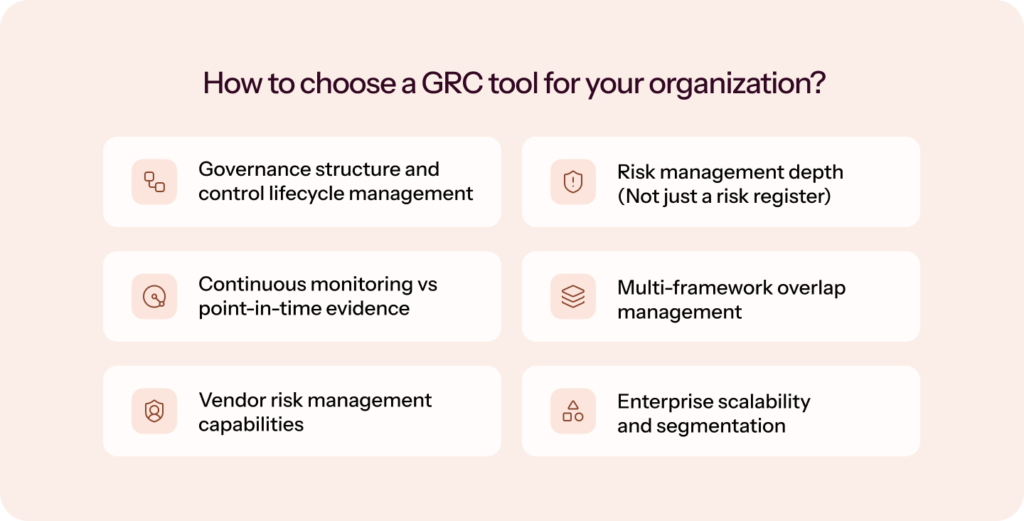
Evaluate these eight areas before you commit:
- Governance and control lifecycle: Your tool should centralize policies and controls, support versioning and approvals, map controls across frameworks, and track ownership and testing frequency. Controls should connect to risks, vendors, and assets, not sit as static documents.
- Risk management depth: Look past the risk log for scoring models, risk-to-control mapping, treatment workflows with owners, real-time dashboards, and residual-risk tracking.
Prometeia connected risks, assets, and controls, automated monitoring of two production lines and corporate IT, and reduced the number of active monitored controls from 1,500 to ~130 using a standard controls approach.
- Continuous monitoring versus point-in-time evidence: Ask whether the platform auto-collects evidence through integrations and detects control drift in real time, or whether it still relies on manual uploads before an audit.
- Multi-framework overlap: If you’ll pursue more than one framework, you need cross-framework mapping, deduplicated evidence reuse, and a single control satisfying multiple requirements. Without it, every new certification restarts the work.
- Vendor risk management: Expect onboarding workflows, questionnaire tracking, risk scoring with reassessment cycles, and ongoing monitoring alerts, built in rather than bolted on.
- Enterprise scalability: Even if you’re small now, check for business-unit separation, role-based access, executive dashboards, and customizable workflows.
- Audit flexibility: The best tools orchestrate audits with dedicated workspaces, evidence-request management, and direct auditor collaboration, so you’re not back in email threads and shared folders.
- Meaningful AI and automation: Not reminders. Intelligent scoping, evidence validation, risk detection, gap identification, and workflow automation. The difference between automation and autonomous compliance is the difference between assistance and execution.
The decision comes down to maturity. For a first certification, prioritize automation and structured onboarding. For multiple frameworks, prioritize control reuse and continuous monitoring. At enterprise scale, prioritize risk-modeling depth and governance flexibility.
How to phase GRC modules without overbuying too early?
Most teams don’t need every GRC module on day one. But they do need a platform that won’t break when the program expands. A practical way to scope is to separate your current audit driver from your next likely governance need.
| If your immediate need is… | Prioritize now | Validate before signing |
| First SOC 2 or ISO 27001 audit | Automated evidence collection, policy workflows, control monitoring, auditor collaboration | Which integrations are supported, what manual evidence is still needed, and how long implementation realistically takes |
| Multiple frameworks | Common-control mapping, evidence reuse, framework gap analysis | Whether SOC 2 evidence can carry into ISO 27001, HIPAA, PCI DSS, or GDPR |
| Vendor or customer security reviews | Vendor risk workflows, questionnaire support, Trust Center, evidence repository | Whether vendor assessments and customer-facing proof are included in your plan or sold separately |
| Growing risk ownership | Risk register, risk-to-control mapping, treatment workflows, owner assignments | Whether risk management is a lightweight log or a usable workflow for owners, reviews, and remediation |
| Enterprise or multi-entity operations | Entity separation, role-based access, custom reporting, regional hosting, audit workspaces | Whether the platform can separate business units, subsidiaries, or regions without duplicate work |
| AI, privacy, or regional regulatory expansion | Custom frameworks, privacy workflows, AI governance (ISO 42001), regional control mapping | Whether these are productized, partner-led, or configured manually during implementation |
The mistake is buying only for the audit in front of you. A platform that handles SOC 2 well but can’t support vendor risk, custom frameworks, or new regions may force a second migration just as your program matures. Buying the largest suite too early creates unused modules, higher costs, and more implementation work than your team can absorb.
Before choosing, ask each vendor which modules are included versus which require an upgrade, whether you can add frameworks later without remapping every control, how pricing changes as you add employees or entities, which parts of implementation are automated, and whether you can test your highest-risk workflows in a sandbox before committing.
GRC implementation mistakes to avoid
GRC implementation rarely fails because of the platform. It fails because of what happens around it: unclear ownership, underestimated scope, and low adoption from the teams who matter most.
Bring your people and process to the demo, then make the vendor prove how its technology supports them. Otherwise, you risk buying a tool that does not fit how your organization actually works. ~ Ryan Schoeller, Director, Governance, Risk, & Compliance, Treasure Data
These are the four that come up most consistently, and what to do about each.
- No clear owner from day one: Programs stall on ownership ambiguity. Someone has to be accountable for scoping, driving integrations, chasing control owners, and keeping the risk register current. In early-stage companies, this defaults to a founder or engineering lead who’s already stretched thin.
What to do: Name a GRC owner before implementation begins. It doesn’t have to be a full-time hire, but it does have to be someone with the authority to make decisions and the time to see the setup through. - Underestimating the scoping exercise: Defining what’s in and out of your compliance environment feels administrative, so teams rush it. Get it wrong and you either over-scope (wasting effort on controls that don’t apply) or under-scope (missing gaps auditors will find).
What to do: Treat scoping as a dedicated task. The best platforms automate much of it; Sprinto’s Scoping Agent maps your environment from the first get-go. For platforms that don’t, you can budget two to three weeks before any controls go live. - Integration gaps that surface late: Teams often discover mid-implementation that a niche HR system, a custom internal app, or an ERP with limited API access isn’t supported. Then you’re either collecting evidence manually or paying for a custom integration.
What to do: Before signing, map your full tech stack against the vendor’s integration catalog, not just the headline number. If something’s missing, get a timeline and a workaround. - Low adoption from control owners: Platforms only work if the engineers, HR leads, and managers who own individual controls actually use them. Pull them in only at audit time, and you may get incomplete responses and missed deadlines.
What to do: Involve control owners during setup, show them their responsibilities before evidence collection begins, and choose tools they can navigate without a training session. Then keep it alive with quarterly risk reviews and annual attestation cycles, and evaluate platforms against your two-to-three-year roadmap so you’re not re-platforming in 18 months.
“Sprinto integrates with everything that we use, and collects evidence automatically. Centralizing evidence in one place is critical for us, so it’s nice that Sprinto does this out-of-the-box.” ~ Deepak Balasubramanyam, CTO, Rocketlane
How Sprinto runs your compliance program
Sprinto is an Autonomous Trust Platform built to move beyond conventional GRC, replacing periodic reporting cycles, manual evidence collection, and reactive risk management with real-time monitoring, continuous compliance, and unified risk visibility across your operation.
AI agents handle the execution: scoping your environment, mapping controls across 200+ frameworks, collecting evidence continuously, monitoring vendors, and keeping your audit workspace current year-round. Your team oversees outcomes. Sprinto runs the program.
Whether you’re entering compliance for the first time or managing a mature, multi-framework program under enterprise scrutiny, Sprinto scales with your complexity without adding to your overhead.
Book a demo with us so we can understand your requirements, identify and analyze your GRC gaps with detailed reports, and put automation to work across your compliance program.
Disclosure: This article is published on the Sprinto blog. Product facts are drawn from vendor documentation; pros, cons, and experience notes are drawn from verified user reviews on G2, Capterra, Gartner Peer Insights, and community discussions. Ratings and counts were current at the time of writing and should be re-verified on each vendor’s site before a purchase decision.
FAQs

Author
Radhika Sarraf
Radhika Sarraf is a content marketer at Sprinto, where she explores the world of cybersecurity and compliance through storytelling and strategy. With a background in B2B SaaS, she thrives on turning intricate concepts into content that educates, engages, and inspires. When she’s not decoding the nuances of GRC, you’ll likely find her experimenting in the kitchen, planning her next travel adventure, or discovering hidden gems in a new city.Go beyond the surface and uncover the governance, risk, and compliance insights that actually matter.


Win digital goodies for boardroom success



Explore more



research & insights curated to help you earn a seat at the table.