
Choosing A Compliance Monitoring Tool in 2026: Key Features & Top Solutions


TL;DR
- Manual compliance processes are no longer viable due to complex cloud ecosystems, increasing regulations, and the high risk of missed gaps.
- A modern compliance monitoring tool must offer real-time control checks, deep integrations, custom workflows, and strong reporting to keep organizations audit-ready at all times.
- The best compliance monitoring tools include Sprinto, Drata, Auditboard, Hyperproof, Vanta, Onetrust, Scrut, Secureframe, etc.
The Compliance maturity research published in 2025 shows that enterprises now juggle an average of seven overlapping regulatory frameworks.
Organizations can’t afford to wait for annual audits to discover gaps. They need continuous visibility, real-time alerts, and automated controls that prove they’re compliant every day, not just on audit day.
Compliance monitoring tools achieve the same by automatically tracking controls, collecting evidence, and detecting any gaps instantly. The right monitoring solution can dramatically reduce risk, effort, and audit fatigue.
This guide explains what these monitoring tools are, how they work, must-have features to look out for, top solutions compared in 2026, and how you can choose the best option for your business.
What is compliance monitoring?
Compliance monitoring is the process of tracking an organization’s compliance with applicable laws, regulations, internal policies, and industry standards. It ensures that the organization maintains compliance, detects and corrects areas of non-compliance, and prevents violations.
Compliance monitoring vs point-in-time audits
Modern compliance tools typically include continuous monitoring of your infrastructure rather than point-in-time audits.
Point-in-time monitoring is not truly monitoring, as it provides a snapshot of what an audit examines for a specific period and issues an opinion.
While still necessary for formal attestation and certification, they have significant limitations. They only tell you whether you were compliant for the audit period, not what happened the other 360 days of the year.
What types of compliance are usually monitored?
Here are the most common types of compliance that organizations usually monitor on an ongoing basis:
- Regulatory compliance: Adherence to laws and regulations specific to the industry (e.g., GDPR, CCPA, HIPAA, SOX, PCI-DSS, FDA regulations, MiFID II, etc.).
- Internal policy compliance: Conformance with the company’s own policies, procedures, code of conduct, and risk frameworks.
- Information security & cybersecurity compliance: Standards and frameworks such as ISO 27001, NIST CSF, CIS Controls, SOC 2, and zero-trust requirements.
- Data privacy & protection compliance: Beyond GDPR/CCPA, also requirements from Brazil’s LGPD, China’s PIPL, etc.
- Contractual & third-party compliance: Meeting obligations in customer contracts, vendor/supplier agreements, SLAs, and partnership terms.
In addition to the types stated above, there are various other types such as financial reporting and anti-fraud, health, safety & environmental (HSE), employment and labor law, anti-bribery & corruption compliance, etc.
The necessity of compliance monitoring
Yes, compliance monitoring is absolutely necessary in 2026. The process helps detect policy violations, control failures, or regulatory breaches early, often in real time, before they escalate into fines, lawsuits, data breaches, reputational damage, or operational shutdowns.
Organizations that treat compliance management as a continuous discipline rather than an annual project respond faster to new regulations, win contracts more easily, and suffer fewer disruptive incidents.
Let’s dig a little more into its importance:
1. Regulators expect proof of continuous compliance
Modern regulations, such as the EU’s DORA and the New York DFS Cybersecurity Regulation, as well as updated SEC guidance on SOX, explicitly require organizations to demonstrate that controls are effective all year round, not just during audit season.
A global benchmark report shows that 19% of risk and compliance professionals have faced legal or regulatory action in the last three years. This showcases stricter oversight and expectations for demonstrable, ongoing compliance.
2. Cloud and SaaS environments have increasing complexity
Usually, when you’re working with multiple tools, your infrastructure becomes more and more complicated. Even with tools that promise simplification, 54% of organizations struggle to monitor regulatory compliance consistently across multiple cloud platforms.
Without automated, continuous monitoring, blind spots appear quickly. A policy that’s correctly configured in one cloud can drift out of compliance in another within days, leaving the organization exposed without anyone noticing.
3. Manual audits have gone out of date
Older methods of compliance and audits are slow, error-prone, and resource-intensive, and often result in surprises during the actual audit.
Most organizations have moved beyond this legacy approach because they recognize that yesterday’s snapshot tells you nothing about whether you’re compliant right now.
4. Monitoring reduces the risk of fines, breaches, and failed audits
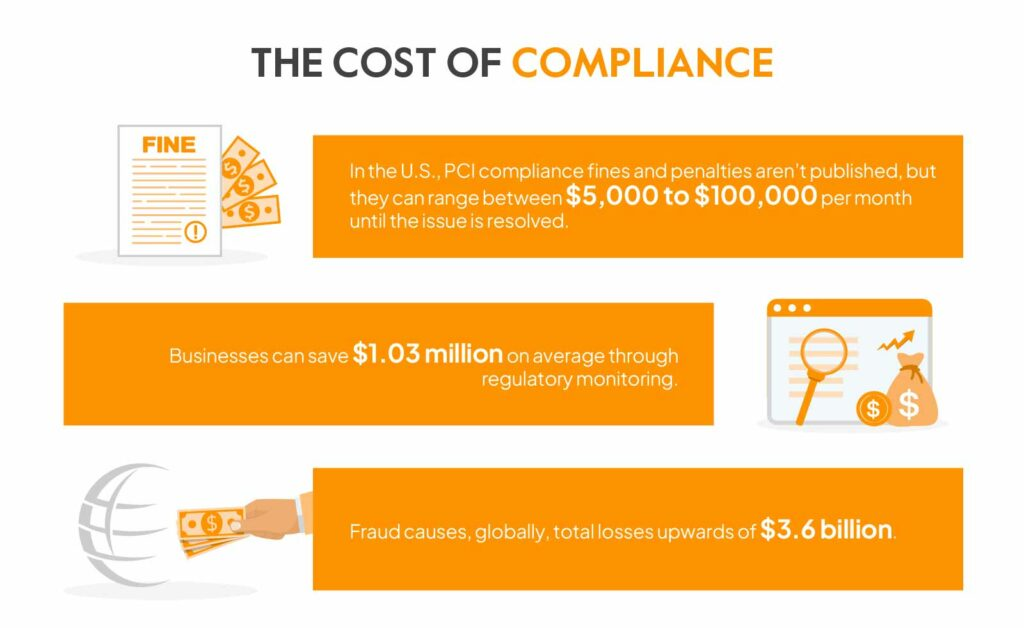
Non‑compliance is significantly more expensive than maintaining a strong program. In contrast, continuous monitoring turns compliance from a stressful annual event into a calm, everyday habit.
The result is fewer audit findings, lower remediation costs, stronger security posture, and, most importantly, far fewer scary headlines or regulatory letters.
What are compliance monitoring tools?
Compliance monitoring tools are software that automatically and continuously track activity across company-managed devices, cloud accounts, applications, and networks to make sure you’re always following the rules.
Compliance monitoring tools collect logs, track user access, and identify any unusual activity. These tools immediately alert the right people if something drifts out of compliance.
How does a compliance monitoring tool work?
Compliance monitoring tools start their work by securely integrating with every platform your company uses. Using read-only API keys, service accounts, or lightweight agents, the tool reaches into all your cloud providers (AWS, Azure, Google Cloud, etc.), SaaS applications (Microsoft 365, Slack, Zoom), on-premises data centers, databases, and even endpoint devices.
Once connected, these integrations stay live: the tool continuously streams events through services such as AWS CloudTrail, Azure Monitor, or Office 365 Management Activity API, while periodically polling the current state of resources.
Watch: How Sprinto Enables Continuous Monitoring at a granular level
How do automated tools differ from manual monitoring?
Automated compliance and security tools fundamentally change how organizations track risks, enforce controls, and maintain readiness. Here are the key differences between the two:
| Aspect | Automated tools | Manual monitoring |
| Speed | Real-time checks and instant alerts | Periodic checks that may miss issues |
| Accuracy | Minimizes human error through consistent execution | Prone to oversight and inconsistency |
| Scalability | Easily handles large, complex environments | Hard to scale as systems and teams grow |
| Effort required | Low ongoing effort with automated workflows | High effort due to repetitive manual tasks |
| Visibility | Continuous monitoring across assets and controls | Limited visibility between scheduled reviews |
| Response time | Immediate notification of compliance drift or risks | Slower detection and delayed response |
7 key features of great compliance monitoring software
As attacks become more sophisticated, there is a need for compliance monitoring tools to go beyond the basic checklist of monitoring. It should constantly act as an always-on control layer, continuously monitoring your entire environment.
A good compliance monitoring platform gives you continuous visibility, automated checks, and audit‑ready evidence across frameworks and systems. For the same to happen in real time, here are the core capabilities:
1. Real-time control monitoring
Real-time control monitoring helps users detect and respond to risks instantly instead of discovering them during audits.
The tool should continuously ingest configuration changes and activity events from cloud-native services (e.g., AWS Config rules recorder, Azure Change Tracking, GCP Asset Inventory) and streaming logs (CloudTrail, GuardDuty, Azure Activity Log, Stackdriver) via event-driven pipelines.
Every change, such as an S3 bucket becoming public, an IAM role gaining admin privileges, or MFA being disabled, should be evaluated in sub-second latency against policy-as-code rules written in Rego, Cedar, or proprietary DSLs.
2. Customizable compliance workflows
Customizable compliance workflows help users reduce manual work and ensure the right teams stay accountable.
Users should be able to build multi-stage, conditional workflows using low-code/no-code builders. Workflows should integrate natively with IT Service Management tools (ServiceNow, Jira), collaboration tools, and identity platforms to enforce accountability and SLAs across security, engineering, and compliance teams.
3. All-in-one dashboard
A unified, real-time dashboard shows compliance status across all cloud accounts, SaaS apps, regions, business units, and frameworks. It highlights trends in compliance scores, heat maps of risk severity, top violations, and the current remediation backlog.
Dynamic scoring models can be used to weigh the importance of each control and account for any compensating controls that may be in place.
4. Mapping custom controls
Mapping custom controls allows users to align internal policies with industry standards and automate their evidence collection.
Organizations should be able to import or author bespoke internal policies and map them to existing industry frameworks or create entirely new frameworks using a control library with versioning, ownership, and tagging.
Each custom control should support multiple evaluation methods, such as API-based configuration checks, log-based behavioral detection, or manually uploaded evidence, and should inherit automated tests from similar built-in controls.
5. Strong security, integrations, and usability
Strong security, integrations, and usability let users connect all their systems easily and streamline compliance operations.
The tool should offer 150-300+ out-of-the-box integrations (including major clouds, Okta, Workday, GitHub, Kubernetes, and Snowflake) via pre-built connectors, as well as a robust REST API/webhook framework for all other integrations.
6. Automated checks and evidence collection
Automated checks and evidence collection enable users to maintain continuous compliance with no manual effort.
The tool should conduct both scheduled scans and event-based scans to check hundreds or even thousands of compliance controls, including encryption at rest, network exposure, patching, and access reviews.
As it runs these checks, it should automatically collect evidence such as timestamped screenshots, API responses, or log snippets. This evidence is stored in an immutable (unchangeable) format to prove the control was validated at that moment.
7. Periodic logs and reports
Periodic logs and reports allow users to generate audit-ready documentation in minutes instead of weeks.
Pre-built report templates in the compliance monitoring tool can generate framework-specific attestation packages (e.g., CIS Controls v8 report, NIST CSF scorecard, SOC 2 Bridge Letter content) on demand or on a scheduled basis (quarterly, annually).
Reports may include executive summaries, detailed control-by-control results, evidence links, remediation status, and trend analysis. This is ready to hand directly to external auditors or regulators with minimal additional work.
Top 12 compliance monitoring tools with features, reviews, pros & cons
The following curated list highlights the top compliance monitoring tools actually used by modern teams today, organized by who they’re best suited for and backed by real customer ratings. Use it as a shortcut to quickly understand which platform aligns with your company’s stage, complexity, and security goals.
| Tool | Best suited for | G2 rating |
| Sprinto | Customizable continuous controls (seed to mid‑market) requiring out‑of‑the‑box setup | 4.8/5 |
| Drata | High‑growth mid‑market organizations | 4.8/5 |
| Auditboard | Large enterprises and heavily regulated industries | 4.6/5 |
| Hyperproof | Businesses willing to invest in building rich, automated tests | 4.5/5 |
| Vanta | Startups and scaleups that need to “sell security.” | 4.6/5 |
| Onetrust | Enterprises and global brands | 4.6/5 |
| Scrut | Cloud‑first teams that want a risk‑first, “security program + compliance” | 4.9/5 |
| Secureframe | Lean security teams that want quick, prescriptive paths | 4.8/5 |
| HIPAA One | Healthcare orgs and business associates | N/a |
| Fortinet | Environments focused on enforcing network/endpoint/security policies | 4.5/5 |
| Onspring | Companies with cross‑functional compliance apps | 4.7/5 |
| Resolver | Enterprises that want compliance monitoring deeply tied to incident and risk data | 4.3/5 |
1. Sprinto
Sprinto is a continuous compliance monitoring tool with AI-native and full-stack GRC that connects to your cloud, code, devices, and people to continuously monitor controls against frameworks such as SOC 2, ISO 27001, HIPAA, and GDPR. It automates evidence collection, tasks, and remediation workflows, allowing you to maintain day-to-day compliance without scrambling at audit time.
Sprinto’s standout strength is its deep compliance automation around audit readiness with 300+ integrations. It includes an integrated audit dashboard and trust center pages that let you share your live compliance posture with customers.
Key features:
- Engineering custom AI workflows: AI tailors workflows to your systems, controls, and processes to automate repetitive compliance tasks end-to-end.
- Ask AI – personalized with your compliance setup: An AI assistant that answers questions using your actual controls, risks, and framework mappings for context-aware guidance.
- Automated control-to-criteria mapping: The system automatically links your existing controls to the correct framework requirements, reducing manual mapping work.
- Real-time system checks with gap remediation: Continuous monitoring detects control failures instantly and triggers guided or automated remediation steps.
- Evidence gap analysis to catch issues early on: AI reviews collected evidence to detect missing, outdated, or insufficient items before auditors do.
- AI due diligence with vendors: Automatically analyzes vendor documents, risks, and security posture to accelerate review and onboarding.
- Ready-to-publish trust center: Generates a live, customer-facing trust page that updates automatically with your latest compliance posture and controls.
G2 ratings: 4.8/5 with 1,501 reviews
| Pros | Cons |
| Clean, intuitive interface that makes navigating compliance workflows straightforward even for first-time users. | Some workflows take a little time to learn, but become smooth once you’re familiar with them. |
| Responsive support team and strong partner ecosystem that helps guide organizations through compliance with confidence. | Frequent updates may require brief re-learning, though they bring useful improvements. |
As seen in WebEngage’s journey, Sprinto replaces slow, manual, and consultant-heavy processes with a centralized platform.
WebEngage achieved ISO 27001 and ISO 27701 certifications in just six months and has maintained six years without any major cybersecurity incidents. Today, they continuously monitor four frameworks on Sprinto to maintain a strong and audit-ready security posture.
“We’re quite confident about our cloud security and compliance posture today, and this confidence translates to bigger clients and deals. Having multiple certifications under your belt helps push conversations forward, especially with MNCs and enterprise clients, and Sprinto has played a huge role in helping us achieve this confidence.”
– Sanjay Mishra, Head of DevOps, Security team at WebEngage
Stay audit-ready with Sprinto. Book a demo
2. Drata
Drata is a compliance automation platform that continuously tests pre‑mapped controls across 10+ frameworks by integrating with your infrastructure, SaaS apps, and developer tools. The platform has a highly standardized, “controls + tests” model that scales well for fast‑growing companies managing many frameworks at once.
Key features:
- Smart gap detection: Always-on monitoring of cloud, identity, and dev tools with automatic drift detection (e.g., MFA disabled, logging changed) and alert routing to owners.
- Easy audits: Audit Hub and live audit views that let auditors self-serve evidence and test histories, shrinking the manual back-and-forth typical in compliance audits.
- Agentic AI: Agent-based coverage for endpoints and local resources where APIs alone are insufficient, extending continuous monitoring beyond just cloud/SaaS integrations
G2 ratings: 4.8/5 from 1,101 reviews
| Pros | Cons |
| The platform offers real-time gap identification with integrations. | Costs rise significantly during the renewal process, along with add-ons. |
| Drata offers enterprise-grade support with Compliance Advisory teams. | The control mapping process has limited flexibility. |
3. Auditboard
AuditBoard is an enterprise audit, risk, and compliance platform built to centralize SOX, internal controls, IT compliance, and regulatory programs in one system. From a monitoring perspective, it connects your control inventory, evidence, and testing workflows so regulators and auditors can see ongoing control performance rather than point‑in‑time status.
Key features:
- Issue tracking and remediation: Instant alerts and notifications about compliance deviations and leverage automated remediation workflows to contain the risk
- Policy management: Ensures employee awareness of compliance policies by managing creation and distribution from one centralized place
- IT risk quantification: Highlights the business impact of IT risks by quantifying and converting them into financial metrics
- Automated evidence collection: Reduces the manual burden of collecting compliance evidence by automating the process and making audits easier
G2 ratings: 4.6/5 from 1,566 reviews
| Pros | Cons |
| You can incorporate any file format, such as PDF, spreadsheet, etc., for evidence | There is a steep learning curve attached to the product. |
| You can add comments and tag users to simplify task management | The resource planning module lacks customization and flexibility |
4. Hyperproof
Hyperproof is a modern GRC platform focused on continuous controls monitoring. It automates evidence collection from cloud and business systems and runs scheduled tests to validate control effectiveness. When tests fail, it routes alerts and workflows to control owners and gives stakeholders real‑time dashboards on risk and compliance posture.
Key features:
- CCM workflow: Teams can define automated tests with pass/fail logic and run them on a schedule across many systems with a built-in Continuous Controls Monitoring (CCM) engine.
- Risk-focused: Ties each control and automated test back to specific risks, allowing dashboards that show how control failures change risk exposure.
- Centralized evidence collection: Direct connectors into IT, security, HR, sales, and finance tools to continuously pull control data and remove manual evidence uploads.
G2 ratings: 4.5/5 from 197 reviews
| Pros | Cons |
| The support team is quite responsive during audits. | There is a steep learning curve while using the product in the first few months. |
| Teams can stay organized with updated dashboards and tasks. | The product has limited reporting capabilities. |
5. Vanta
Vanta is a GRC trust management platform that pairs continuous security monitoring with automated compliance for frameworks like SOC 2, ISO 27001, HIPAA, and more. It runs frequent automated tests (often hourly) across your systems, surfaces failing controls with remediation guidance, and supports access reviews, vendor reviews, and risk assessments.
Key features:
- Broad integration ecosystem: Supports seamless connection to 300+ security and infrastructure tools, enabling comprehensive evidence collection with minimal manual effort.
- Cross-team collaboration hub: Facilitates real-time coordination between engineering, security, and compliance teams around failed controls and remediation.
- Automated vendor security reviews: Simplifies third-party risk management with continuous monitoring and automated evidence requests tied to vendor controls.
G2 ratings: 4.6/5 from 2,132 reviews
| Pros | Cons |
| Vanta does not require heavy engineering and is easy to use. | The platform has high renewal costs with a common problem of expensive add-ons. |
| Wide range of integrations with accurate compliance monitoring. | A self-service support model that may not be sufficient for all businesses. |
6. Onetrust Tech & Risk Compliance
OneTrust is a broad privacy, data, and AI governance platform that also delivers compliance monitoring across privacy, security, and third‑party risk programs. It uses regulatory intelligence and automation to track law changes, assess risk, and monitor controls for data privacy and AI use, providing alerts and reports when obligations or risks shift.
Key features:
- Global privacy regulatory intelligence: Continuously tracks and interprets evolving privacy laws worldwide, automatically updating compliance obligations.
- Intelligent data mapping: Maps data flows and personal information inventories dynamically to underpin privacy compliance and risk assessment.
- AI governance monitoring: Oversees AI models and data usage to detect policy violations and maintain audit-ready AI risk documentation.
G2 ratings: 4.6/5 from 106 review
| Pros | Cons |
| It has pre-built templates, policies, and workflows, cutting manual workload. | The initial setup is complicated and time-consuming. |
| Has global coverage with over 50+ frameworks | There is delay in support sometimes, and it is known to show inconsistencies. |
7. Scrut Automation
Scrut is a security-first GRC platform that centralizes risk management, control monitoring, and audits, providing real-time insight into compliance against 50+ frameworks. It emphasizes automated, risk‑first compliance, prioritizing controls and monitoring based on the risks in your cloud, applications, and vendors rather than treating all controls as equal.
Key features:
- Risk-weighted compliance insights: Compliance to prioritize controls and monitoring based on quantified business risk exposure.
- Unified asset and vendor risk registry: Tracks organizational assets and vendors in a single system to ensure continuous alignment of compliance controls.
- AI-enhanced control automation: Uses AI to optimize control coverage and reduce manual compliance workflows through intelligent prioritizations.
G2 ratings: 4.9/5 from 1,289 reviews
| Pros | Cons |
| Scut customizes workflows for different businesses. | There’s a significant amount of manual uploads required during setup. |
| They have a risk-based system with centralized features. | Support is limited with frequent delays. |
8. Secureframe
Secureframe is a compliance automation platform that continuously monitors your cloud and SaaS stack, mapping automated tests to framework controls and sending alerts when tests fail. It automatically collects evidence for SOC 2, ISO, HIPAA, CMMC, and more, then turns continuous test results into audit‑ready reports and dashboards.
Key features:
- Adaptive compliance frameworks: Automatically tailors control tests and monitoring configurations based on company size, industry, and chosen frameworks.
- Continuous device compliance: Tracks encryption, endpoint protections, and device health status continuously with alerting on deviations.
- Dynamic evidence repository: Continuously updated centralized evidence store simplifies audit preparation and enables real-time reporting.
G2 ratings: 4.8/5 from 1,188 reviews
| Pros | Cons |
| There are well-guided templates and documents during onboarding. | The system setup is completed with limited hands-on support from the team. |
| Pricing is affordable for small teams requiring complex set-ups. | Gap alerts in monitoring are less contextual for users. |
9. HIPAA One
HIPAA One (often paired with tools like Onspring or other GRC platforms) is specialized software for HIPAA risk analysis and compliance, focused on healthcare entities and business associates. It guides organizations through HIPAA Security Risk Assessments, documenting controls around access, audit logging, integrity, and transmission security, and producing audit‑ready reports for regulators and partners.
Key features:
- Automated risk score tracking: Automated risk scoring that reflects how threats and safeguards evolve over time.
- OCR-Ready reporting tools: Reporting capabilities designed in the exact format required for OCR audits and healthcare compliance reviews.
- Repeatable risk assessments: A consistent approach to recurring assessments, making it easy to compare progress year over year.
G2 ratings: Unclaimed profile
| Pros | Cons |
| All templates and policies are ready to use and customizable. | Initial training is necessary to understand the software. |
| Easy to upload documents and update them inside the tool. | Navigating the tool can be hard sometimes. |
10. Fortinet
Fortinet is primarily a cybersecurity vendor, but its security fabric (including FortiSIEM, FortiAnalyzer, and compliance dashboards) supports continuous monitoring against standards like PCI DSS, NIST, and ISO. Logs and telemetry from firewalls, endpoints, and cloud workloads are correlated to detect policy violations and generate compliance reports and alerts.
Key features:
- Security fabric compliance integration: Unifies endpoint, network, and cloud security data to evaluate controls against regulatory standards.
- Dynamic firewall and network policy auditing: Identifies configuration issues and policy misalignments that could affect compliance posture.
- Automated compliance alerting: Surfaces control drift instantly with real-time alerts delivered to security teams.
- End-to-end visibility across attack surface: Pulls together insights from multiple security layers for a consolidated compliance view.
G2 ratings: 4.5/5 from 28 reviews
| Pros | Cons |
| There is unified management across all its products and features. | Requires integration with most of its products for maximum usability. |
| There’s a wide range of features available for complex compliance set ups. | The platform has high licensing costs with performance complexities. |
11. Onspring
Onspring is a no‑code GRC platform that centralizes compliance requirements, risks, and audits and automates workflows like assessments, approvals, and incident‑driven re‑assessments. For monitoring, it provides a single risk and control register, dynamic reports, and automated task/evidence routing so teams can track control status and remediate issues without spreadsheet chaos.
Key features:
- Streamlined workflows: Automatically map and manage applicable regulatory requirements and speed up compliance tasks with streamlined workflows.
- Real-time control assessment: Assess controls in real-time to understand your current compliance status and kickstart corrective actions.
- Compliance reporting: Shares comprehensive reports with key stakeholders, providing visibility across compliance metrics, analysis, and insights.
- Multi-channel alerts: Provides automated alerts for any deviations or updates on Slack, email, and SMS.
G2 ratings: 4.7/5 from 79 reviews
| Pros | Cons |
| The tool can be easily customized as per industries and use cases | Getting comfortable with the product may take some effort |
| There is a lot of training material for admins, which is super helpful | Limited out-of-the-box integrations |
12. Resolver
Resolver is a risk‑centric GRC platform that unifies incident, risk, and compliance data so organizations can see how control failures and events impact overall risk exposure. Its strong incident‑to‑risk linkage makes it well-suited for organizations that want compliance monitoring tightly integrated with enterprise risk and security operations.
Key features:
- Automated workflow management: Replaces slow manual processes with automated workflows and alerts for managing compliance tasks
- Regulatory environment monitoring: Instant notifications for any changes in the regulatory environment and learn about their impact on business
- Key Risk Indicators Tracking: Enables KRI tracking related to various compliance areas and prioritize proactive action accordingly
- Regulator-centric reports: Generates specific reports to satisfy regulators and share details related to compliance implementation, mitigation measurement, etc.
G2 ratings: 4.3/5 with 176 reviews
| Pros | Cons |
| The implementation guidance from the support staff is good | The integration options with third-party applications are limited |
| The UI is clean and intuitive, making it easy to navigate | Some users complain about search issues and bugs |
How to choose the right compliance monitoring software for your business?
To finalize a compliance monitoring tool, start by identifying your business needs and objectives, and then choose a vendor that offers the required feature set. Research the market reputation of the vendor and take trials and demos to finalize.
Here are seven essentials to look for in a compliance monitoring tool:
- Requirement mapping: Start by clearly defining your organization’s compliance needs so the tool can be matched to your specific use case and regulatory priorities. A structured requirements list prevents overbuying or selecting misaligned features.
- Ease of use & learning curve: Demo the tool to assess intuitiveness, navigation, and the time your team will need to adopt it. Consider ongoing bandwidth required for monitoring, updates, and day-to-day management.
- Integration readiness: Ensure the platform connects seamlessly with your existing systems like HRMS, cloud platforms, IAM, ticketing tools, and more. Strong integrations reduce manual work and improve data accuracy across compliance workflows.
- Reporting strength: Evaluate how well the tool surfaces insights through dashboards, alerts, and exportable reports. Strong reporting should enable quick decision-making and simplify audits, investigations, and stakeholder updates.
- Onboarding & implementation: Look for guided setup, migration support, and structured training resources tailored to your team. Smooth implementation minimizes disruptions and accelerates time-to-value.
- Customer support quality: Assess availability, responsiveness, and expertise of the support team, including SLAs, dedicated CSMs, and knowledge base resources. Strong support ensures quicker issue resolution and reliable compliance operations.
- Cost & ROI: Understand the full pricing model, including base plan, add-ons, user limits, and integration fees. Evaluate the total cost of ownership and compare it against expected efficiency gains and risk reduction.
Best practices for implementing a compliance monitoring tool
The compliance monitoring tool you choose should align with your organizational goals, integrate well into your ecosystem, and enable automated oversight of your compliance infrastructure. Having said that, there are still some nuances that need to be taken care of during implementation:
1. Defining clear objectives
Begin by identifying specific compliance frameworks, regulatory requirements, and internal policies that the tool must monitor. Align tool capabilities with the organization’s risk appetite and business priorities to avoid scope creep.
2. Establishing cross-functional collaboration
Secure buy-in from leadership and involve stakeholders across IT, security, legal, and business units early. This ensures the tool addresses real-world workflows and compliance pain points comprehensively.
3. Integrating deeply with your business systems
Connect the tool to cloud platforms, SaaS apps, identity providers, endpoint management, and ticketing systems for automated, real-time data collection. Deeper integration reduces manual evidence gathering and enhances data accuracy.
4. Configuring real-time alerts
Set up configurable triggers to notify control owners and compliance teams instantly when a control fails or a risk threshold is crossed. Automated workflows should assign tasks, track remediation progress, and validate fixes.
5. Providing role-based reporting
Tailor views and reports to different audiences, like executives, control owners, and auditors, to ensure relevant insights and actionable metrics are visible for decision-making and audit readiness.
6. Training and engaging users
Offer ongoing training and support to ensure adoption, understanding, and effective use of the tool. Engagement drives better compliance culture and tool ROI.
Common challenges and pitfalls while using automated compliance tools
While most tools cover all the basic aspects of compliance monitoring, there are some minute but important details that they may miss. Before going forward with any tool, look for bottlenecks that can disrupt your monitoring process. Here are some examples:
1. Continuous expansion of the integration ecosystem
Many automated tools struggle to keep pace with the ever-growing set of HRMS, IDP, cloud, change-management, and security platforms used by modern teams.
Limited or one-way integrations can create blind spots in monitoring and force teams back into manual work. When a tool can’t ingest the right metadata or doesn’t support new systems quickly, it restricts coverage and slows down compliance operations.
2. Depth of checks
While most platforms offer surface-level checks, many fail to delve sufficiently into provider configurations to identify nuanced risks.
Missing CIS benchmark checks, incomplete infrastructure evaluations, or gaps in incident and vulnerability validations can leave organizations with an inaccurate picture of their security posture. Without deeper monitoring, teams may operate with partial insights and assume compliance where critical misconfigurations still exist.
3. User and access management
Compliance hinges heavily on accurate visibility into users, groups, roles, and privileges. Tools that cannot fetch nested user structures, track privilege levels, or map access across accounts and repositories introduce risk.
Without consistent user-syncing, role awareness, or privilege monitoring, organizations struggle to validate least-privilege access, making access drift a frequent and often undetected problem.
4. Defining custom checks and logics
Every organization has unique processes, naming conventions, environments, and control expectations—tools with rigid monitoring logic limit how teams evaluate controls or define compliance rules.
When teams can’t modify how checks run, add custom logic, or tailor success criteria, they end up bending internal processes to fit the tool. This makes compliance cumbersome rather than supportive.
5. User experience while monitoring
Even the most powerful monitoring engine becomes difficult to use if teams can’t easily navigate incidents, vulnerabilities, access logs, and change-management data.
Many tools fall short in usability when dealing with large-scale environments. Poor dashboards, limited filters, clunky workflows, and slow navigation increase the cognitive load on security teams, diluting the benefits of automation.
Sprinto streamlines compliance monitoring
Sprinto goes far beyond basic compliance monitoring by combining deep automation, smart integrations, and flexible configuration into one unified platform. It delivers the kind of visibility and assurance that traditionally required manual audits, without the time, effort, or overhead.
The platform has exceeded its monitoring capabilities with:
- Advanced, framework-aligned checks: Sprinto automatically evaluates configurations against ISO, SOC 2, HIPAA, CIS benchmarks, and more, catching issues most tools overlook.
- Rich integrations: It connects deeply with HRMS, IDP, cloud, code repo, access, and security tools, pulling in granular data to ensure complete coverage across your environment. Or, you have custom APIs that support can set up for you.
- High configurability: Unlike rigid platforms, Sprinto lets you tailor monitor logic, custom checks, evaluation metrics, and classification rules to match your exact processes.
- Built for scale: Smart filters, bulk actions, streamlined navigation, and AI-assisted insights make it easy to manage thousands of entities, incidents, vulnerabilities, and access records.
- Minimal manual work: Continuous monitoring, automated validations, and guided fixes reduce human effort while keeping teams consistently audit-ready.
With Sprinto, organizations achieve a real-time, reliable, and scalable compliance posture without the operational drag that usually comes with continuous monitoring.
Frequently asked questions
Not necessarily. Most compliance monitoring tools are designed to support multiple frameworks, and the core monitoring functions, such as tracking controls, alerting on drift, and collecting evidence, remain consistent. The tool simply maps these capabilities to the specific requirements of each framework, so it can support SOC 2, ISO 27001, HIPAA, PCI-DSS, and others without being tied to just one.
Compliance monitoring is the continuous process of checking whether an organization’s systems, controls, and processes meet the standards required by a regulatory or security framework.
Yes, but it’s slow, error-prone, and difficult to scale. Manual monitoring requires teams to review logs, gather evidence, track controls, and identify issues on their own—often across scattered systems. As environments grow more complex, manual work becomes overwhelming and increases the risk of missing critical compliance gaps.
Most modern tools support a wide range of frameworks such as ISO 27001, SOC 2, HIPAA, GDPR, PCI-DSS, NIST, and more. Many platforms also allow mapping custom controls, enabling organizations to monitor internal standards or industry-specific regulations alongside major frameworks.
Automated compliance monitoring provides real-time visibility, reduces manual effort, and ensures consistent control checks across the entire environment. It helps teams identify risks earlier, maintain audit readiness continuously, and scale compliance programs without increasing workload.
Pansy
Pansy is an ISC2 Certified in Cybersecurity content marketer with a background in Computer Science engineering. Lately, she has been exploring the world of marketing through the lens of GRC (Governance, risk & compliance) with Sprinto. When she’s not working, she’s either deeply engrossed in political fiction or honing her culinary skills. You may also find her sunbathing on a beach or hiking through a dense forest.
Go beyond the surface and uncover the governance, risk, and compliance insights that actually matter.


Win digital goodies for boardroom success



Explore more









research & insights curated to help you earn a seat at the table.