

HIPAA-compliant data storage is now a high-stakes pillar of healthcare security, even though on paper it can look like nothing more than ‘where the data lives.’
Why is this so critical? A recent analysis of dark‑web marketplaces found that an electronic health record can sell for up to $1,000—far more than a stolen credit card number. In 2024 alone, attacks on U.S. healthcare organizations exposed more than 270 million patient records. Network and cloud servers are now the most common place where Protected Health Information (PHI) is leaked.
This guide explains what HIPAA-compliant actually means for data storage. It covers what the law requires, how to think about cloud versus on-premises options, and which technical features matter most. It also shows where storage providers fit in and how to monitor that everything stays compliant between audits. The goal is to turn storage from a blind spot into a defensible part of your security and compliance program.
What is HIPAA‑compliant data storage?
HIPAA‑compliant data storage, in HIPAA terms, means your organization meets all the requirements under the Security Rule pertaining to any ePHI it creates, receives, maintains, or transmits—regardless of where that data lives.
PHI is any identifiable health information linked to a person’s past, present, or future health, care, or payment for care. When that information exists in digital form on servers, cloud platforms, laptops, or SaaS tools, it becomes ePHI.
HIPAA‑compliant storage is not a specific product. It is any storage environment that meets the standards prescribed in HIPAA by preserving the confidentiality, integrity, and availability of ePHI across all systems that store it.
In practice, that means you:
- Implement administrative, physical, and technical safeguards (for example: role‑based access controls, unique user IDs, MFA, encryption, audit logs, and backup/restore).
- Apply those safeguards consistently to every system that stores or processes ePHI, whether on‑premises or in the cloud.
- Ensure any third party that stores ePHI for you signs and adheres to a Business Associate Agreement (BAA) that defines shared security responsibilities.
HIPAA is deliberately technology‑neutral. It doesn’t tell you which storage platform to use. It expects you to choose what fits your environment, then prove you’ve put the proper safeguards in place for any ePHI it holds.
HIPAA storage requirements: What does the law say?
HIPAA doesn’t have a separate storage rule. Instead, data storage is covered by the Security Rule, the Privacy Rule, and the Breach Notification Rule. Together, they govern how ePHI must be handled, regardless of where it’s stored.
| HIPAA Rule | What it means for storage | Core questions to answer |
| Security Rule | How the Confidentiality, Integrity, and Availability (CIA) of ePHI is preserved and protected | Is each storage location properly secured and monitored? |
| Privacy Rule | Who accesses PHI and patients’ rights (e.g., Right of Access) | Can patients and authorized parties get timely access to records? |
| Breach Notification Rule | What happens when ePHI is compromised or exposed | Can you detect, document, and report storage‑related incidents? |
1. Security Rule
Under the Security Rule, HIPAA defines three safeguard categories you must implement in a reasonable and appropriate way for your size, complexity, and risk profile.
a. Administrative safeguards
Key administrative requirements that touch storage include:
- Risk analysis and risk management: Identify risks to ePHI across storage locations (on‑premises, cloud, backups, logs, endpoints) and reduce them to a reasonable level.
- Assigned security responsibility: Make one person formally accountable for ePHI security, including storage decisions.
- Workforce security and training: Train staff who handle or manage storage on how ePHI must be stored, accessed, and disposed of.
- Information system activity review: Regularly review logs and audit trails for systems that store or access ePHI.
- Contingency planning: Maintain documented backup, disaster recovery, and emergency‑mode operation plans, and be able to restore exact ePHI if something goes wrong.
b. Physical safeguards
Physical safeguards cover the environments where PHI is stored, including data centers, server rooms, offices, and any devices or media that hold ePHI.
For storage, HIPAA calls out:
- Facility access controls: Limit who can physically access servers, storage arrays, and backup media (for example, badge or biometric access, cameras, visitor logs).
- Workstation use and security: Define how workstations and laptops that can access or store ePHI are positioned, locked, and monitored.
- Device and media controls: Set policies for backup media, removable drives, and server disks, including secure disposal, reuse, and transfer, and ensure ePHI is backed up before devices leave service.
c. Technical safeguards
For systems that store ePHI, HIPAA requires you to implement:
- Access control: Unique user IDs, role‑based access, emergency access procedures, and automatic logoff for systems that expose stored ePHI.
- Audit controls: Mechanisms to log and review access to ePHI—who accessed which record, what they did, and when—and to keep those logs for use in investigations and audits.
- Integrity controls: Safeguards to prevent improper alteration or destruction of stored ePHI (for example, hashing, versioning, checksums, tamper‑evident logs).
- Person or entity authentication: Ensure that anyone accessing systems containing ePHI is correctly identified, using strong authentication methods such as multi-factor authentication (MFA).
- Transmission security: Protect ePHI in transit between systems (backups over the network, API calls, sync jobs), typically via Transport Layer Security.
HIPAA labels some of these as ‘required’ and some as ‘addressable.’ Addressable does not mean optional—it means you must implement the control as specified, use a reasonable alternative, or document why it’s not appropriate.
Call‑out: Treat network‑level protections (VPCs, subnets, firewalls, ‘no open public buckets’) as part of your technical safeguards for storage—not optional.
2. Privacy Rule
The Privacy Rule’s Right of Access also shapes how you store PHI. Patients have a legal right to access PHI in a designated record set for as long as you (or your vendors) maintain it—whether that PHI is on‑premises, remote, or archived.
Practically, your storage strategy must let you:
- Locate PHI across all systems that form part of designated record sets (EHR, billing, lab systems, cloud apps, etc.)
- Produce copies in the requested format (electronic, where maintained electronically) within 30 days, with one possible 30‑day extension if justified in writing.
Even though HIPAA is tech-agnostic, this pushes you toward discoverable, searchable storage with clear ownership for each repository.
Any vendor that creates, receives, maintains, or transmits ePHI on your behalf—including a cloud service provider offering storage—is a business associate under HIPAA. When onboarding vendors that store ePHI, you must:
- Sign a BAA that requires them to implement Security Rule safeguards and clarifies how they’ll use, protect, and return or destroy PHI.
- Use only services and configurations that are actually covered under that BAA.
- Ensure the vendor handles security of the cloud (data center, hardware, some platform controls) while you handle security in the cloud (access control, network rules, encryption settings, bucket permissions).
If a BAA does not exist, then the vendor’s storage is not deemed HIPAA-compliant even if their technical security is strong.
3. Breach Notification Rule
The Breach Notification Rule ties storage directly to breach risk and reporting obligations.
PHI is considered unsecured if it isn’t protected by technologies (such as full‑disk or database encryption) that make it unusable, unreadable, or indecipherable to unauthorized parties. For data at rest and in transit, this typically means using strong algorithms such as AES-256 for encryption at rest and TLS 1.2 or higher for data in transit.
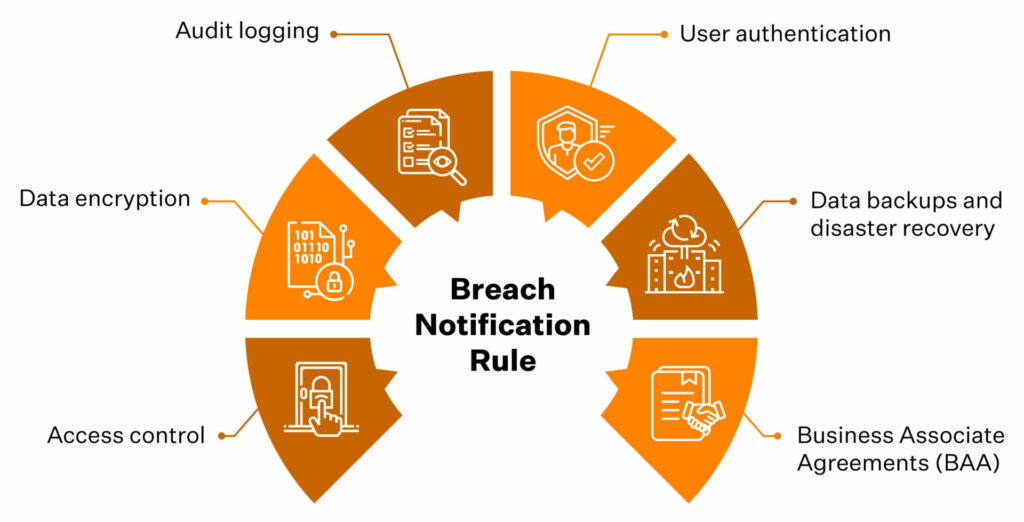
If PHI is properly encrypted and the keys are protected separately, loss or theft of that stored data may qualify for encryption safe harbor—meaning the incident may not be a reportable breach under HIPAA.
Encryption and key management are, therefore, not just security choices; they materially affect your regulatory exposure when stored data is compromised.
Speak to our experts and see how Sprinto can help you prove the right controls are in place.
👉 Book a demo →
HIPAA‑compliant data storage options
HIPAA‑compliant data storage isn’t a single product. It’s every place ePHI lives across your stack, from EHR databases and cloud buckets to email, logs, and backups.
Any digital system that can identify a patient and store health information can become an ePHI repository. So when you think about storage options, think in terms of surfaces, not a single ‘HIPAA storage box.’
Where ePHI usually lives
In a mid‑market healthcare or health‑adjacent company, HIPAA‑relevant storage typically includes:
- Primary clinical and business systems: EHR/EMR platforms, practice management tools, billing, patient portals, and CRMs that hold visit or clinical context.
- File and object storage: Document management systems, network file shares, and cloud object storage (for example, buckets holding PDFs, DICOM images, lab reports).
- Collaboration and messaging tools: Email, chat, support desks, ticketing tools where PHI appears in attachments, screenshots, or copy‑pasted records.
- APIs, logs, and telemetry: API gateways, integration platforms, app logs, error traces, and monitoring tools that capture identifiers or payloads with PHI.
- Backups and archives: Point‑in‑time database snapshots, off‑site backups, and long‑term archives used for disaster recovery and retention.
Core storage models you can choose from
HIPAA doesn’t mandate on‑premises or cloud. You can use any combination of on‑prem, cloud, and SaaS as long as each environment is secured and governed in line with your risk profile.
1. On‑premises and colocation data centers
You host servers and storage in your own racks or a colocation facility. That gives you direct control but also direct responsibility for:
- Physical security (locked rooms, badges, cameras, environmental controls).
- Secure configuration and patching of databases, hypervisors, and storage arrays.
- Encryption at rest, network segmentation, and perimeter defenses.
This model is common for legacy EHRs or organizations with complex data‑residency or latency requirements, but it depends on mature operations and security teams.
2. Cloud infrastructure (IaaS and PaaS)
In this model, you use a cloud provider for core building blocks like servers, databases, and storage. Most large providers offer HIPAA‑eligible services and will sign a BAA so you can store ePHI safely.
At a storage level:
- The provider secures the data center and underlying infrastructure.
- You configure services, identities, networks, and encryption.
- You keep PHI on HIPAA‑eligible services that are actually covered by your BAA.
A cloud storage service is only HIPAA-compliant once you have a BAA in place with the vendor and you’ve configured it so that access controls, network protections, encryption, and logging meet the safeguards described above.
3. SaaS applications and managed platforms
SaaS applications are ready‑to‑use tools such as EHRs, telehealth platforms, patient engagement systems, and analytics products that store and process ePHI on your behalf.
For SaaS, HIPAA‑aligned storage hinges on:
- A signed BAA that describes permitted uses and disclosures and the vendor’s security obligations.
- Confidence that the vendor’s sub‑processors and infrastructure (for example, their cloud provider and logging tools) are also covered.
- An app configuration—roles, sharing settings, exports—that matches your minimum‑necessary and access‑control policies.
With SaaS, most of the storage stack is often hidden behind the service. So, your main controls are how carefully you vet the vendor and how securely you configure and use the application.
4. End‑user devices and edge storage
Laptops, tablets, mobile devices, and removable media can all become ePHI storage if staff download reports, export CSVs, or cache data locally. This is where ‘simple Excel files on laptops’ become part of the ePHI universe.
To keep this aligned with HIPAA expectations, organizations typically rely on:
- Full‑disk encryption and strong authentication on devices.
- Mobile device management (MDM) controls and remote wipe.
- Policies that limit or forbid local downloads of PHI unless strictly necessary.
5. Backups, archives, and disaster recovery environments
Backups and DR replicas are often the most overlooked HIPAA‑relevant storage, but they’re still in scope and must meet the same safeguards as primary systems (encryption, access control, logging, lifecycle policies).
Top features to look for in HIPAA‑compliant storage
Whether you evaluate storage providers or build your own stack, it helps to translate HIPAA’s abstract safeguards into concrete features. Below are key capabilities to insist on.
1. A signed BAA and clear shared‑responsibility model
Any storage provider that holds or processes ePHI must sign a BAA. Without it, the service is not HIPAA‑aligned for PHI use, regardless of how secure the vendor claims to be.
Look for:
- A standard BAA that explicitly references the Privacy, Security, and Breach Notification Rules.
- A clear statement of which safeguards the vendor handles (for example, physical security, base encryption) and which you configure (for example, user access, logging).
- Confirmation that any subcontractors the provider uses are also under BAAs.
After cloud‑related incidents, regulators often focus on weak or missing BAAs and who was responsible for which controls.
2. Strong access controls
Your storage platform should make it straightforward to control who can access ePHI and what they can do with it.
Look for:
- Unique user IDs for every person and service account, not shared logins.
- Role‑based access control (RBAC) so teams only see the minimum data they need.
- MFA and support for SSO (SAML, OIDC, enterprise IdPs like Okta or Ping).
- Emergency access procedures and configurable session timeouts or automatic logoff.
3. Encryption in transit and at rest with sound key management
Encryption is still labeled ‘addressable’ in the Security Rule, but in practice, strong encryption is treated as non‑negotiable—especially for internet‑facing or mobile‑accessible storage.
Look for:
- TLS 1.2+ (ideally TLS 1.3) for all connections to storage (APIs, web consoles, database links)
- Encryption at rest for disks, databases, and backups using modern algorithms such as AES‑256
- Managed key services (KMS or HSM) so keys are stored, rotated, and audited separately from the data
These capabilities directly support the encryption safe harbor described under the Breach Notification Rule.
4. Comprehensive audit logging and long‑enough retention
HIPAA’s audit control requirements expect you to record and review activity in systems that contain ePHI. Your storage should make it easy to answer—who accessed which records, when were they accessed, and what changes were made.
Look for:
- Logs for PHI‑related actions: reads, writes, deletes, permission changes, failed logins.
- Centralized, tamper‑resistant logging—logs stored in a dedicated location with restricted access.
- Support for retaining logs for several years (many teams align to HIPAA’s six‑year documentation expectation).
5. Integrity controls
HIPAA’s integrity standard requires safeguards to prevent improper alteration or destruction of ePHI. Storage should help you prove that records haven’t been tampered with.
Look for:
- Versioning or immutable history for critical records.
- Checksums or hashing to detect unauthorized changes to files or database rows.
- Optional WORM (write‑once, read‑many) capabilities for especially sensitive logs or documents.
This is what lets you show an auditor the original lab result and all subsequent edits.
6. Tested backups and disaster recovery with defined RTO/RPO
The Security Rule’s contingency plan standard expects working backups and a realistic disaster recovery plan. A high‑performance storage system that cannot be restored quickly will fail a HIPAA review.
Look for:
- Automated, encrypted backups of ePHI to off‑site or logically separate locations.
- Documented recovery time and recovery point objectives (RTO/RPO) for critical systems and data.
- Evidence of periodic restore testing, not just ‘we claim to back up.’
7. Network and perimeter security
Many modern breaches come from simple misconfigurations rather than exotic exploits. Cloud storage that technically ticks the HIPAA boxes can still be exposed to the internet with a single overly permissive rule.
When you review a provider’s network and perimeter security, make sure they support:
- Private networking (VPCs, subnets) and firewall or security group rules that default to least privilege.
- Simple ways to block public access to storage buckets, shares, or volumes that contain ePHI.
- VPN or private links between your applications and storage, so PHI doesn’t traverse the open internet unnecessarily.
8. Physical security and device/media controls (for on‑premises or hybrid)
Even if most PHI resides in the cloud, HIPAA still prioritizes physical security—server rooms, laptops, backups, and printed records remain within scope.
Look for:
- Locked, monitored facilities with badges/biometrics and CCTV if you host storage on‑premises or in your own racks.
- Full‑disk encryption and hardening on any workstation or server that can access ePHI.
- Secure media handling and disposal aligned to NIST 800‑88 (wiping or destroying retired disks).
9. Patient access and export‑friendly data structures
Storage that makes it hard to find and export PHI quickly will cause recurring operational pain and, potentially, Right of Access violations.
For storage and platforms that hold PHI, look for:
- Searchable, exportable data formats, not just opaque binaries.
- Secure export paths (encrypted email, secure portals, APIs) that let you meet your access timelines.
- Clear ownership for each system holding PHI and a playbook for responding to access requests.
10. Observability, configuration baselines, and continuous checks
Finally, HIPAA expects regular review and updates to security measures. In modern, cloud‑heavy environments, this requires ongoing monitoring:
Look for storage (and adjacent tooling) that supports:
- Configuration baselines (for example, ‘all PHI buckets encrypted, logging enabled, public access blocked’) and simple ways to detect drift.
- Integrations with SIEM & SOC tools ensure that access and security events flow seamlessly into your broader monitoring program.
- Easy evidence export—screenshots or reports showing that controls are enabled and have stayed that way.
Any HIPAA‑aligned storage setup needs secure configurations, continuous monitoring, documented safeguards, and periodic reviews. Otherwise, it only looks compliant on paper.
Examples of HIPAA‑compliant cloud storage providers
Most mid-market teams end up with a mix of the big three cloud providers and collaboration suites, such as Microsoft 365 or Google Workspace, for storing PHI. They can be part of a HIPAA‑aligned architecture, but none are compliant for your organization until BAAs are signed and configurations are hardened.
Treat the examples below as common building blocks, not endorsements. HIPAA does not certify vendors, and provider lists are subject to change. You always own the architecture and configuration
1. Public cloud infrastructure providers
These are the large IaaS platforms many healthtech and SaaS teams use as their base layer:
- Amazon Web Services (AWS): Offers a BAA and publishes a list of HIPAA‑eligible services (for example, S3, RDS, EC2). Your job is to keep ePHI on eligible services and configure identities, networks, and encryption in line with the safeguards defined above.
- Microsoft Azure: Includes a HIPAA BAA in its standard agreements for in‑scope customers across Azure and Microsoft 365. You still need to design for least‑privilege access, segmentation, encryption, and key management; Azure provides the primitives.
- Google Cloud Platform (GCP): Provides a BAA for specific services and labels certain offerings, such as the Cloud Healthcare API, as HIPAA‑eligible. As with AWS and Azure, Google supplies the components; you assemble them into a compliant architecture and operate the controls on a day-to-day basis.
2. Productivity and file‑sharing platforms
Collaboration tools are another common place where PHI ends up in practice. It includes Enterprise suites such as Microsoft 365 (OneDrive, SharePoint) and Google Workspace (Drive), and Enterprise file‑sharing platforms such as Box or Dropbox Business on HIPAA‑aligned plans.
These can be appropriate for storing or sharing PHI when:
- You are on a plan that includes a BAA.
- PHI‑containing locations are tightly controlled (RBAC, MFA, device policies).
- Logging is enabled and retained in line with your HIPAA documentation retention period.
3. Healthcare‑specific hosting and EHR platforms
Many EHR vendors and healthcare‑focused hosting providers (for example, managed hosting for Epic, Cerner, athenahealth) market themselves as ‘HIPAA‑compliant.’
In practice, that usually means:
- They will sign a BAA as a business associate.
- Their environment includes baseline guardrails such as physical security, standard encryption, and operational controls aligned with HIPAA and related frameworks.
Even no view providers that only host encrypted ePHI sit in the business‑associate chain. You still need to evaluate them against the safeguards and features covered earlier and configure roles, retention, and integrations accordingly.
How to make your storage HIPAA compliant
Since 2024, regulators have tightened expectations around risk analysis, vendor oversight, and documented controls for storage systems—reinforced by a 2025 Security Rule update that explicitly calls out asset inventories, MFA, encryption, and disaster recovery.
The goal isn’t to buy a compliant bucket, but to show that every location where ePHI resides is known, protected, monitored, and recoverable.
Here’s a practical way to build that program, using the rules and features you’ve already seen.
1. Map where ePHI actually lives
Turn ‘where ePHI lives’ into a concrete inventory:
- Build an ePHI map of systems, databases, buckets, file shares, SaaS tools, backups, and devices.
- Track less obvious sources like logging and analytics platforms, message queues, CI/CD logs, API gateways, and test or staging environments.
- Tag each location with an owner, data types, and whether it is part of a designated record set.
HIPAA expects you to know which systems create, receive, maintain, or transmit ePHI and to protect those systems. This map becomes the scope for everything else.
2. Choose storage options and lock in BAAs
For every external service that stores or processes ePHI (cloud storage, SaaS apps, backup providers, logging tools):
- Execute a BAA before any PHI flows into the system.
- Check that the BAA covers Security Rule obligations, breach notification, subcontractor obligations, and return or destruction of PHI at contract termination.
- Document what the provider secures vs. what you own (access management, encryption settings, logging, monitoring).
3. Apply safeguards and features to each storage location
With your architecture and vendors in place, apply the safeguards you defined earlier in three layers:
- Administrative: Put policies and procedures around storage, backups, media handling, vendor management, and Right of Access into operation. Train workforce members who can access ePHI and define sanctions for violations.
- Physical: Enforce facility access controls for data centers and server rooms, lock down and encrypt laptops with full-disk encryption, and follow secure processes for device disposal and visitor management.
- Technical: Configure access controls, encryption, logging, integrity protections, and network security for all systems and backups that store or process PHI.
Document each safeguard and map it to the specific HIPAA Security Rule standard it satisfies.
4. Make APIs, integrations, and ‘modern plumbing’ safe
For many healthtech teams, APIs and integrations are where ePHI escapes into logs, queues, and third‑party tools. Treat this layer as storage when they hold or replicate ePHI:
- Use OAuth2/OIDC or equivalent for API auth; avoid long‑lived static keys.
- Require TLS 1.2+ for any API traffic carrying ePHI and block weak ciphers.
- Suppress PHI in logs wherever possible; where logging is required, protect log stores with the same controls as primary storage.
- Treat integration platforms and iPaaS tools as business associates if they touch ePHI, with BAAs and documented controls.
5. Backups, disaster recovery, and data lifecycle
HIPAA’s contingency planning requirements mean backups and DR environments are just as in‑scope as primary systems. For storage, you should:
- Maintain encrypted backups of ePHI with documented RTO/RPO for critical systems.
- Test restores regularly, so you know you can meet those targets in practice.
- Protect backup media with the same access controls and encryption as production and destroy retired media securely.
- Enforce retention rules in storage configuration, not just in policy documents.
6. Operationalize and monitor
HIPAA storage compliance is an ongoing review loop, not a one‑time setup:
- Run periodic risk assessments that include cloud misconfigurations and new storage surfaces.
- Review audit logs and access reports for anomalies and re‑certify user access on a defined cadence.
- Re‑evaluate BAAs and vendor security posture for key storage providers.
- Document decisions, exceptions, incidents, and remediation steps.
Leverage monitoring tools (CSPM, SIEM, GRC platforms) to keep track of compliance drift in the controls between audits.
Neurosynaptic Communications, a telehealth and remote-diagnostics provider leveraged Sprinto to automate and run its ISO 27001 and HIPAA programs. Within two weeks, the team completed both audits and received certifications.
“It felt like one overarching audit with almost no back-and-forth,” says Rajeev Kumar, co-founder at Neurosynaptic. “The whole process was straightforward and smooth.”
If you want to work toward a similar ‘one overarching audit’ experience for HIPAA storage, talk to our team to learn what that could look like for your environment.
HIPAA violations related to improper storage
When HIPAA enforcement actions land, data storage is rarely the only problem. However, the weak point is often where ePHI resides, how it’s protected, and who has access to it.
Common storage‑related violations OCR is enforcing in 2025
Patterns OCR flags repeatedly include:
- Misconfigured cloud or network servers: open or poorly secured cloud buckets, NAS shares, or hosted servers holding ePHI.
- Storing ePHI with vendors without a BAA: parking ePHI in third‑party systems (cloud storage, ticketing, analytics, backups) without a BAA.
- Weak access control and logging around storage: shared database logins, no role‑based access, missing session timeouts, or audit logs that aren’t retained long enough.
- Failure to encrypt or protect portable media and backups: lost laptops, unencrypted external drives, unsecured backups in third‑party facilities.
- Improper disposal or reuse of media: discarding drives without wiping them, reusing tapes, repurposing cloud resources without sanitizing data.
- Poor data governance that breaks the Right of Access: scattered records across inboxes, spreadsheets, and ad‑hoc cloud folders, leading to missed access‑request deadlines.
These aren’t exotic exploits; they’re configuration and governance gaps around where ePHI lives.
What penalties look like now (2025)
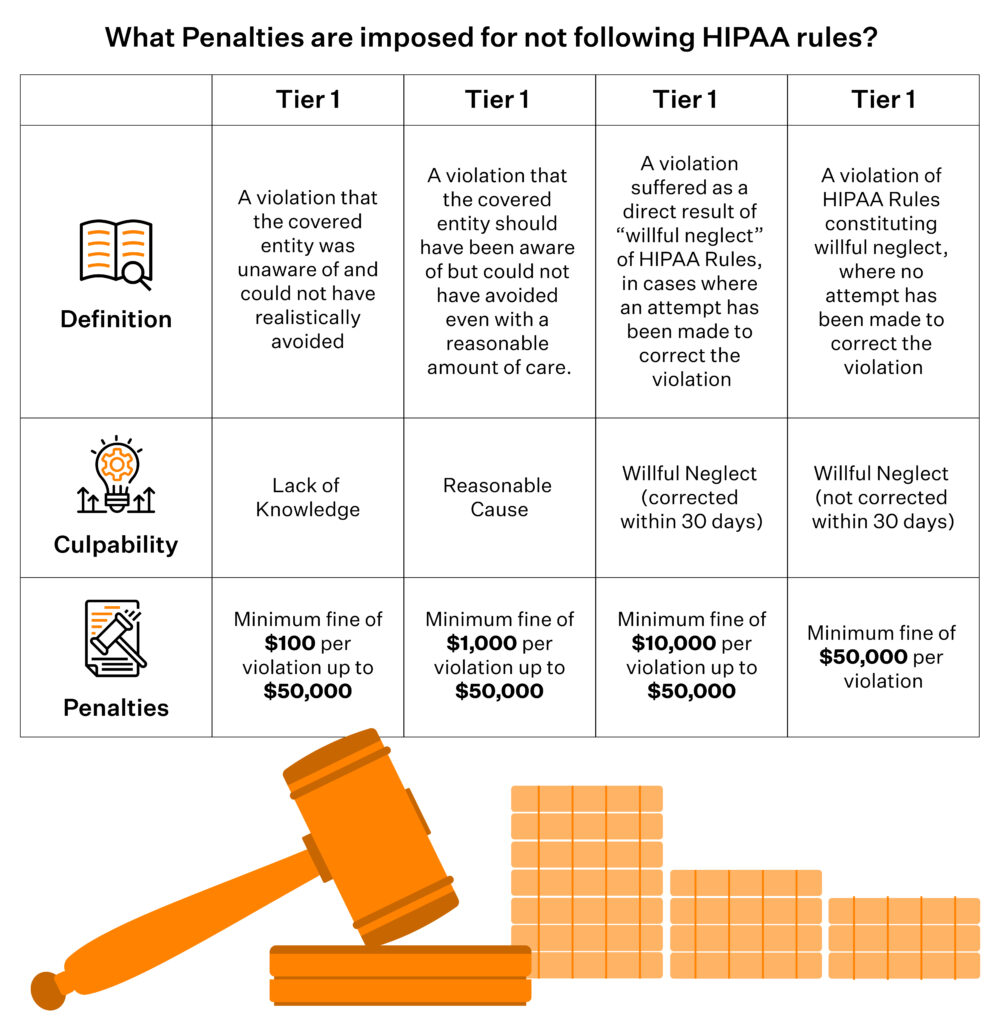
Civil penalties have been indexed for inflation. As of the latest adjustment, OCR can impose:
- Minimum civil penalties starting around $141 per violation
- Up to $71,162 per violation in most tiers
- Annual caps up to $2,134,831 per violation category for willful neglect that is not corrected
Individuals involved in egregious misuse of PHI (for example, selling patient lists) still face criminal exposure, including fines up to $250,000 and 10 years in prison, though criminal cases are less common than civil enforcement.
OCR is increasingly willing to fine smaller and mid‑sized entities (and business associates) for:
- Repeated failure to perform or update a risk analysis on storage systems
- Ignoring basic hardening guidance for servers and cloud storage
- Not having BAAs or using non‑HIPAA‑eligible services for PHI
For a CISO or compliance lead, the takeaway is straightforward: ‘improper storage’ is no longer just an IT problem. OCR treats it as a governance failure and will follow the data into whatever logs, backups, SaaS tools, and cloud buckets your teams actually use.
Neopharma Technologies, an Australian MedTech company providing patented drug-testing solutions, used Sprinto’s common control framework to consolidate ISO 27001, SOC 2, HIPAA, and GDPR into a single, unified program. They achieved compliance with all four frameworks in just 90 days.
“Everything that the auditor needed was already up on the Sprinto dashboard,” says Gajenddra Raj, CTO at Neopharma. “It was the fastest audit experience we’ve had. Even our non-technical folks could stay on top of their compliance tasks.”
Book a Sprinto demo to see how you can streamline HIPAA and other frameworks on a similar timeline.
Monitor HIPAA‑compliant data storage with Sprinto
Getting your HIPAA storage audit-ready once is hard. Keeping every bucket, database, backup, SaaS app, and access path in line with HIPAA safeguards is what really breaks teams. Misconfigurations in cloud and SaaS now drive more breaches than missing policies. Sprinto AI sits on top of that sprawl, maps HIPAA storage requirements to real systems, and continuously monitors them instead of once a year.
Sprinto’s agentic AI engine pulls data from your cloud, SaaS, identity, and ticketing tools, auto-maps it to HIPAA controls and storage safeguards, and flags gaps and fixes with humans still in the loop.
With Sprinto AI, you can:
- Turn HIPAA storage safeguards into live checks: Map Security Rule expectations for storage to concrete controls and automated tests across cloud, SaaS, and identity. AI automaps controls to HIPAA criteria, runs encryption/access/logging checks on a schedule, and surfaces drifts (such as public buckets or unencrypted volumes) before they become findings.
- Keep a real-time map of where ePHI lives: Build an integration-driven asset inventory, scope HIPAA’ zones’, and link risks to specific databases, buckets, and file stores. Live dashboards and risk intelligence show which locations holding ePHI are healthy, drifting, or failing controls, so you’re not guessing where HIPAA applies.
- Arrive at audits with pre-validated evidence: Auto-collect storage evidence from your systems, reuse it across HIPAA and other frameworks, and run AI-driven evidence gap analysis. You see missing, stale, or misaligned evidence for HIPAA storage controls before auditors or customers ask.
Want to see how Sprinto AI would monitor your HIPAA storage in real time? Book a 1:1 demo with our team.
FAQs
No. HIPAA doesn’t mandate U.S.‑only storage. It requires that covered entities and business associates ensure appropriate safeguards and contractual assurances (via BAAs) wherever the data physically resides. Many organizations still choose U.S.‑only storage to simplify risk, vendor oversight, and enforcement questions.
Yes, but only if appropriate safeguards (encryption, access controls, authentication, logging) are in place and configured correctly. Tools that don’t give you admin controls and visibility are usually not appropriate for routine ePHI exchange or storage.
Backups and DR replicas are fully in scope and must meet the same safeguards as primary storage: encryption, access control, audit logging, and lifecycle policies for retention and secure destruction. You also need a documented contingency plan and periodic testing so you can restore ePHI within acceptable timeframes after an incident.
De‑identified data has had identifiers removed in line with HIPAA standards, so it no longer qualifies as PHI and is not subject to HIPAA storage rules. HIPAA‑compliant storage applies to ePHI that can still identify an individual. Many organizations maintain both de-identified datasets for analytics and identifiable ePHI for care and billing, with different controls and risk profiles.
HIPAA doesn’t specify an exact cadence, but regulators expect periodic technical and non‑technical evaluations and updated risk analyses. In practice, most mid‑market teams aim for at least an annual formal review, plus continuous monitoring for configuration drift, failed controls, and vendor changes. The more cloud‑native and dynamic your environment, the more you should lean on automated checks and event‑driven reviews.

Sucheth
Sucheth is a Content Marketer at Sprinto. He focuses on simplifying topics around compliance, risk, and governance to help companies build stronger, more resilient security programs.
Go beyond the surface and uncover the governance, risk, and compliance insights that actually matter.


Win digital goodies for boardroom success



Explore more









research & insights curated to help you earn a seat at the table.