Privacy impact assessments still run across email threads and shared documents with no single record of approvals, risk mappings, or assessment outcomes. AI-assisted control mapping only draws from controls your organization has already enabled, leaving coverage gaps that your full control library could fill. Failing monitors get fixed one at a time, each requiring its own remediation cycle. Systems without native integrations sit entirely outside automated compliance coverage. Supporting documents like screenshots, PDFs, and reports live outside the workflows where reviewers need them. And risk profiles display fields in a fixed order that does not match how different teams actually review and enter data.
Die neuesten Updates von Sprinto wurden genau für dieses Problem entwickelt. Sie können jetzt:
- Run Data Protection Impact Assessments through configurable workflows with AI-generated reporting
- Map framework requirements using the full SDC and SCF control libraries, including disabled controls and control templates
- Remediate multiple failing monitors in a single Fix-it Agent execution flow
- Auto-generate workflow checks for systems without native integrations
- Upload attachments directly within custom fields across workflows
- Reorder fields in risk profiles independently for each Risk Register
Lesen Sie unten mehr über diese Aktualisierungen:
1. Run Data Protection Impact Assessments to standardize privacy risk management
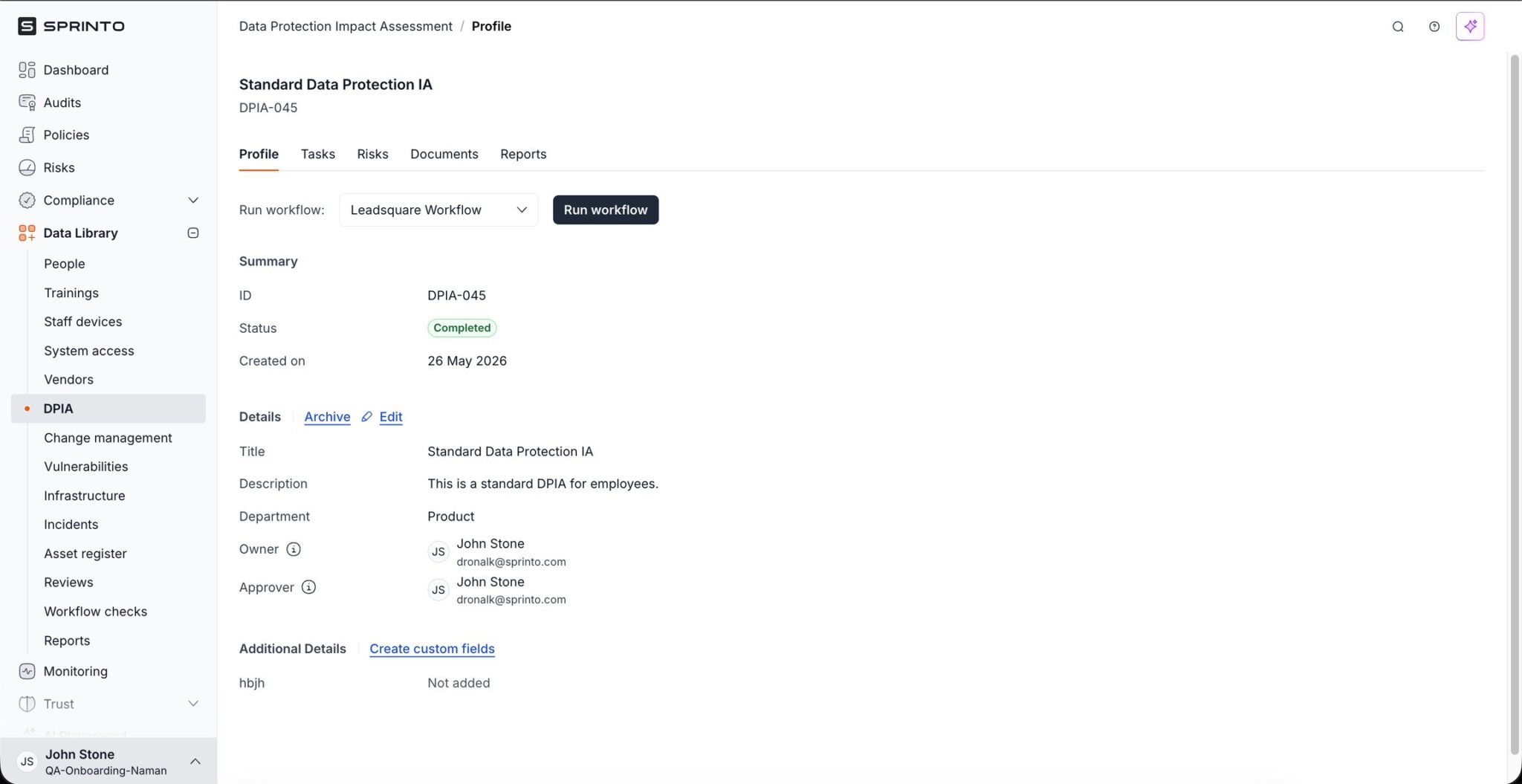
You can now run end-to-end Data Protection Impact Assessments in Sprinto, giving your compliance team a structured way to conduct privacy assessments with configurable workflows, automated task assignment, centralized evidence collection, and AI-generated reporting.
When creating a DPIA, you define its name, description, department, owners, and approvers. From there, you configure a custom workflow tailored to your organization’s existing PIA or DPIA process. As the workflow progresses, Sprinto automatically assigns tasks and sends notifications to relevant stakeholders, removing the need for manual coordination across teams.
During the assessment, you can map risks directly to the DPIA and view all associated risks in the Risks tab. Supporting documents, screenshots, and reports can be uploaded and managed from the Documents tab, keeping all evidence and assessment inputs centrally available. Once all workflow tasks are completed, Sprinto generates an AI-powered DPIA report that summarizes the assessment. The report includes task responses, mapped risks, supporting inputs, and outcomes.
| Warum ist das wichtig? DPIAs involve multiple stakeholders, approval chains, and supporting evidence. Running this process through email threads or shared documents creates gaps in traceability and slows down assessment cycles. Sprinto’s DPIA workflow automates task orchestration, approval routing, and report generation, making assessments repeatable and reducing manual coordination. |
The result is a single, auditable record that connects each DPIA to its mapped risks, collected evidence, and approval history. When your auditor requests documentation for a specific privacy assessment, everything is already linked and exportable from one place.
2. Expand AI control mapping coverage with the full SDC and SCF libraries
You can now use Sprinto AI to map framework requirements against the entire control library, including disabled controls and control templates. This solves a key limitation where AI recommendations were restricted to only the controls already enabled in your organization, leaving potential coverage gaps undetected.
Sprinto AI recommendations now draw from the full SDC and SCF control libraries. When the AI identifies a control that does not yet exist in your environment, it can suggest and automatically import that control during the mapping process. You can also configure control packs and mapping sources to tailor how Sprinto AI generates its recommendations for each framework.
| Warum ist das wichtig? Framework onboarding becomes significantly faster when your AI recommendations account for every available control, not just the ones you have already activated. This broader mapping surface improves gap identification and increases the accuracy of each recommendation. |
For organizations adopting a new framework, this means Sprinto AI can surface controls you have not yet considered, reducing the risk of missed requirements. Your team spends less time manually reviewing control catalogs and more time acting on the AI’s recommendations.
3. Remediate multiple failing monitors in a single Fix-it Agent run
You can now use the Fix-it Agent to generate and execute a remediation plan across multiple failing monitors in one flow, removing the need to address each monitor individually.
When multiple monitors are in a failing state, the Fix-it Agent generates a consolidated remediation plan. You review the execution plan before running fixes, giving you full visibility into what will be changed and where. Once approved, the Fix-it Agent automatically executes the remediation steps across all selected monitors.
| Warum ist das wichtig? Compliance gaps rarely occur in isolation. When a configuration drift or a policy change affects multiple monitors, fixing them one by one is time-consuming and error-prone. The Fix-it Agent’s multi-monitor remediation compresses that cycle into a single execution flow, helping your team return to a compliant state faster. |
Consider a scenario where a cloud infrastructure change causes five monitors to fail simultaneously. With this update, your team reviews one consolidated plan, approves it, and the Fix-it Agent resolves all five issues in sequence. That is a meaningful reduction in remediation time and context-switching.

4. Auto-generate workflow checks for systems without native integrations
You can now auto-generate workflow checks for systems that do not have native integrations in Sprinto, extending compliance coverage to applications that previously required manual control creation.
Sprinto generates checks based on the type of system you are onboarding. This means you can create controls for unsupported applications without relying on internal experts to define each check from scratch. The generated workflow checks bring these systems into your compliance program alongside natively integrated ones.
| Warum ist das wichtig? Most organizations run a mix of well-supported SaaS tools and internal or niche applications that lack API-level integrations. Without automated checks for those systems, compliance teams either build controls manually or leave coverage gaps. Auto-generated workflow checks remove that dependency and reduce onboarding effort for each unsupported system. |
For a team managing 40 or more systems where 10 lack native integrations, this update eliminates the need to manually design and configure checks for each one. Compliance coverage expands faster, and your team avoids the bottleneck of waiting on engineering or security architects to define check logic.

5. Upload attachments directly within custom fields
You can now use an Attachment field type in custom fields, allowing your team to upload and manage files directly within workflows where they are needed.
The Attachment field supports PDFs, images, spreadsheets, ZIP files, JSON files, and other common formats. Once uploaded, files can be previewed, downloaded, and removed directly from the field. This keeps supporting documents, screenshots, and reports co-located with the workflow data they relate to.
| Warum ist das wichtig? Evidence collection often involves gathering files from multiple sources and storing them in a separate location. When those files live outside the workflow, reviewers lose context and waste time tracking down the right document. The Attachment field type centralizes document management within the custom field itself. |
For a team conducting a vendor risk review, this means the vendor’s SOC 2 report, security questionnaire responses, and architecture diagrams can all be attached directly to the relevant custom fields in the workflow. Reviewers see everything in one place without switching between tabs or tools.

6. Customize field ordering in risk profiles for each Risk Register
You can now reorder fields within each Risk Register’s risk profiles, giving your team control over how risk data is displayed and entered.
Using drag-and-drop, you can rearrange both system fields and custom fields to match the review workflow that each register requires. Field layouts are configured independently for each register, so your IT risk register can prioritize different fields than your privacy or operational risk register.
| Warum ist das wichtig? When multiple teams use the same risk management module, a one-size-fits-all field layout slows down data entry and review. Configurable field ordering lets each team surface the most relevant information at the top of the risk profile, reducing scroll time and improving data entry accuracy. |
For organizations managing three or more registers across different compliance programs, this means each register reflects the priorities of the team that owns it. A privacy-focused register might lead with data categories and processing purposes, while an infrastructure register might lead with asset type and threat classification. Each layout is purpose-built for its context.

Sprinto’s May 2026 Updates Deliver Increased Compliance Efficiency and Coverage
With these updates, your team can run DPIAs end-to-end inside Sprinto with configurable workflows and AI-generated reports that produce a complete audit trail, draw from every available SDC and SCF control to surface requirements not yet activated, resolve multiple failing monitors in a single Fix-it Agent execution, bring systems without native integrations into your compliance program through auto-generated workflow checks, and configure risk registers to display fields in the exact order each team needs.
These updates give privacy, security, and risk teams the structure to run assessments, close compliance gaps, and extend coverage across every system in their environment with less manual effort at each step.

Autorin
Srikar Sai
Srikar Sai, Senior Content Marketer bei Sprinto, ist überzeugt, dass guter Content standardmäßig zum Speichern einladen sollte. Er schreibt über Cybersicherheit und GRC und hat sich zum Ziel gesetzt, mit jedem Beitrag etwas zu bewegen. Zudem ist er zertifizierter Lead Auditor nach ISO 27001.Gehen Sie über die Oberfläche hinaus und entdecken Sie die Erkenntnisse zu Governance, Risikomanagement und Compliance, die wirklich wichtig sind.


Sichern Sie sich digitale Vorteile für Ihren Erfolg im Vorstand.


Mehr erfahren




Recherchen und Erkenntnisse, die Ihnen helfen sollen, sich einen Platz am Tisch zu sichern.